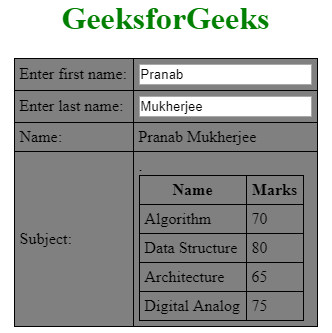
The data in tables are basically repeatable, so you can use ng-repeat directives to create tables easily The example will clear the approach.
Syntax:Displayed Data in table.Content..
<html>
<head>
    <title>AngularJS ng-repeat Directivetitle>
head>
<body>
    <center>
        <h1 style="color:green;">GeekforGeeksh1>
        <table>
         <tr>
          <th>Courseth>
          <th>Durationth>
         tr>
         <tr ng-repeat = "subject in student.subjects">
          <td>{{ Course.name }}td>
          <td>{{ Duration.time }}td>
         tr>
        table>
    center>
body>
html>
 Displayed with CSS style
      <style>
         table, th , td {
            border: 1px solid black;
            border-collapse: collapse;
            padding: 5px;
         }

         table tr:nth-child(odd) {
            background-color: #82E0AA  ;
         }

         table tr:nth-child(even) {
            background-color: #2ECC71  ;
         }
         h1{
             color:green;
         }
      style>
<html>
   <head>
      <title>Angular JS Tabletitle>
      <script src =
"https://ajax.googleapis.com/ajax/libs/angularjs/1.3.14/angular.min.js">
      script>
      <style>
         table, th , td {
            border: 1px solid black;
            border-collapse: collapse;
            padding: 5px;
         }
         table {
            background-color: grey;
         }
         h1{
             color:green;
         }
      style>
   head>

   <body>
       <center>
      <h1>GeeksforGeeksh1>
      <div ng-app = "mainApp" ng-controller = "studentController">

         <table border = "0">
            <tr>
               <td>Enter first name:td>
               <td><input type = "text" ng-model = "student.firstName">td>
            tr>
            <tr>
               <td>Enter last name: td>
               <td>
                  <input type = "text" ng-model = "student.lastName">
               td>
            tr>
            <tr>
               <td>Name: td>
               <td>{{student.fullName()}}td>
            tr>
            <tr>
               <td>Subject:td>

               <td>
                  <table>
                     <tr>
                        <th>Nameth>.
                        <th>Marksth>
                     tr>
                     <tr ng-repeat = "subject in student.subjects">
                        <td>{{ subject.name }}td>
                        <td>{{ subject.marks }}td>
                     tr>
                  table>
               td>
            tr>
         table>
      div>

      <script>
         var mainApp = angular.module("mainApp", []);

         mainApp.controller('studentController', function($scope) {
            $scope.student = {
               firstName: "Pranab",
               lastName: "Mukherjee",


               subjects:[
                  {name:'Algorithm',marks:70},
                  {name:'Data Structure',marks:80},
                  {name:'Architecture',marks:65},
                  {name:'Digital Analog',marks:75}

               ],

               fullName: function() {
                  var studentObject;
                  studentObject = $scope.student;
                  return studentObject.firstName + " " + studentObject.lastName;
               }
            };
         });
      script>
   center>
   body>
html>