


Dave Gershgorn is a writer covering monitors, laptops, and tablets. He is a certified display calibrator through the Imaging Science Foundation.
If you’re looking for a simple, small desktop computer for your home or office, consider a mini PC. These computers are best for everyday tasks such as working on documents and spreadsheets, browsing the web, taking video calls, or watching TV. However, our top picks are also powerful enough for editing media or compiling code.
The best mini PC for you depends on whether you prefer Mac or Windows. Apple’s Mac mini (M6) is one of the most powerful PCs we’ve tested, easily capable of coding, media editing, or running local AI models. If you’re more comfortable using Windows, the Lenovo Yoga Mini is the best option. It’s capable of swapping between multiple apps alongside dozens of tabs, though it’s not great for graphics-heavy tasks like media editing or gaming.
Nearly every kind of computer or PC component has gotten more expensive this year, with budget or niche products like mini PCs and lower-cost laptops increasing in cost by hundreds of dollars. However, we still think Apple makes the best mini PCs — even if they cost $300 more than they did in 2025.
Everything we recommend

Top pick
The Mac mini offers excellent performance, and the system’s fan is whisper-quiet even when you’re editing photos or videos or compiling code.
| Processor: | Apple M6 | Storage: | 256 GB proprietary SSD |
| Memory: | 16 GB | Size: | 5 by 5 by 2 inches |
| Front ports: | two USB-C, headphone jack | Wireless: | Wi-Fi 7 and Bluetooth 6 |
| Rear ports: | three USB-C, one HDMI, one Ethernet, power jack | Expansion: | none |
We like the Apple Mac mini (M6, 2026) because it provides enough power for nearly any work or school task, includes USB-C ports on its front, and operates silently enough to sit on a desk. It has the same access to Apple services such as iMessage and FaceTime as MacBooks and other Macs, but you need to supply your own monitor, mouse, and keyboard.
Keep in mind that you can’t upgrade the Mac mini’s memory or storage after you buy it, so you need to make that decision up front. Apple’s internal-storage upgrades are pricey enough that you should look at an external hard drive or a portable SSD if you need more space.
Apple has increased its prices across the board due to the worldwide chip shortage, and the base Mac mini now costs $900. It’s a fantastic computer, just more expensive than before.
Top pick
This Windows PC is small enough to fit on your desk and fast enough for daily work.
| Processor: | Intel Core Ultra 5 325 | Storage: | 512 GB SSD |
| Memory: | 16 GB | Size: | 5.12 by 5.12 by 2 inches |
| Side ports: | one USB-C, headphone jack | Wireless: | Wi-Fi 7 and Bluetooth 6 |
| Rear ports: | three USB-C, one USB-A, one HDMI, one 2.5 Gbps Ethernet | Expansion: | none |
Lenovo’s Yoga Mini is the Windows-based Mac mini competitor we’ve been waiting for. Its latest Intel processor is energy-efficient enough for it to draw power over USB-C, so you can either connect it to the wall as usual or use a monitor’s USB-C power delivery. In addition to having enough power for daily work and enough ports for you to connect peripherals, it has nice extra features such as RGB lighting that can change when a certain app sends a notification.
The research
Why you should trust us
I’m a writer at Wirecutter covering computer monitors, PCs, laptops, tablets, and 3D printers. I’m a certified display calibrator through the Imaging Science Foundation, and I’m responsible for all of Wirecutter’s computer monitor coverage.
For this guide:
- I’ve covered mini PCs for Wirecutter for the past five years, and in that time I’ve tested more than 35 models.
- In January 2026, I attended the Consumer Electronics Show, where I saw many new and upcoming mini PCs.
- I researched the best mini PCs available right now, with an eye toward availability and price, and tested eight new mini PCs for this update.
- Like all Wirecutter journalists, I review and test products with complete editorial independence. Most of the computers we test are sent by the manufacturer for review consideration, but I return every computer that Wirecutter hasn’t purchased. I’m also never made aware of any business implications of my editorial recommendations. Read more about our editorial standards.
Who this is for
Mini PCs are small computers that cram all the components of a desktop tower into a box the size of a paperback. There’s no attached display, mouse, or keyboard, so you have to buy your own. (Check out our guides to the best monitors for our recommendations on which one is best for you.) Despite these desktops’ small size, they’re more than powerful enough for browsing the web, handling basic photo and video editing, and working in documents or large spreadsheets.
Unlike ultrabooks or most all-in-one PCs, Windows mini PCs are easy to upgrade if you want to add more memory or storage, and they have all the ports you need to connect two or three monitors and your favorite keyboard, mouse, and webcam. The size of a mini PC prevents much expansion, but you can upgrade the storage and the memory on most Windows models, and some allow you to swap out the CPU, too. Instead of having a dedicated graphics card, you’re usually stuck with integrated graphics, so don’t expect a mini PC to have enough power to play many modern games; you can add an external graphics dock if your mini PC supports Thunderbolt 3 or higher, but such docks tend to be large and expensive.
Two of Apple’s flagship desktops fit into this mini PC category, and they’re a bit different from Windows mini PCs. They are not upgradable or repairable — instead they contain desktop versions of the same powerful guts found in the MacBook Air and MacBook Pro. Their chips are power-efficient, and they’re nearly silent, since they don’t require much cooling from fans to run smoothly; the Mac mini has a fan, but it’s almost unnoticeably quiet.
You can find mini PCs for less than $400, but Windows PCs in that price range have unusably slow processors and less memory and storage than most people need. We did not look at cheap, single-board computers, such as those from Raspberry Pi, nor would we include them in our definition of the term “mini PC.” Those ARM-based computers are slow, geared toward hobbyists, and designed to use custom Linux software.
How we picked


Here’s what we look for in a good mini PC:
- Specs:
- Processor: A mini PC needs a processor powerful enough to handle basic web browsing, light photo editing, and any office programs you use.
- Memory: We recommend at least 16 GB of RAM for browsing the web and handling basic productivity tasks. If you spend lots of time in heavy-duty apps such as Adobe Photoshop, Lightroom, or Premiere, or if you regularly edit several large spreadsheets or databases at a time, you may benefit from upgrading to 32 GB.
- Storage: A spinning hard drive can bog down an otherwise speedy computer, so a solid-state drive is a requirement here. A 256 GB SSD should be available as a standard feature, and upgrading the storage or adding a second drive later should be easy.
- Wireless features: Every mini PC should come with support for Wi-Fi 6 or 6E wireless networking, as well as at least Bluetooth 5.0, so you don’t have to waste USB ports by adding dongles for Wi-Fi or your wireless keyboards and mice.
- Price: Mini PCs are smaller than desktop PCs, but their size doesn’t make them cheaper — on the contrary, cramming everything into a small box is an engineering feat that you pay a small premium for. Expect to pay between $800 and $1,200 for a mini PC capable enough to last you the next few years.
- Ports: A good mini PC comes with at least four USB ports. A great mini PC tosses in a USB Type-C or Thunderbolt port and an SD card reader. The ports should be split between the PC’s front and back so that you can access at least a couple of them without messing around at the back of the computer. A mini PC should have at least two ports for connecting to monitors; any combination of HDMI, DisplayPort, and USB-C is workable for most people.
- Preinstalled operating system: We focus on computers that have either Windows or macOS. Each of our picks comes with the operating system preinstalled.
- Size: A mini PC should be small enough to hide behind or under a monitor, taking up no additional space on a desk. Because mini PCs fit almost anywhere, many clever mounting options are available, and if a smaller mini PC model has a VESA mount (more on that below), you can tuck the PC behind a monitor or underneath a desk.
- Ease of upgrades: You should be able to upgrade the memory and storage on any mini PC without much technical know-how. (However, our Mac picks are not upgradable in this way.)
- Fan noise: Like laptops, mini PCs cram a lot of power into a small case. Although you don’t need to worry about burning your legs with a mini PC, you do need to confirm that the case regulates temperature so that the computer doesn’t overheat. Due to the system’s size, you might hear the fan (if it has one) kick on more often than with other computers, so it’s important that the fan’s sound isn’t too annoying.
- Warranty: Most mini PCs come with at least a one-year warranty, but the best have a two- or three-year warranty. The policy should cover any defects as well as tech support over the phone, chat, or email.
We also consider the following features, but their presence has no effect on our recommendations:
- Lack of bloatware: Nobody wants useless, poorly designed, complicated software, aka bloatware, preinstalled on their PC, and it’s annoying for people who can’t figure out how to remove it. A mini PC free of manufacturer cruft is more desirable.
- Bundled keyboard and mouse: Some of the mini PCs we’ve looked at come packaged with keyboards and mice, while others don’t. This doesn’t affect our judgment one way or the other. The accessories that PC manufacturers bundle with their desktops are rarely very good — if you care about your keyboard and mouse, you’re likely to spend extra on a nice Bluetooth keyboard or mechanical keyboard and a good wireless mouse anyway.
- VESA-mounting support: Mounting a mini PC to the back of a monitor is a good way to save a little space on your desk and get some of the benefits of an all-in-one without having to pay for one (or dealing with its lack of upgradability). VESA support on a mini PC is nice to have but not something everyone needs.
After we settled on the hardware criteria, we searched the websites of major PC manufacturers such as Acer, Apple, Asus, Dell, HP, Intel, and Lenovo — and poked around in the inventory of smaller manufacturers such as Aoostar, Beelink, and Minisforum — to find models to test.
How we tested
We started our tests by booting up each mini PC and then running all available updates to the operating system and hardware.
We then ran benchmarking software, which we used to repeat the same test on multiple computers to gauge their relative speed. We used Geekbench 7, Geekbench AI, Cinebench 2026, and our own functional tests in creative applications such as Adobe Premiere Pro.
We also set up each mini PC and used it for at least one day of work. This process usually consisted of running a web browser with at least 15 tabs open at a time (Google Docs, Sheets, Gmail, Slack, Twitch streams, YouTube videos, and plenty more), streaming music through the Spotify desktop application, video-chatting, and recording audio. This real-world testing allowed us to get a feel for how each mini PC performed on a daily basis, and it also gave us time to discover any quirks related to bloatware or driver issues.
Top pick: Apple Mac mini (M6, 2026)


Top pick
The Mac mini offers excellent performance, and the system’s fan is whisper-quiet even when you’re editing photos or videos or compiling code.
| Processor: | Apple M6 | Storage: | 256 GB proprietary SSD |
| Memory: | 16 GB | Size: | 5 by 5 by 2 inches |
| Front ports: | two USB-C, headphone jack | Wireless: | Wi-Fi 7 and Bluetooth 6 |
| Rear ports: | three USB-C, one HDMI, one Ethernet, power jack | Expansion: | none |
The Apple Mac mini (M6, 2024) is fast, tiny, and silent in its operation, all of which make it the best mini PC we’ve tested. Apple’s M6 processor is fast enough for nearly anyone’s needs, matching the previous M4 Pro chip in tests that simulate multitasking between apps. (The M4 Pro was the chip we recommended for professional video editors just two years ago, and it cost $1,400 in a Mac mini — and that was before the chip shortage, which made it even more expensive.) The fact that Apple’s consumer processor has been able to achieve performance similar to that of its already-powerful professional chip in just two years indicates a serious jump in processing power. We opened dozens of tabs, typed documents, and streamed video on the new Mac mini, and it handled our heaviest tests with only minimal, temporary slowdowns.
It has a fast processor that’s great for everyday tasks. The 2026 Mac mini’s M6 processor makes it about as fast as the MacBook Pro for basic tasks, so it’s great for web browsing, document and spreadsheet work, photo editing, coding, and video editing. If you plan to use it mainly as a day-to-day computer, the basic, $900 version with 16 GB of memory will be more than enough. Apple has increased the cost of memory, so it now costs $200 to upgrade the M6 Mac mini to just 24 GB, rather than the 32 GB previously offered at that price. Unless you know you need extra memory for running local AI models or multitasking on professional apps, you can save the money and stick with 16 GB. Apple’s storage upgrades are similarly expensive, so we recommend buying an external hard drive or a portable SSD rather than paying Apple’s prices.
It has more ports than a MacBook. The M6 Mac mini has five USB-C ports, three of which are located on its back; it has the other two USB-C ports, plus a headphone jack, on the front. Previous Mac mini models had only rear ports, and the M6 version’s layout makes it way easier for you to plug in flash drives or other accessories. The M6 Mac mini also has an HDMI port, an Ethernet port, and an AC power jack.


It supports up to three displays. If you’re the multi-monitor menace at your office, note that the M6 Mac mini can power up to three 5K displays, rather than the two monitors that previous versions supported.
It has upgraded Wi-Fi, Bluetooth, and Ethernet. Apple has updated the M6 Mac mini’s connectivity options, and the device is now capable of Wi-Fi 7, Bluetooth 6, and 2.5 Gbps Ethernet speeds. The updates make Wi-Fi, Bluetooth, and wired internet connections faster and more reliable, but they also help when you buy new devices built around those latest standards. You probably don’t have a Wi-Fi 7 router now, but when you do get one, the Mac mini will be ready for it.
It easily fits under your monitor. This mini Mac, like the previous version, is just 5 inches wide, 5 inches deep, and 2 inches tall. It practically disappears on a desk and is short enough to fit under a monitor. But Apple put the power button on the underside of the computer, which is pretty inconvenient.
It runs silently. The M6 version of the Mac mini is barely audible even when you’re playing a game or encoding video files. Apple’s processors, originally designed to fit into small, fanless iPhones and iPads, are more efficient than Intel’s, so they generate less heat and use less power. In laptops like the MacBook Air, you get longer battery life as a result. In a desktop computer like the Mac mini, the system doesn’t need a loud fan, and your power bills will be a little lower.
It comes with Apple’s standard one-year warranty. Extending that coverage to three years with AppleCare+ costs $99; doing so also adds accidental-damage protection and three years of “priority access to tech support.”
Flaws but not dealbreakers
It just got more expensive. The M6 Mac mini costs $300 more than its predecessor, the M4 Mac mini, did at launch, due in part to the global chip shortage and the mini PC’s success. The company also increased the price of memory upgrades to the Mac mini; adding an extra 8 GB of RAM now costs $200, which could previously get you an additional 16 GB. We still think the base, $900 Mac mini is worth the cost, mainly because it will likely continue to outperform Windows options for a couple of years and will last most people for more than five years.
You cannot repair or upgrade the Mac mini at home. Apple’s choice to make its devices non-upgradable means that if you run out of storage on your Mac mini, you won’t be able to swap out its storage drive to gain more space. Your only options at that point are to buy an external hard drive (though some synced iCloud services like iMessage cannot be stored on external devices), to buy Apple’s cloud storage for a monthly cost, or to buy a new Mac mini. If you’re interested in a repairable mini PC, we recommend checking out the Framework Desktop.
Apple offers paltry storage capacities for entry-level devices. Part of what makes Apple devices compelling is the suite of great applications that sync across them all, such as iMessage and Photos. Unfortunately, the size of Apple’s default storage drives hasn’t grown as quickly as the number of photos that people take and send to their friends. And larger drives are extremely costly, adding hundreds of dollars over the typical market price to the cost of the Mac mini. Long-term Apple users who have years’ worth of saved photos, videos, and messages and who don’t want to pay for iCloud must now pay a premium to store all that data on their own drives.
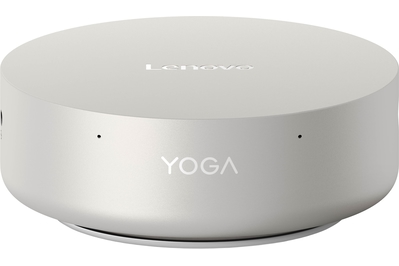
Top pick for Windows: Lenovo Yoga Mini


Top pick
This Windows PC is small enough to fit on your desk and fast enough for daily work.
| Processor: | Intel Core Ultra 5 325 | Storage: | 512 GB SSD |
| Memory: | 16 GB | Size: | 5.12 by 5.12 by 2 inches |
| Side ports: | one USB-C, headphone jack | Wireless: | Wi-Fi 7 and Bluetooth 6 |
| Rear ports: | three USB-C, one USB-A, one HDMI, one 2.5 Gbps Ethernet | Expansion: | none |
If you prefer Windows to Mac, Lenovo’s Yoga Mini is by far the best option we tested. The Yoga Mini’s sleek aluminum design obviously mimics the Mac mini, except it’s circular rather than square. The Yoga Mini is not as fast as the Mac mini, but Lenovo’s take on a tiny PC has some unique tricks up its sleeve, such as the ability to draw power over USB-C. That opens up the potential for powering the Yoga Mini through the USB-C port of a monitor with power delivery or using a battery bank and a portable monitor. Think of it like this: The Mac is better for raw computing power, but the Lenovo mini PC is more flexible for use in different desk setups.
Its processor is fast enough for daily work and multitasking. We were able to surf the web with about 20 Chrome tabs open, as well as running Spotify, Slack, and Zoom, without slowing down. Another upside of this lower-powered CPU is that the fan doesn’t need to run most of the time, and it can draw power from a variety of sources.


It has a useful selection of ports, including USB-A. The Yoga Mini has two main areas for ports, on its back and its left side. Its back has HDMI, 2.5 Gbps Ethernet, USB-A, and USB-C ports. One of its USB-C ports is specifically for powering the device but also passes data through if connected to a power-providing USB hub or monitor. On the Yoga Mini’s side, where they’re more accessible, are a USB-C port and a headphone jack.
It can draw power from a variety of USB-C sources. One of the most exciting features of the Yoga Mini is how flexible its powering is. We tested running the PC from a monitor with USB-C power delivery, as well as powering it off a power bank, and the PC ran perfectly each time. The Yoga Mini ships with a 100 W power brick, but we got it running on sources that provide 65 W of power or more.
It has fun extra features, such as tap controls and RGB lighting. You can set the Yoga Mini’s lighting to change when you receive a notification or to react to music using Lenovo’s Turbo AI Engine app. Lenovo has also figured out a way to detect large objects near the mini PC by Wi-Fi signal alone, so the PC can change its lighting color when you approach. In addition, the Yoga Mini has an accelerometer, which it uses to detect your tapping on the PC; one tap toggles the lighting, and two taps activates the microphones and launches the AI Voice Mode. You can also set these actions to open apps on the PC instead.
We’ve already seen it on sale. The Lenovo Yoga Mini is new this year, but it has already been on sale for more than $300 off, which makes it around $680 at times. It’s worth watching the price for a few weeks to see if Best Buy will put it on sale again.
Flaws but not dealbreakers
It has an audible fan. Like many mini PCs, the Yoga Mini has a fan to cool its processor, which is audible when the PC is working hard. But the sound is soft and non-aggressive compared with that of other models we tested.
It’s difficult to repair or upgrade. You can technically open up the Yoga Mini, but doing so requires special suction cups and screwdrivers. With enough determination and the right tools, you could replace the M.2 storage drive and Wi-Fi card, but any other hardware changes require far too much finagling of sensitive circuit boards.
Other mini PCs worth considering
If you want lots of RAM: The Framework Desktop is the most cost-effective way we’ve found to get a large pool of fast RAM, needed by developers and AI enthusiasts to run the latest artificial intelligence models. We loaded a 59 gigabyte, 120-billion parameter version of ChatGPT into the Framework’s memory using LMStudio, and were able to easily chat with the model. (Just make sure the AMD Software is updated to get the latest drivers.) The Framework Desktop’s AMD Ryzen Max+ 395 processor allows for up to 128 GB of LPDDR5 RAM and costs about $1,000 less than comparable systems made by HP (and $1,500 less than a comparable Mac Studio). The Framework Desktop has USB-C, HDMI, DisplayPort, ethernet, USB-A ports, and a headphone jack on its back, plus two of Framework’s signature swappable ports on its front. However, the Framework Desktop measures 3.8 by 8.1 by 8.9 inches and has a 4.5-liter capacity, which makes it about three times larger than the mini PCs we typically test. Most people would save money and desk space with our other picks, unless you specifically need a large bank of RAM.
If you want the most portable mini PC: The HP EliteBoard G1a is a niche mini PC that’s built into the base of a keyboard. It has two USB-C ports, and it’s powered over USB-C, so you can plug it into the back of a monitor with USB-C power delivery instead of plugging it into the wall. The EliteBoard is similar to our top Windows pick, the Lenovo Yoga Mini, except this model eliminates the need for a separate keyboard. You do still need a separate mouse, however. This PC is best for people who want to shuttle a computer between a few places that already have desk setups with modern monitors, such as between their home and an office.
If you need to work on local-AI or intensive media-editing projects: The most powerful mini PC we’ve tested is the Mac Studio with Apple’s M5 Max chip. It has an 18-core CPU, a 32-core GPU, and 36 GB of fast unified memory, in contrast to the Mac mini’s 12-core CPU and GPU and 16 GB of memory. It was significantly faster than the M6 Mac mini in our media-editing tests, but its strength lies in its ability to quickly handle much larger workloads than our typical tests. The Mac Studio is best suited for tasks such as local AI-assisted coding, heavy media-editing projects, and complex 3D-design work.
The competition
The Asus ExpertCenter PN55 is a business-focused mini PC that’s more repairable than our picks. It’s fast, it has a lot of good ports, and it’s generally good, but it isn’t widely available at retailers, and it’s about $400 more expensive than our top picks. You can also still buy the Asus ExpertCenter PN54, which costs about the same as our top picks, but our picks have newer and faster processors.
The GMKtec M6 Ultra was the best budget mini PC we tested, but its price increased while we were testing, and it’s no longer budget. It’s fast enough for basic office work, and it has a useful selection of ports, but its older processor won’t get security updates for as long, and multitasking with lots of tabs bogs down the system. Unlike with our picks, opening it and replacing components such as the storage and RAM is easy. However, you can usually find our top Windows pick, the Lenovo Yoga Mini, on sale for about the same price, and that’s a much better deal.
The Minisforum UM760 Slim has a processor similar to that of the GMKtech M6 Ultra we tested, but it had issues with the Windows installation. After we set up the PC, Windows updates continually failed, even after our multiple troubleshooting attempts and driver updates.
The Lenovo Yoga Mini with Intel’s Core Ultra X7 3558H processor is faster than the less expensive model that we made our top pick, but it also has a louder fan that turns on more often, and it gets hotter under regular use. The less expensive model strikes the better balance of power, size, and price.
We previously tested the Minisforum AI X1 and found that its fans were too loud and that other options outperformed it for the cost.
This article was edited by Caitlin McGarry.
Meet your guide

Dave Gershgorn
I am based in Seattle and responsible for Wirecutter’s computer monitor coverage, as well as all our guides to Apple laptops and desktops. I also review higher-powered laptops, such as business laptops and laptops for photo and video editing. Plus, I write our reviews for all-in-one computers, ergonomic keyboards, and home 3D printers. If it has a screen, sits on a desk, and isn’t a basic Windows ultrabook, I’m usually the person to try it out.
Further reading
How to Shop for a Used Laptop or Desktop PC
by Kimber Streams and Dave Gershgorn
Major stores and manufacturers sell refurbished, refreshed, and used laptops and desktops that sometimes perform as well as new ones, but for much lower prices.
Apple Makes the Best Desktop Computers. We've Tested Them All.
by Dave Gershgorn
Apple makes fantastic laptops, but its desktops are also great options for many people. We’re here to help you figure out which one is right for you.The Best SSDs
by Arthur Gies
Whether you’re adding storage or replacing a failing drive, the right SSD balances speed, capacity, and price.The Best Laptops for Video and Photo Editing
by Dave Gershgorn
Creative professionals need powerful laptops. We have recommendations for those who prefer Macs and those who prefer Windows.




Advertisement
SKIP ADVERTISEMENT