CSharpEssentials.LoggerHelper
5.2.9
dotnet add package CSharpEssentials.LoggerHelper --version 5.2.9
NuGet\Install-Package CSharpEssentials.LoggerHelper -Version 5.2.9
paket add CSharpEssentials.LoggerHelper --version 5.2.9
#r "nuget: CSharpEssentials.LoggerHelper, 5.2.9"
#:package CSharpEssentials.LoggerHelper@5.2.9
#addin nuget:?package=CSharpEssentials.LoggerHelper&version=5.2.9
#tool nuget:?package=CSharpEssentials.LoggerHelper&version=5.2.9
CSharpEssentials — LoggerHelper
Stop writing Serilog boilerplate. Route any log level to any sink — in one JSON file.


⭐ If you find this project useful, please consider giving it a star on GitHub!
💡 Explore the source code, check open issues, or contribute.
LoggerHelper is a modular logging infrastructure for .NET. Install the core + only the sink packages you need, drop in a JSON config, and your entire app's ILogger routes to Console, File, Email, Telegram, SQL Server, PostgreSQL, MySQL/MariaDB, Elasticsearch, Seq, and Hangfire Console — each receiving only the log levels you configure.
Zero code changes required if you already use ILogger. LoggerHelper registers as a standard ILoggerProvider.
dotnet add package CSharpEssentials.LoggerHelper
dotnet add package CSharpEssentials.LoggerHelper.Sink.Console
dotnet add package CSharpEssentials.LoggerHelper.Sink.File
Table of Contents
- Quick Start
- Run the Demo in 60 Seconds
- Why choose LoggerHelper?
- Packages
- Feature Highlights
- Built-in UI — Dashboard
- AI Integration — MCP Server
- Sink Overview
- Comparison
- Architecture
- View Source & Contribute
- Documentation & Links
🚀 Quick Start
Option A — JSON config (recommended)
1. Install packages
dotnet add package CSharpEssentials.LoggerHelper
dotnet add package CSharpEssentials.LoggerHelper.Sink.Console
dotnet add package CSharpEssentials.LoggerHelper.Sink.File
2. Wire up in Program.cs
builder.Services.AddLoggerHelper(builder.Configuration);
app.UseLoggerHelper();
3. Create appsettings.LoggerHelper.json in your project root
{
  "LoggerHelper": {
    "ApplicationName": "MyApp",
    "Routes": [
      { "Sink": "Console", "Levels": ["Information", "Warning"] },
      { "Sink": "File", "Levels": ["Information", "Warning", "Error", "Fatal"] }
    ],
    "Sinks": {
      "File": {
        "Path": "Logs",
        "RollingInterval": "Day",
        "RetainedFileCountLimit": 7
      }
    },
    "General": { "EnableRequestResponseLogging": true }
  }
}
🔌 Adding more sinks is effortless: Want to route logs to SQL Server, PostgreSQL, MySQL/MariaDB, Email, Seq, or Telegram? Just install the specific sink NuGet package (e.g.
CSharpEssentials.LoggerHelper.Sink.Email) and add its configuration block and route to the JSON. No C# code changes required.
Done. Every ILogger in your app now routes through LoggerHelper.
💡 PRO TIP: Environment-Specific Configs
LoggerHelper automatically detects your environment! Create anappsettings.LoggerHelper.debug.jsonfile alongside the main config, and LoggerHelper will automatically load it when running in Development mode. This is perfect for enabling verbose Console logging locally while keepingappsettings.LoggerHelper.jsonstrictly for Production settings (like Databases and Email).
⚠️ File in the working directory wins. If an
appsettings.LoggerHelper*.jsonexists in the current directory,AddLoggerHelper(...)reads it and it fully replaces theIConfigurationyou passed (no merge). WithAddLoggerHelper(config, fluent), routes may come from the fluent API alone: the "no routes" check runs after the fluent merge.
⚠️ Misconfigured sinks are reported, not hidden. A sink with missing required settings (e.g. empty
ConnectionString,Host,BotToken,ServerUrl,NodeUris) fails to configure; the other sinks keep working and the Dashboard / MCPloggerhelper_get_sinksshow it as FAILED.
Option B — Fluent API
builder.Services.AddLoggerHelper(b => b
    .WithApplicationName("MyApp")
    .AddRoute("Console", LogEventLevel.Information, LogEventLevel.Warning)
    .AddRoute("File",    LogEventLevel.Information, LogEventLevel.Warning, LogEventLevel.Error, LogEventLevel.Fatal)
    .AddRoute("Email",   LogEventLevel.Error, LogEventLevel.Fatal)
    .ConfigureFile(f => { f.Path = "Logs"; f.RollingInterval = "Day"; })
    .ConfigureEmail(e => { e.To = "ops@example.com"; e.Host = "smtp.example.com"; })
    .EnableRequestResponseLogging()
);
Option C — JSON + Fluent merge
// JSON defines shared config across environments.
// Fluent adds development-only extras without touching JSON.
builder.Services.AddLoggerHelper(builder.Configuration, b => b
    .AddRoute("Console", LogEventLevel.Debug)
);
Fluent General flags and SensitiveDataMasking are merged over the JSON: EnableSelfLogging, EnableRequestResponseLogging and EnableRenderedMessage are OR-ed; EnableOpenTelemetry is AND-ed (fluent DisableOpenTelemetry can only turn it off); masking presets/properties are unioned and rules appended.
⚡ Run the Demo in 60 Seconds
Clone the repo and start the interactive demo app. The demo comes pre-configured with Console, File, MSSqlServer, and PostgreSQL sinks.
git clone https://github.com/alexbypa/CSharp.Essentials.git
cd CSharp.Essentials/src/CSharpEssentials.LoggerHelper.Demo
dotnet run
Open the URL shown in your terminal (usually http://localhost:) — the Swagger UI lists all available demo scenarios. Each endpoint produces structured logs visible immediately in the terminal and in the Logs/ folder.
💡 No database required to run it: Even if you don't have SQL Server or PostgreSQL running locally, LoggerHelper gracefully ignores the connection errors. Your app won't crash, and logs will still appear perfectly in the Console and File sinks!
🎯 Why choose LoggerHelper?
- 🔌 Native
ILogger: Zero vendor lock-in. Uses standard Microsoft abstractions. - 🧩 Zero Unnecessary Dependencies: Highly modular. Install the core package and only the specific sinks you need.
- 🛠️ JSON-First Configuration: Route any log level to any sink without writing a single line of C# conditional logic.
- 🛡️ PII Data Masking: Automatically redact passwords, JWTs, and sensitive fields across all sinks globally.
- 🤖 AI-Ready: Includes a native MCP Server to let AI assistants query log health and configuration out-of-the-box.
📦 Packages
| Package | Description | Version | Downloads |
|---|---|---|---|
CSharpEssentials.LoggerHelper |
Core routing engine, ILogger bridge, JSON/fluent config |
 |
 |
CSharpEssentials.HttpHelper |
HttpClient + Polly resilience, rate limiting, auto logging |  |
 |
...Sink.Console |
Colored console output, per-level themes — guide → |  |
 |
...Sink.MSSqlServer |
SQL Server structured logs, auto table creation — guide → |  |
 |
...Sink.Postgresql |
PostgreSQL, JSONB columns, custom schema — guide → |  |
 |
...Sink.MySql |
MySQL & MariaDB, real typed columns + native JSON, auto table creation — guide → |
 |
 |
...Sink.Elasticsearch |
Elasticsearch/OpenSearch indexing, Kibana-ready — guide → |  |
 |
...Sink.File |
Rolling JSON files, per-property subdirectories, configurable retention — guide → |  |
 |
...Sink.Telegram |
Bot notifications, MarkdownV2, throttling — guide → |  |
 |
...Sink.Email |
SMTP alerts, HTML templates, throttling — guide → |  |
 |
...Sink.Dashboard |
Dashboard LoggerHelper — guide → |  |
 |
...Sink.HangfireConsole |
Structured logs in Hangfire Dashboard with color output — guide → |  |
 |
...Sink.Seq |
Seq centralized log server — guide → |  |
 |
CSharpEssentials.LoggerHelper.MCP |
MCP server: AI assistants can query sink health, errors & config — guide → |  |
 |
✨ Feature Highlights
Per-Level Sink Routing — Declarative
Send different log levels to different destinations without writing conditional predicates:
"Routes": [
  { "Sink": "Console",       "Levels": ["Debug", "Information", "Warning"] },
  { "Sink": "File",          "Levels": ["Information", "Warning", "Error", "Fatal"] },
  { "Sink": "Telegram",      "Levels": ["Error", "Fatal"] },
  { "Sink": "Email",         "Levels": ["Fatal"] },
  { "Sink": "Elasticsearch", "Levels": ["Information", "Warning", "Error", "Fatal"] }
]
Native ILogger — Zero Code Changes
If your app already uses ILogger, you change nothing. LoggerHelper registers as a standard ILoggerProvider:
public class OrderService(ILogger logger) {
    public void Process(int orderId) {
        logger.LogInformation("Processing order {OrderId}", orderId);  // → Console + File
        logger.LogError("Payment failed for {OrderId}", orderId);      // → File + Email
    }
}
Named parameters like {OrderId} are preserved as structured Serilog properties — not flattened into strings.
BeginScope — Context That Travels
using (_logger.BeginScope(new Dictionary {
    ["OrderId"] = orderId,
    ["UserId"]  = userId
}))
{
    _logger.LogInformation("Validation started");   // OrderId + UserId attached
    await ValidateStock();                           // inner logs also carry them
    _logger.LogInformation("Order confirmed");       // OrderId + UserId attached
}
Enrichment — Extra Properties on Every Log
Enrichment adds properties to a log event besides its message. They become searchable fields in Seq and Elasticsearch, and dedicated columns in database sinks when you map them (see From property to column).
Automatic, nothing to write:
| Property | Source |
|---|---|
ApplicationName |
Config / WithApplicationName() |
MachineName |
Environment.MachineName |
SourceContext |
Class name from ILogger |
TraceId / SpanId |
System.Diagnostics.Activity (OpenTelemetry) |
Per operation: BeginTrace adds Action and IdTransaction (plus SpanName inside an Activity) to every log in the block:
using (logger.BeginTrace("Checkout", idTransaction)) {
    logger.LogInformation("Payment authorized");     // + Action, IdTransaction
    logger.LogInformation("Order {OrderId} shipped", orderId);
}

// One-off log, no scope:
logger.Trace("Checkout", idTransaction, "Order {OrderId} shipped", orderId);
Any property you like: BeginScope, as shown above (OrderId, UserId, TenantId...).
On every event, with your own logic: WithEnrichers plugs standard Serilog enrichers into the pipeline:
builder.Services.AddLoggerHelper(builder.Configuration, b => b
    .WithEnrichers(c => c
        .Enrich.WithProperty("Environment", builder.Environment.EnvironmentName)
        .Enrich.With(new TenantEnricher())));   // your Serilog ILogEventEnricher
Enrichers added with
WithEnrichersrun after sensitive data masking: don't put secrets in them.
| Sink | Where the properties go |
|---|---|
| PostgreSQL | Default columns already include ApplicationName, MachineName, Action, IdTransaction; add more with Columns |
| SQL Server | In the Properties column; promote any of them to its own column with AdditionalColumns |
| Seq, Elasticsearch | Every property is a searchable field, nothing to configure |
Internal Diagnostics
If a sink fails (wrong connection string, unreachable SMTP), your app keeps running. Errors are captured (not thrown) and inspectable at runtime:
app.MapGet("/health/logging", (ILogErrorStore errors) =>
    errors.Count == 0
        ? Results.Ok("All sinks healthy")
        : Results.Problem(string.Join("\n", errors.GetAll().Select(e => $"{e.SinkName}: {e.ErrorMessage}")))
);
Request/Response Logging Middleware
"General": { "EnableRequestResponseLogging": true }
app.UseLoggerHelper();
One setting, one line — full HTTP request/response logging with correlation IDs and timing.
Dynamic File Routing (Multi-Tenant)
Route logs to subdirectories based on any log property:
"Sinks": {
  "File": { "Path": "Logs", "RollingInterval": "Day", "FileNameProperty": "TenantId" }
}
Logs with TenantId = "acme" → Logs/acme/log-20250101.txt.
Logs without the property → Logs/log-20250101.txt.
Sensitive Data Masking — One JSON Block Protects Every Sink
Stop writing Regex.Replace calls before every logger.LogInformation. Declare what's sensitive
once, and LoggerHelper redacts it everywhere — Console, File, SQL, Elasticsearch, Seq, Telegram —
before any sink ever sees it:
"SensitiveDataMasking": {
  "Enabled": true,
  "MaskText": "***MASKED***",
  "Presets": [ "Email", "CreditCard", "JwtToken", "BearerToken", "ConnectionStringSecret" ],
  "SensitiveProperties": [ "Password", "ApiKey" ],
  "Rules": [
    { "Name": "OrderId", "Pattern": "ORD-\\d+" }
  ]
}
logger.LogInformation("Login for {Email} with {Password}", "alice@example.com", "Sup3rSecret!");
// → every sink receives: Login for ***MASKED*** with ***MASKED***
- Built-in presets for the secrets that leak most often: emails, credit card numbers, JWTs,
Bearer ...tokens, andPassword=.../Pwd=...in connection strings. SensitivePropertiesredacts named structured fields outright (e.g.Password,ApiKey), regardless of content.- Custom regex rules with an optional
secretcapture group mask only part of a match —Bearer ***MASKED***keeps the scheme visible while hiding the token. - Zero overhead when disabled (the default) — the enricher isn't added to the pipeline at all.
Serilog has no first-class equivalent: redaction usually means a hand-rolled IDestructuringPolicy
or a third-party enricher wired up per project. Here it's one JSON block, applied globally.
📊 Built-in UI — Dashboard
dotnet add package CSharpEssentials.LoggerHelper.Dashboard
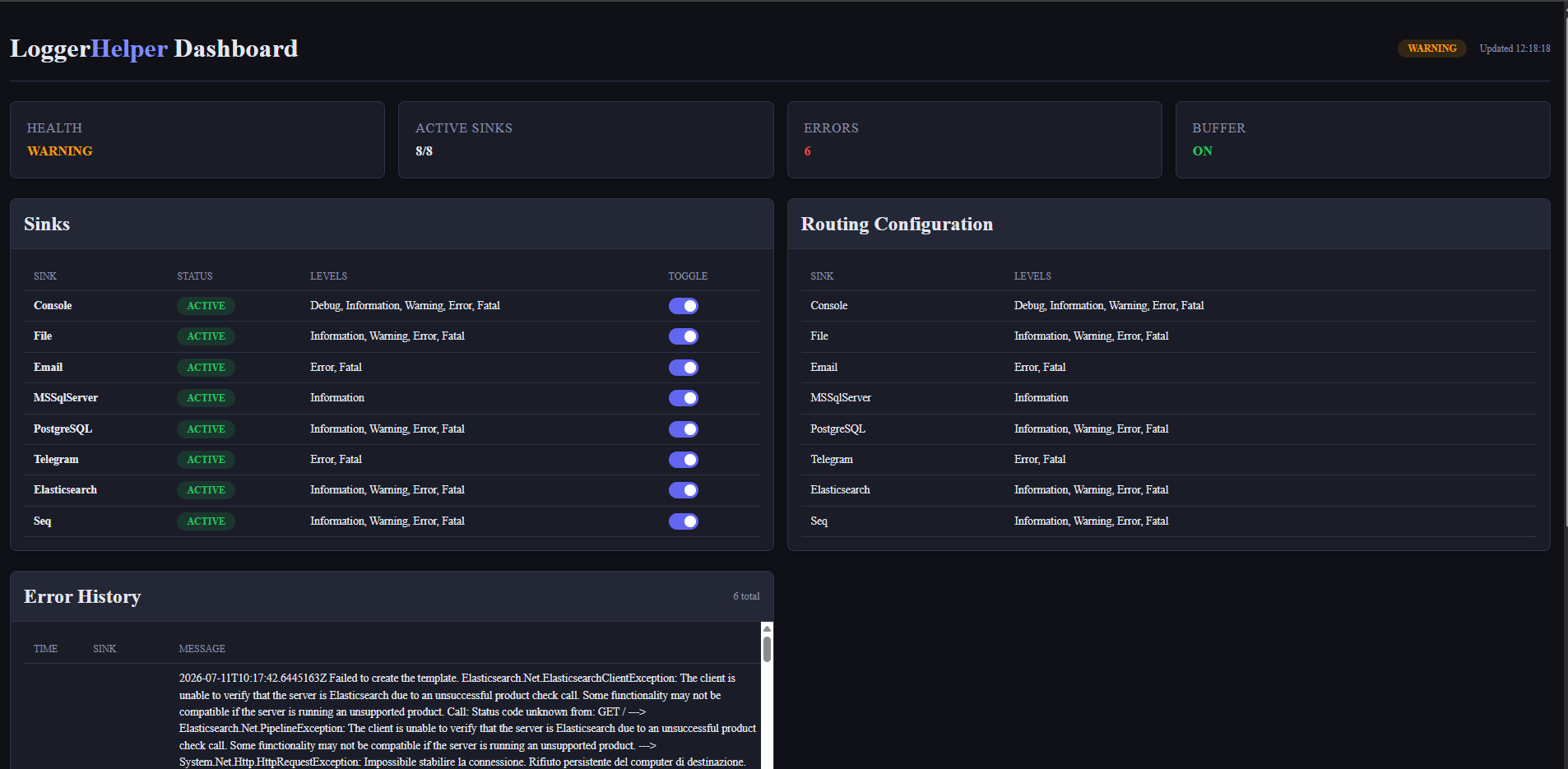
Embedded real-time diagnostics dashboard for ASP.NET Core — no Seq, no Kibana, no extra infrastructure required.
Navigate to /loggerhelper to see the health of your logging pipeline at a glance:
- 📡 Live Log Stream: Browser-based
tail -fvia Server-Sent Events. Filter by level or text in real time. - 🩺 Sink Health Cards: At-a-glance status for every configured sink (ACTIVE / FAILED) and their assigned log levels.
- ⚠️ Error History: Click-to-expand table of recent sink errors (SMTP failures, DB write errors) with full stack traces.
- ⏪ Context Before Error: The killer feature. A zero-allocation ring buffer automatically flushes all preceding Debug/Info/Warning entries only when an Error or Fatal event fires. You see exactly what happened before the crash without keeping verbose logging on permanently!
// Program.cs
builder.Services.AddLoggerHelperDashboard(o => o.UseBasicAuthentication("admin", builder.Configuration["Dashboard:Password"]));
// ...
app.MapLoggerHelperDashboard(); // Exposes the UI at /loggerhelper
Authentication is mandatory on every Dashboard route (page,
/api/status,/api/logs,/api/stream). Use the built-in Basic auth shown above (HTTPS only), your app's authentication, or a namedAuthorizationPolicy. Without any of themMapLoggerHelperDashboard()throwsInvalidOperationExceptionat startup. See the Dashboard guide.
🤖 AI Integration — MCP Server
dotnet add package CSharpEssentials.LoggerHelper.MCP
🤖 AI Diagnostics in Action: Here is an example of an AI assistant querying the running application's logging state in real-time, instantly identifying offline sinks (like Elasticsearch and Seq), and proposing actionable fixes directly in the chat:

Give your AI assistant live visibility into your running app's logging state. Two lines of setup expose a Model Context Protocol (MCP) server that Claude, Cursor, GitHub Copilot, and any MCP-compatible client can query.
// Program.cs — add after AddLoggerHelper()
builder.Services.AddLoggerHelperMcp();
// ...
app.MapLoggerHelperMcp("/mcp");        // Streamable HTTP  — Claude Code, Cursor, Copilot
app.MapLoggerHelperMcpSse();           // HTTP+SSE         — Claude Desktop, MCP Inspector
AI can now ask your app:
- "Are all sinks healthy?" →
loggerhelper_get_health(OK / WARNING / CRITICAL) - "Show me the last 10 logging errors" →
loggerhelper_get_errors - "What levels does the Email sink receive?" →
loggerhelper_get_sinks - "Is PII masking enabled?" →
loggerhelper_get_config
Predefined prompt — run a full diagnostic with one command:
curl -X POST http://localhost:5000/mcp \
  -H "Content-Type: application/json" \
  -d '{"jsonrpc":"2.0","id":1,"method":"prompts/get","params":{"name":"diagnose-logging","arguments":{"focus":"all"}}}'
The diagnose-logging prompt instructs the AI to call all four tools and return a structured report
with Overall Status, Failed Sinks, Configuration Issues, and Recommended Actions.
Why this matters: Every other .NET logging library requires a separate dashboard (Seq, Kibana, Grafana) before an AI assistant can see log state. LoggerHelper MCP ships that built in — zero extra infrastructure, zero extra dependencies, one NuGet package.
📋 Sink Overview
Each sink is a separate NuGet package — install only what you need. Click guide → for the full configuration reference, sample output, and troubleshooting for each sink.
| Sink | What it does | Install | Full guide |
|---|---|---|---|
| Console | Colored terminal output, per-level themes | dotnet add package CSharpEssentials.LoggerHelper.Sink.Console |
guide → |
| File | Rolling JSON files, per-property subdirectories, configurable retention | dotnet add package CSharpEssentials.LoggerHelper.Sink.File |
guide → |
| SMTP alerts, HTML templates, throttling | dotnet add package CSharpEssentials.LoggerHelper.Sink.Email |
guide → | |
| Telegram | Bot notifications, MarkdownV2, throttling | dotnet add package CSharpEssentials.LoggerHelper.Sink.Telegram |
guide → |
| Elasticsearch | Elasticsearch / OpenSearch indexing, auto template, Kibana-ready | dotnet add package CSharpEssentials.LoggerHelper.Sink.Elasticsearch |
guide → |
| SQL Server | Structured log table, auto creation, custom columns | dotnet add package CSharpEssentials.LoggerHelper.Sink.MSSqlServer |
guide → |
| PostgreSQL | JSONB properties column, custom schema | dotnet add package CSharpEssentials.LoggerHelper.Sink.Postgresql |
guide → |
| MySQL / MariaDB | Typed columns, native JSON column, auto table creation, batched writes |
dotnet add package CSharpEssentials.LoggerHelper.Sink.MySql |
guide → |
| Seq | Centralized log server with search, alerts, and dashboards | dotnet add package CSharpEssentials.LoggerHelper.Sink.Seq |
guide → |
| Hangfire Console | Structured logs inside the Hangfire Dashboard | dotnet add package CSharpEssentials.LoggerHelper.Sink.HangfireConsole |
guide → |
Every sink uses the same routing pattern — just add the sink name to Routes:
"Routes": [
  { "Sink": "Console",       "Levels": ["Debug", "Information", "Warning"] },
  { "Sink": "File",          "Levels": ["Information", "Warning", "Error", "Fatal"] },
  { "Sink": "Elasticsearch", "Levels": ["Warning", "Error", "Fatal"] }
]
For per-sink configuration options (connection strings, paths, retention, custom columns), see the guide → linked in the table above.
📊 Comparison
| Feature | Serilog alone | NLog | LoggerHelper v5 |
|---|---|---|---|
| Per-level sink routing (declarative) | Manual per sink | Via targets | JSON / fluent — built-in |
ILogger compatible |
Via bridge pkg | Native | Native — zero code change |
| Install only needed sinks | ❌ | ❌ | ✅ modular NuGet |
| Named params preserved (structured) | ✅ | ✅ | ✅ |
BeginScope structured |
✅ | ✅ | ✅ propagates to Serilog |
| OpenTelemetry trace correlation | Manual | Manual | ✅ built-in, auto |
| Internal error diagnostics | ❌ | ❌ | ✅ injectable ILogErrorStore |
| Fluent OR JSON OR merged | ❌ | ❌ | ✅ all three |
| Request/Response middleware | Serilog.AspNetCore | Manual | ✅ 1 line |
| Email/Telegram alerts | 3rd-party | NLog.MailKit | ✅ built-in + throttling |
| Dynamic file routing by property | ❌ | ❌ | ✅ multi-tenant ready |
| Sink plugin system (custom sinks) | Manual wiring | Manual | ✅ [ModuleInitializer] auto-reg |
| Initial setup complexity | 15–30 lines | XML + code | ✅ 5 lines |
| Sensitive data masking (PII/secrets) | Manual IDestructuringPolicy |
3rd-party | ✅ JSON-driven, all sinks at once |
🏗️ Architecture
LoggerHelper uses a zero-dependency plugin architecture. The core package has no knowledge of any specific sink — they self-register at startup via [ModuleInitializer].
Your App
  └── CSharpEssentials.LoggerHelper (core)
        ├── Bridges ILogger → Serilog (zero allocations on hot path)
        ├── Routes events by level via pre-computed HashSet
        ├── Exposes ILogErrorStore for sink failure diagnostics
        └── Discovers sink plugins automatically at startup
              ├── Sink.Console    (auto-registers via [ModuleInitializer])
              ├── Sink.File       (auto-registers)
              ├── Sink.Email      (auto-registers)
              └── ... any ISinkPlugin
Performance Focus
Every version ships a targeted performance audit. Key hot-path optimizations to date:
| Version | Component | Optimization | Impact |
|---|---|---|---|
| v5.0.6 | Middleware ReadBodySafe |
ArrayPool replaces new char[64K] |
−256 KB LOH per request |
| v5.0.5 | SinkRouting.Matches() |
HashSet replaces string O(n) scan |
Zero alloc per log event |
| v5.0.5 | Telegram Emit() |
Fire-and-forget Task.Run vs blocking GetResult() |
No pipeline stall |
| v5.0.5 | Email template | Cached at ctor vs File.ReadAllText per emit |
No disk I/O on hot path |
Building a Custom Sink
[LoggerHelperSink]
public sealed class MyTargetSinkPlugin : ISinkPlugin {
    public bool CanHandle(string sinkName) =>
        sinkName.Equals("MyTarget", StringComparison.OrdinalIgnoreCase);

    public void Configure(LoggerConfiguration loggerConfig, SinkRouting routing, LoggerHelperOptions options) {
        var opts = options.GetSinkConfig("MyTarget")
                   ?? options.BindSinkSection("MyTarget");

        loggerConfig.WriteTo.Conditional(
            evt => routing.Matches(evt.Level),
            wt => wt.MySink(opts?.ConnectionString)
        );
    }
}

public static class PluginInitializer {
    [ModuleInitializer]
    public static void Init() => SinkPluginRegistry.Register(new MyTargetSinkPlugin());
}
If required options are missing or empty, throw InvalidOperationException from Configure: the engine catches it, skips your sink and records it as not configured (FAILED in Dashboard/MCP). Do not silently return.
Reference CSharpEssentials.LoggerHelper as a NuGet package. The sink auto-registers with no changes to the core.
🤝 View Source & Contribute
If you're reading this on NuGet, we highly recommend visiting our GitHub Repository!
By visiting the repository you can:
- 👀 Explore the source code and evaluate the code quality.
- 🐛 Check open issues or report new ones.
- 🛠️ Contribute to the project via Pull Requests.
- ⭐ Drop a star to support the project's growth!
📚 Documentation & Links
- Documentation Site — full reference, guides, and playground
- Interactive Playground
- Changelog
- Benchmark Results
- Migration Guide v2/v4 → v5
- NuGet — LoggerHelper
- NuGet — HttpHelper
- GitHub Issues
License
MIT — Alessandro Chiodo
| Product | Versions Compatible and additional computed target framework versions. |
|---|---|
| .NET | net8.0 is compatible. net8.0-android was computed. net8.0-browser was computed. net8.0-ios was computed. net8.0-maccatalyst was computed. net8.0-macos was computed. net8.0-tvos was computed. net8.0-windows was computed. net9.0 is compatible. net9.0-android was computed. net9.0-browser was computed. net9.0-ios was computed. net9.0-maccatalyst was computed. net9.0-macos was computed. net9.0-tvos was computed. net9.0-windows was computed. net10.0 is compatible. net10.0-android was computed. net10.0-browser was computed. net10.0-ios was computed. net10.0-maccatalyst was computed. net10.0-macos was computed. net10.0-tvos was computed. net10.0-windows was computed. |
-
net10.0
- Serilog (>= 4.2.0)
- Serilog.Settings.Configuration (>= 9.0.0)
-
net8.0
- Microsoft.Extensions.Configuration (>= 10.0.9)
- Microsoft.Extensions.Configuration.Binder (>= 10.0.9)
- Microsoft.Extensions.Configuration.Json (>= 9.0.1)
- Microsoft.Extensions.Logging (>= 9.0.1)
- Serilog (>= 4.2.0)
- Serilog.Settings.Configuration (>= 9.0.0)
-
net9.0
- Microsoft.Extensions.Configuration (>= 10.0.9)
- Microsoft.Extensions.Configuration.Binder (>= 10.0.9)
- Serilog (>= 4.2.0)
- Serilog.Settings.Configuration (>= 9.0.0)
NuGet packages (13)
Showing the top 5 NuGet packages that depend on CSharpEssentials.LoggerHelper:
| Package | Downloads |
|---|---|
|
CSharpEssentials.HttpHelper
Make every HTTP call resilient in one line. Built-in retry, rate limiting, and automatic logging — so your app keeps working when APIs don't. Built on IHttpClientFactory — register once with AddHttpClients(), inject anywhere. |
|
|
CSharpEssentials.LoggerHelper.Sink.Console
See your logs in color, instantly. Add Console to your LoggerHelper routes and get beautiful, level-filtered colored output — zero configuration beyond a single JSON entry. Auto-registered via [ModuleInitializer]: no code changes, just add the NuGet. Part of the CSharpEssentials.LoggerHelper ecosystem with 9 pluggable sinks and now a built-in MCP server for AI assistant integration. |
|
|
CSharpEssentials.LoggerHelper.Sink.MSSqlServer
Query your logs with SQL. Auto-creates the table, batches the writes, and lets you JOIN logs with your business data — because sometimes grep isn't enough. AutoCreateSqlTable means zero migrations to get started. |
|
|
CSharpEssentials.LoggerHelper.Sink.Postgresql
Logs meet PostgreSQL. JSONB fields you can query, auto-created tables, and the full power of SQL — perfect for teams already running Postgres. NeedAutoCreateTable means zero migrations to get started. |
|
|
CSharpEssentials.LoggerHelper.Sink.Elasticsearch
Search millions of logs in milliseconds. Ship structured logs straight to Elasticsearch and build Kibana dashboards that actually tell you what's happening. Works with self-hosted Elasticsearch, OpenSearch, and Elastic Cloud — point IndexFormat at your ILM policy and go. |
GitHub repositories
This package is not used by any popular GitHub repositories.
| Version | Downloads | Last Updated |
|---|---|---|
| 5.2.9 | 0 | 10/6/2026 |
| 5.2.8 | 0 | 10/6/2026 |
| 5.2.7 | 33 | 10/6/2026 |
| 5.2.6 | 284 | 8/31/2026 |
| 5.2.4.1 | 274 | 8/27/2026 |
| 5.2.4 | 307 | 8/25/2026 |
| 5.2.3 | 285 | 8/25/2026 |
| 5.2.2.9 | 485 | 7/11/2026 |
| 5.2.2.8 | 316 | 7/11/2026 |
| 5.2.2.7 | 311 | 7/10/2026 |
| 5.2.2.6 | 294 | 7/6/2026 |
| 5.2.2.5 | 302 | 7/5/2026 |
| 5.2.2.4 | 310 | 7/5/2026 |
| 5.2.2.3 | 299 | 7/5/2026 |
| 5.2.2.2 | 318 | 7/5/2026 |
| 5.2.2.1 | 303 | 7/4/2026 |
| 5.2.2 | 335 | 7/3/2026 |
| 5.2.0 | 389 | 6/29/2026 |
| 5.1.1 | 342 | 6/19/2026 |
| 5.1.0 | 328 | 6/16/2026 |