

A load balancer is a networking device or software application that distributes and balances the incoming traffic among the servers to provide high availability, efficient utilization of servers and high performance.
- Works as a "traffic cop" routing client requests across all servers.
- Ensures that no single server bears too many requests, which helps improve the performance, reliability and availability of applications.
- Highly used in cloud computing domains, data centers and large-scale web applications where traffic flow needs to be managed.
Example: A company may use NGINX, HAProxy, or AWS Elastic Load Balancing to distribute incoming requests across multiple backend servers.

Load Balancing
Load balancing is the process of distributing incoming network or application traffic across multiple backend servers or resources. Its main purpose is to prevent a single server from becoming overloaded while improving performance, scalability, and availability.
Load balancing is similar to a busy restaurant where multiple chefs handle different orders instead of one chef managing everything. This allows customers to be served more efficiently.
Similarly, in computer systems, a load balancer distributes requests among multiple servers according to routing rules so that the workload is shared efficiently.
Problems Without a Load Balancer
Without load balancing, applications that depend on a limited number of backend servers may face several problems.

- Risk of a Single Point of Failure: If all traffic depends on a single application server and that server fails, users may lose access to the application until the server is restored.
- Server Overload: Every server has limited processing, memory, and network capacity. If too many requests reach the same server, its performance may degrade or it may become unavailable.
- Limited Scalability: Adding more servers does not automatically distribute traffic among them. A routing mechanism is needed to direct requests to the available servers.
- Uneven Resource Utilization: Some servers may become overloaded while others remain underutilized if traffic is not distributed effectively.
- Reduced Availability: Without redundant backend servers and proper traffic routing, server failures can directly affect application availability.
With Load Balancer
A load balancer distributes incoming requests across multiple backend servers, helping prevent overload and improving application performance, scalability, and availability.

How a Load Balancer Works
A load balancer receives incoming requests and forwards them to suitable backend servers according to configured routing rules and server health information.
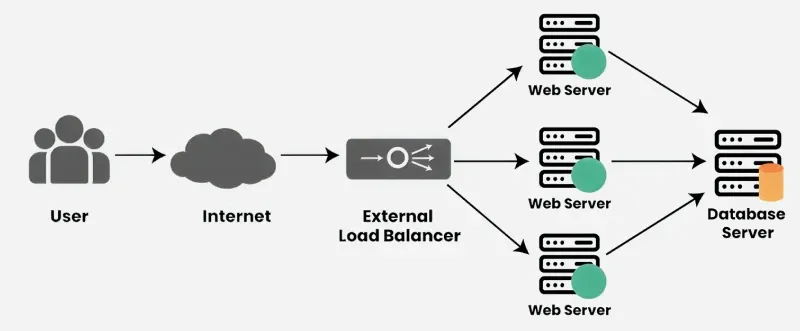
- Receives Incoming Requests: When users access a website or application, their requests first reach the load balancer rather than going directly to an individual backend server.
- Identifies Healthy Backend Servers: The load balancer uses health checks or other monitoring mechanisms to determine which backend servers are available and capable of handling traffic.
- Selects a Backend Server: The load balancer selects a server according to a configured load-balancing algorithm.
- Forwards the Request: The request is forwarded to the selected healthy backend server, which processes the request and generates a response.
- Handles Server Failures: If a backend server is marked unhealthy after configured health-check thresholds are reached, the load balancer stops routing new requests to that server and sends traffic to healthy servers.
- Returns the Response: The backend server processes the request and sends the response back to the client, usually through the load balancer.
Characteristics of Load Balancers
Load balancers provide several capabilities that help improve system scalability, availability, and performance.
- Traffic Distribution: Requests are distributed across backend servers according to a configured routing algorithm rather than always being distributed equally.
- High Availability Support: Load balancers help improve availability by routing requests to multiple healthy backend instances. However, the load balancer itself should also be deployed redundantly to avoid becoming a single point of failure.
- Scalability: Additional backend servers can be added to the server pool as traffic increases, making horizontal scaling easier.
- Resource Optimization: Traffic distribution helps make better use of available server resources and reduces the chances of individual servers becoming overloaded.
- Health Monitoring: Load balancers can monitor backend health and remove unhealthy instances from request routing.
- SSL/TLS Termination: Some load balancers can terminate SSL/TLS connections, reducing cryptographic processing work on backend servers.
- Session Persistence: Some load balancers can route requests from the same user to the same backend server when an application requires session affinity.
- Traffic Routing: Layer 7 load balancers can route traffic according to URL paths, headers, hostnames, cookies, or other application-level information.
Types of Load Balancers
Load balancers can be classified in different ways. One classification is based on deployment or implementation, while another is based on the networking layer at which they operate.
1. Based on Deployment
A. Hardware Load Balancer
A hardware load balancer is a dedicated physical device used to distribute traffic across servers. It is commonly used in large enterprise environments that require high performance.
Example: F5 hardware appliances.
B. Software Load Balancer
A software load balancer runs as an application on a server, virtual machine, or container. It is flexible, cost-effective, and widely used in modern applications.
Example: NGINX and HAProxy.
C. Cloud Load Balancer
A cloud load balancer is a managed service provided by a cloud platform to distribute traffic across cloud resources.
Example: AWS Elastic Load Balancing.
2. Based on OSI Model
The most common types are Layer 4 and Layer 7 load balancers.
A. Layer 4 Load Balancer
A Layer 4 load balancer works at the Transport Layer and routes traffic using information such as IP addresses, TCP/UDP protocols, and port numbers.
Example: It may distribute TCP connections across multiple backend servers.
B. Layer 7 Load Balancer
A Layer 7 load balancer works at the Application Layer and can route traffic based on HTTP information such as URLs, headers, hostnames, cookies, and request methods.
Example: It can route
/imagesrequests to one service and/apirequests to another.
Server Health Monitoring by Load Balancers
Load balancers monitor backend servers to ensure that requests are sent only to healthy instances. This helps maintain application availability and reduces failed requests.
1. Active Health Checks
Active health checks periodically test backend servers to determine whether they are healthy.
- The load balancer may send HTTP, HTTPS, or TCP health-check requests at regular intervals.
- If a server fails multiple consecutive checks based on configured thresholds, it may be marked unhealthy and removed from traffic routing.
Example: A load balancer may periodically send a request to /health and expect a successful response.
2. Passive Health Checks
Passive health checks determine server health by observing actual client traffic.
- The load balancer monitors connection failures, timeouts, or unsuccessful responses.
- If failures exceed configured thresholds, the server may be temporarily removed from the healthy server pool.
3. Heartbeat Monitoring
Heartbeat monitoring uses periodic signals to indicate that a server or service is alive.
- A component periodically sends or responds to heartbeat messages.
- Missing multiple heartbeats may indicate that the component is unavailable.
Note: Heartbeat monitoring and active load-balancer health checks are related techniques, but they are not always the same mechanism.
4. Automatic Failover and Recovery
When a backend server is marked unhealthy, the load balancer stops routing new requests to it and redirects traffic to healthy servers.
- Failed servers may continue receiving periodic health checks.
- When a server passes the required recovery checks, it can be added back to the server pool.
- The speed of failover depends on health-check intervals, timeout settings, and configured failure thresholds.
Example: During an e-commerce flash sale, if one application server stops responding, health checks can mark it unhealthy. The load balancer then sends new requests to the remaining healthy servers until the failed server recovers.
- The load balancer receives requests from the user and distributes them across multiple servers, ensuring all servers handle traffic efficiently.
- Heartbeat signals continuously check if each server is healthy; working servers respond normally (shown with green hearts).
- If a server fails (shown with cross), the load balancer detects it through missed heartbeats and stops sending requests to that server, redirecting traffic to healthy ones.
Challenges and Risks of Load Balancers
Although load balancers improve performance and availability, they also introduce some challenges that must be managed properly.
- Single Point of Failure: If the load balancer itself fails, it can stop traffic from reaching servers unless backup load balancers are configured.
- Performance Bottleneck: If the load balancer cannot handle very high traffic, it may slow down request processing.
- Configuration Complexity: Setting up load balancing correctly for large applications can be complex.
- Security Risks: Since load balancers sit between users and servers, they can become targets for cyber attacks.
- Cost: Hardware load balancers and high-availability configurations can increase infrastructure costs.