

SQL Joins are used to combine data from two or more tables based on a related column.
- Matching records using common columns.
- Improving data analysis by combining related information.
- Creating meaningful result sets from separate tables.
Types of SQL Joins
SQL joins are categorized into different types based on how rows from two tables are matched and combined. Consider the student and student_course tables, which share the roll_no column. SQL Joins combine their related data.
student table:

student_course table:

1. INNER JOIN
INNER JOIN is used to retrieve rows where matching values exist in both tables. It helps in:
- Combining records based on a related column.
- Returning only matching rows from both tables.
- Excluding non-matching data from the result set.
- Ensuring accurate data relationships between tables.
Syntax:
SELECT A.column1, A.column2, B.column1, ...
FROM tableA AS A
INNER JOIN tableB AS B
ON A.matching_column = B.matching_column;
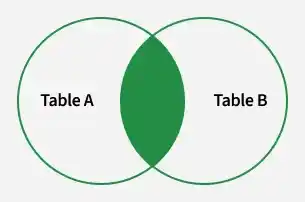
Note: We can also write JOIN instead of INNER JOIN. JOIN is same as INNER JOIN.
Example of INNER JOIN:
To find students enrolled in different courses
Query:
SELECT student_course.course_id, student.name, student.age
FROM student
INNER JOIN student_course
ON student.roll_no = student_course.roll_no;
Output:

2. LEFT JOIN
LEFT JOIN is used to retrieve all rows from the left table and matching rows from the right table. It helps in:
- Returning all records from the left table.
- Showing matching data from the right table.
- Displaying NULL values where no match exists in the right table.
Syntax:
SELECT A.column1, A.column2, B.column1, ...
FROM tableA AS A
LEFT JOIN tableB AS B
ON A.matching_column = B.matching_column;

Note: We can also use LEFT OUTER JOIN instead of LEFT JOIN, both are the same.
Example: In this example, the LEFT JOIN retrieves all rows from the student table and the matching rows from the student_course table based on the roll_no column.
Query:
SELECT student.name, student_course.course_id
FROM student
LEFT JOIN student_course
ON student_course.roll_no = student.roll_no;
Output:

3. RIGHT JOIN
RIGHT JOIN is used to retrieve all rows from the right table and the matching rows from the left table. It helps in:
- Returning all records from the right-side table.
- Showing matching data from the left-side table.
- Displaying NULL values where no match exists in the left table.
- Performing outer joins, also known as RIGHT OUTER JOIN.
Syntax:
SELECT A.column1, A.column2, B.column1, ...
FROM tableA AS A
RIGHT JOIN tableB AS B
ON A.matching_column = B.matching_column;

Note: We can also use RIGHT OUTER JOIN instead of RIGHT JOIN, both are the same
Example: In this example, the RIGHT JOIN retrieves all rows from the student_course table and the matching rows from the student table based on the roll_no column.
Query:
SELECT student.name, student_course.course_id
FROM student
RIGHT JOIN student_course
ON student_course.roll_no = student.roll_no;
Output:

4. FULL JOIN
FULL JOIN is used to combine the results of both LEFT JOIN and RIGHT JOIN. It helps in:
- Returning all rows from both tables.
- Showing matching records from each table.
- Displaying NULL values where no match exists in either table.
- Providing complete data from both sides of the join.
Syntax:
SELECT A.column1, A.column2, B.column1, ...
FROM tableA AS A
FULL JOIN tableB AS B
ON A.matching_column = B.matching_column;

Example: This example uses a FULL JOIN to return all rows from both tables. Matching records appear together, while non-matching records still show up with NULL values for the missing fields.
Query:
SELECT student.name, student_course.course_id
FROM student
FULL JOIN student_course
ON student_course.roll_no = student.roll_no;
Output :

Note: MySQL does not support FULL OUTER JOIN. To get the same result, you can simulate it using a UNION of a LEFT JOIN and a RIGHT JOIN.
5. Natural Join
A Natural Join automatically combines two tables based on columns that have the same name and compatible data types. It returns only the rows where the values in the common columns match.
- It joins tables using common columns with the same name.
- It returns only rows where values in those columns match.
- The common column appears only once in the result.
Syntax:
SELECT column_names
FROM tableA
NATURAL JOIN tableB;
Example:
SELECT student.name, student_course.course_id, age
FROM student
NATURAL JOIN student_course;
Output: