

Synchronization in Java controls access to shared resources when multiple threads execute concurrently. It helps prevent race conditions and maintains consistent shared data by coordinating access to critical sections.
- Controls concurrent access to shared mutable resources.
- Helps maintain data consistency when multiple threads modify the same state.
Example: Two ATMs Accessing the Same Bank Account
Suppose a bank account has ₹10,000, and two people try to withdraw money from the same account at the same time:
Account Balance = ₹10,000
ATM 1 -> Withdraw ₹6,000
ATM 2 -> Withdraw ₹5,000
Without synchronization, both threads may check the ₹10,000 balance simultaneously and proceed with their withdrawals, causing incorrect account data.
With synchronization, only one thread can execute the withdrawal operation at a time:
ATM 1 -> Locks Account
Checks Balance = ₹10,000
Withdraws ₹6,000
New Balance = ₹4,000
Unlocks AccountATM 2 -> Locks Account
Checks Balance = ₹4,000
Withdrawal of ₹5,000 rejected
Unlocks Account
class BankAccount {
    private int balance = 10000;

    public synchronized void withdraw(int amount) {
        if (balance >= amount) {
            balance -= amount;
            System.out.println("Withdrawn: " + amount);
        } else {
            System.out.println("Insufficient balance");
        }
    }
}
Here, the synchronized keyword ensures that only one thread at a time can execute withdraw() on the same BankAccount object.
Why Synchronization is Needed
When multiple threads access and modify the same shared resource simultaneously, their operations may interfere with each other and produce inconsistent results. This situation is known as a race condition.
- Prevents multiple threads from modifying critical shared data at the same time.
- Helps maintain data consistency and predictable program behavior.
- Protects critical sections that access shared mutable resources.
Ways to Achieve Synchronization
There are three main ways to achieve synchronization.
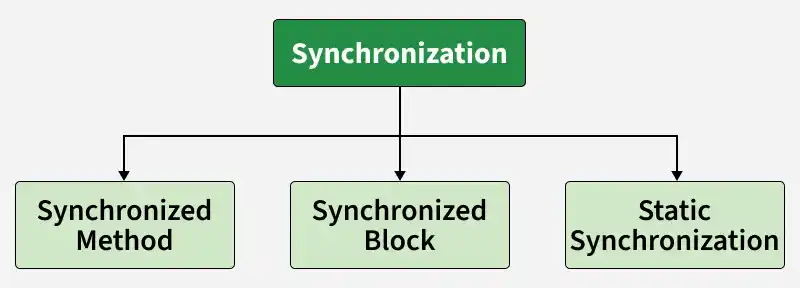
1. Synchronized Methods
Synchronized methods are used to lock an entire method so that only one thread can execute it at a time for a particular object. This ensures safe access to shared data but may reduce performance due to full method locking.
- Locks the whole method, not just a part of it.
- Uses the object-level lock (instance lock).
class Counter{

    // Shared variable
    private int c = 0;

    // Synchronized method to increment counter
    public synchronized void inc(){
        c++;

    }

    // Synchronized method to get counter value
    public synchronized int get(){
        return c;

    }
}

public class Geeks{

    public static void main(String[] args){

        // Shared resource
        Counter cnt = new Counter();

        Thread t1 = new Thread(() -> {
            for (int i = 0; i < 1000; i++)
                cnt.inc();
        });

        Thread t2 = new Thread(() -> {
            for (int i = 0; i < 1000; i++)
                cnt.inc();
        });

        t1.start();
        t2.start();

        try {
            t1.join();
            t2.join();
        }
        catch (InterruptedException e) {
            e.printStackTrace();
        }

        System.out.println("Counter: " + cnt.get());
    }
}
Output
Counter: 2000
Explanation: Both threads increment the same counter concurrently. Since the inc() and get() methods are synchronized, only one thread can access them at a time, ensuring the correct final count.
2. Synchronized Blocks
Synchronized blocks allow locking only a specific section of code instead of the entire method. This makes the program more efficient by reducing the scope of synchronization.
- Locks only the critical section of code, not the entire method.
- Provides better performance due to fine-grained control.
class Counter{

    private int c = 0;

    public void inc(){

        // Synchronize only this block
        synchronized (this) { c++; }
    }

    public int get() { return c; }
}

public class Geeks {

    public static void main(String[] args)
        throws InterruptedException{

        Counter cnt = new Counter();

        Thread t1 = new Thread(() -> {
            for (int i = 0; i < 1000; i++)
                cnt.inc();
        });

        Thread t2 = new Thread(() -> {
            for (int i = 0; i < 1000; i++)
                cnt.inc();
        });

        t1.start();
        t2.start();
        t1.join();
        t2.join();

        System.out.println("Counter: " + cnt.get());
    }
}
Output
Counter: 2000
Explanation: The synchronized block ensures mutual exclusion only for the increment statement, reducing the locking overhead.
3. Static Synchronization
Static synchronization is used when static data or methods need to be protected in a multithreaded environment. It ensures that only one thread can access the class-level resource at a time.
- Locks at the class level instead of the object level.
- Shared across all instances of the class.
class Table{

    synchronized static void printTable(int n){

        for (int i = 1; i <=3; i++){

            System.out.println(n * i);
            try {
            } catch (Exception e) {
                System.out.println(e);
            }
        }
    }
}

class Thread1 extends Thread{

    public void run() {
        Table.printTable(1);
    }
}

class Thread2 extends Thread {
    public void run() {
        Table.printTable(10);
    }
}

public class GFG{

    public static void main(String[] args){

        Thread1 t1 = new Thread1();
        Thread2 t2 = new Thread2();
        t1.start();
        t2.start();
    }
}
Output
1
2
3
10
20
30
Explanation: Both threads t1 and t2 call the static synchronized method printTable(). The lock is applied to the Table.class object, ensuring that only one thread can access the method at a time, even if no object instance is shared.
Types of Synchronization
There are two type of synchronizations in Java which are listed below:
1. Process Synchronization
Process synchronization is a fundamental concept in operating systems that ensures multiple processes or threads can execute safely while sharing common resources. Process Synchronization is a technique used to coordinate the execution of multiple processes. It ensures that the shared resources are safe and in order.
- Prevents race conditions by controlling access to shared resources.
- Ensures data consistency and integrity in concurrent execution.
- Uses mechanisms like semaphores, mutex locks, and monitors for coordination.
class BankAccount{

    // Shared resource (bank balance)
    private int balance = 1000;

    // Synchronized method for deposit operation
    public synchronized void deposit(int amount){

        balance += amount;
        System.out.println("Deposited: " + amount
                           + ", Balance: " + balance);
    }

    // Synchronized method for withdrawal operation
    public synchronized void withdraw(int amount){

        if (balance >= amount) {
            balance -= amount;
            System.out.println("Withdrawn: " + amount
                               + ", Balance: " + balance);
        }
        else {
            System.out.println(
                "Insufficient balance to withdraw: "
                + amount);
        }
    }

    public int getBalance() { return balance; }
}

// Main class
public class Geeks{

    public static void main(String[] args){

        BankAccount account
            = new BankAccount(); // Shared resource

        // Thread 1 to deposit money into the account
        Thread t1 = new Thread(() -> {
            for (int i = 0; i < 3; i++) {
                account.deposit(200);
                try {
                    Thread.sleep(50); // Simulate some delay
                }
                catch (InterruptedException e) {
                    e.printStackTrace();
                }
            }
        });

        // Thread 2 to withdraw money from the account
        Thread t2 = new Thread(() -> {
            for (int i = 0; i < 3; i++) {
                account.withdraw(100);
                try {
                    Thread.sleep(
                        100); // Simulate some delay
                }
                catch (InterruptedException e) {
                    e.printStackTrace();
                }
            }
        });

        // Start both threads
        t1.start();
        t2.start();

        // Wait for threads to finish
        try {
            t1.join();
            t2.join();
        }
        catch (InterruptedException e) {
            e.printStackTrace();
        }

        // Print final balance
        System.out.println("Final Balance: "
                           + account.getBalance());
    }
}
Output
Deposited: 200, Balance: 1200
Withdrawn: 100, Balance: 1100
Deposited: 200, Balance: 1300
Deposited: 200, Balance: 1500
Withdrawn: 100, Balance: 1400
Withdrawn: 100, Balance: 1300
Final Balance: 1300
Explanation: Two threads perform deposit and withdrawal operations simultaneously. The synchronized methods prevent race conditions, ensuring consistent balance updates.
2. Thread Synchronization in Java
Thread Synchronization is used to coordinate and ordering of the execution of the threads in a multi-threaded program. There are two types of thread synchronization are mentioned below:
- Mutual Exclusive
- Cooperation (Inter-thread communication in Java)
Example: Ticket Booking System
class TicketBooking{

    // Shared resource (available tickets)
    private int availableTickets
        = 10;

    // Synchronized method for booking tickets
    public synchronized void bookTicket(int tickets){

        if (availableTickets >= tickets){

            availableTickets -= tickets;
            System.out.println(
                "Booked " + tickets
                + " tickets, Remaining tickets: "
                + availableTickets);
        }
        else{
            System.out.println(
                "Not enough tickets available to book "
                + tickets);
        }
    }

    public int getAvailableTickets(){

        return availableTickets;
    }
}

public class Geeks{

    public static void main(String[] args){

        // Shared resource
        TicketBooking booking
            = new TicketBooking();

        // Thread 1 to book tickets
        Thread t1 = new Thread(() -> {
            for (int i = 0; i < 2; i++) {

                // Trying to book 2
                // tickets each time
                booking.bookTicket(2);

                try{

                    // Simulate delay
                    Thread.sleep(50);
                }
                catch (InterruptedException e) {
                    e.printStackTrace();
                }
            }
        });

        // Thread 2 to book tickets
        Thread t2 = new Thread(() -> {
            for (int i = 0; i < 2; i++){

                // Trying to book 3
                // tickets each time
                booking.bookTicket(3);

                try{

                    // Simulate delay
                    Thread.sleep(40);
                }
                catch (InterruptedException e) {
                    e.printStackTrace();
                }
            }
        });

        // Start both threads
        t1.start();
        t2.start();

        // Wait for threads to finish
        try {
            t1.join();
            t2.join();
        }
        catch (InterruptedException e) {
            e.printStackTrace();
        }

        // Print final remaining tickets
        System.out.println("Final Available Tickets: "
                           + booking.getAvailableTickets());
    }
}
Output
Booked 2 tickets, Remaining tickets: 8
Booked 3 tickets, Remaining tickets: 5
Booked 3 tickets, Remaining tickets: 2
Booked 2 tickets, Remaining tickets: 0
Final Available Tickets: 0
Explanation: The synchronized bookTicket() method ensures that only one thread books tickets at a time, preventing overbooking and ensuring correct availability.
Volatile Keyword
The volatile keyword in Java ensures that all threads have a consistent view of a variable's value. It prevents caching of the variable's value by threads, ensuring that updates to the variable are immediately visible to other threads.
Working of Volatile Modifier
- It applies only to variables.
- volatile guarantees visibility i.e. any write to a volatile variable is immediately visible to other threads.
- It does not guarantee atomicity, meaning operations like count++ (read-modify-write operations) can still result in inconsistent values
class Counter {
    private volatile boolean running = true;

    public void stop() {
        running = false;
    }

    public void start() {
        new Thread(() -> {
            while (running) {
                System.out.println("Running...");
                try {
                    Thread.sleep(200);
                } catch (InterruptedException e) {
                    Thread.currentThread().interrupt();
                }
            }
            System.out.println("Stopped.");
        }).start();
    }
}

public class Geeks {
    public static void main(String[] args) throws InterruptedException {
        Counter counter = new Counter();
        counter.start();

        Thread.sleep(600); // Let it run briefly
        counter.stop();    // Then stop the thread
    }
}
Output
Running...
Running...
Running...
Stopped.
Explanation: The volatile variable running ensures that updates made by one thread (in stop()) are visible to the thread running the loop in start().
volatile vs synchronized
volatile | synchronized |
|---|---|
| Provides visibility of reads and writes to a variable across threads. | Provides mutual exclusion and establishes visibility guarantees around the synchronized region. |
| Does not use an intrinsic lock for accessing the variable. | Uses an object's intrinsic monitor lock. |
Does not make compound operations such as count++ atomic. | Can protect compound operations when all accesses to the shared state follow the same synchronization strategy. |
| Applied to variables. | Applied to methods or blocks. |
| Does not prevent multiple threads from accessing the variable simultaneously. | Allows only one thread at a time to execute code guarded by the same monitor. |
| Suitable for simple state flags where atomic compound updates are not required. | Suitable for critical sections that require coordinated access to shared mutable state. |