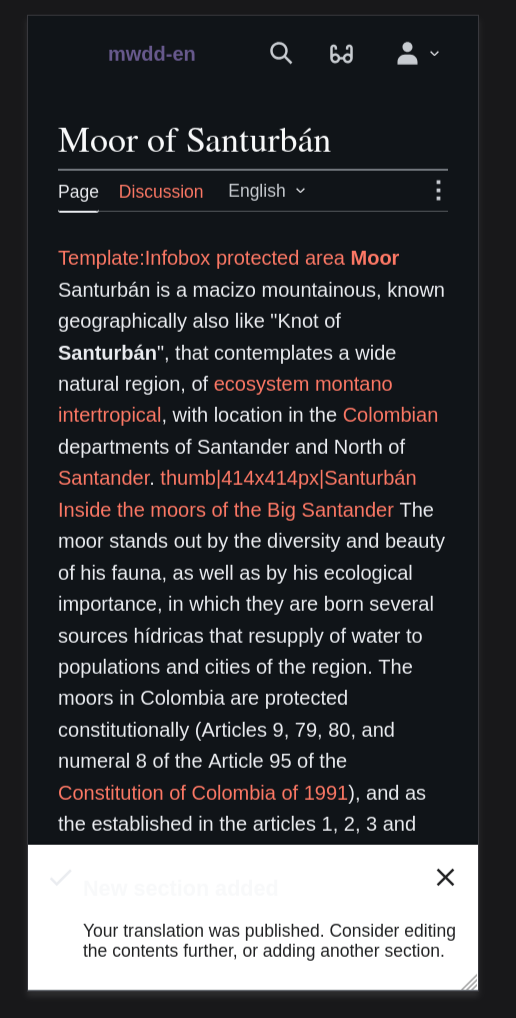
Feature summary (what you would like to be able to do and where):
Since ContentTranslation uses its own skin, it doesn't support dark mode out of the box. Minerva and Vector 2022 support a dark mode theme using a class on the HTML element skin-theme-clientpref-dark / skin-theme-clientpref-os the value of which comes from a preference minerva-theme / vector-theme or by using mw.user.clientprefs.get('skin-theme'); for anonymous users.
Suggestion
- For anons: ContentTranslation adds a class skin-theme-clientpref-day to the HTML element. This should allow it to benefit from any cookie that has been stored on the device.
- For logged in users: Either ContentTranslation should have its own dark mode preference, or should read the preference from Vector 2022/Minerva.
Use case(s) (list the steps that you performed to discover that problem, and describe the actual underlying problem which you want to solve. Do not describe only a solution):
- Some users prefer using a dark mode.
Benefits (why should this be implemented?):
- Consistency with the rest of the site
Maintenance initiative
What needs to be prioritized:
Content Translation needs dark mode support in its own CX skin on Special:ContentTranslation. Vector 2022 and Minerva already support dark mode, but Content Translation uses a separate interface and does not automatically inherit the same behavior. Users who use dark mode elsewhere on the site currently get an inconsistent experience when they enter the translation workflow.
Scope:
- Support dark mode in the main Content Translation interface.
- Respect the relevant existing skin/client preference where technically appropriate.
- Fix major dark mode visual issues in the CX interface, including unreadable text, broken contrast, and inconsistent theme behavior.
- Document any remaining non-blocking visual issues as follow-up work.
Out of scope:
- Typography customization through the accessibility menu.
- Full accessibility menu integration for Content Translation.
- Changing the Content Translation tool menu from a vertical column layout to a horizontal row layout.
- General redesign or unrelated refactoring of the CX interface.
Work is completed when Content Translation can be used in dark mode without major visual regressions, unreadable text, broken contrast, or inconsistent theme behavior.
Why this is essential:
Content Translation is a user-facing editing tool, and its interface should be usable by people who rely on or prefer dark mode. Dark mode is already supported in the main site skins, so the current behavior leaves Content Translation as an exception.
This is an accessibility and product-quality issue. Dark mode can reduce visual fatigue for some users, and it is now part of the expected platform experience.
Finally, this will reduce tech debt by migrating to design tokens from hard coded or custom values.
What happens if we do not do it now:
Content Translation remains inconsistent with Vector 2022 and Minerva dark mode behavior.
The issue is also likely to remain visible as a recurring community request or bug report.
Dependencies / constraints:
- The implementation needs to align with the existing dark mode/client preference behavior used by supported site skins where technically appropriate.
- Design or product input may be needed to confirm acceptable dark mode behavior and resolve visual edge cases.
Estimated effort: 8 story points, medium uncertainty.
QA Plan
Test 1: Verify the following screens look good in both mobile and desktop devices:
- Dashboard
- Article selection
- Article search
- Section selection
- Translation Editor
- Mobile
- Desktop
- Publish & Review
- Mobile
Test 2: Theme preference test
- Verify that the automatic color scheme follows system scheme when automatic scheme is selected.
- Verify that dark/light schemes preferences are applied properly
Test 3: Anonymous user preference test
- Ensure anonymous user's theme preferences are retained - CX is not accessible by anonymous users.