Some information relates to prerelease product that may be substantially modified before it’s released. Microsoft makes no warranties, express or implied, with respect to the information provided here.
Represents a control for viewing flow content in a fixed viewing mode that shows content one page at a time.
public ref class FlowDocumentPageViewer : System::Windows::Controls::Primitives::DocumentViewerBase
[System.Windows.TemplatePart(Name="PART_FindToolBarHost", Type=typeof(System.Windows.Controls.Decorator))]
public class FlowDocumentPageViewer : System.Windows.Controls.Primitives.DocumentViewerBase
[]
type FlowDocumentPageViewer = class
    inherit DocumentViewerBase
Public Class FlowDocumentPageViewer
Inherits DocumentViewerBase
Neptune (planet), major planet in the solar system, eighth planet
from the Sun and fourth largest in diameter. Neptune maintains an almost constant
distance, about 4,490 million km (about 2,790 million mi), from the Sun. Neptune
revolves outside the orbit of Uranus and for most of its orbit moves inside the
elliptical path of the outermost planet Pluto (see Solar System). Every 248 years,
Pluto’s elliptical orbit brings the planet inside Neptune’s nearly circular orbit
for about 20 years, temporarily making Neptune the farthest planet from the Sun.
The last time Pluto’s orbit brought it inside Neptune’s orbit was in 1979. In
1999 Pluto’s orbit carried it back outside Neptune’s orbit.
Neptune has 72 times Earth's volume...
Neptune StatsMean Distance from Sun4,504,000,000 kmMean Diameter49,532 kmApproximate Mass1.0247e26 kg
Information from the
Encarta
web site.
Astronomers believe Neptune has an inner rocky core that is surrounded by a vast
ocean of water mixed with rocky material. From the inner core, this ocean extends
upward until it meets a gaseous atmosphere of hydrogen, helium, and trace amounts
of methane. Neptune has four rings and 11 known moons. Even though Neptune's volume
is 72 times Earth’s volume, its mass is only 17.15 times Earth’s mass. Because of
its size, scientists classify Neptune—along with Jupiter, Saturn, and Uranus—as
one of the giant or Jovian planets (so-called because they resemble Jupiter).
Neptune has an orbital period of ~20 years...
Mathematical theories of astronomy led to the discovery of Neptune. To account for
wobbles in the orbit of the planet Uranus, British astronomer John Couch Adams and
French astronomer Urbain Jean Joseph Leverrier independently calculated the existence
and position of a new planet in 1845 and 1846, respectively. They theorized that the
gravitational attraction of this planet for Uranus was causing the wobbles in Uranus’s
orbit. Using information from Leverrier, German astronomer Johann Gottfried Galle first
observed the planet in 1846.
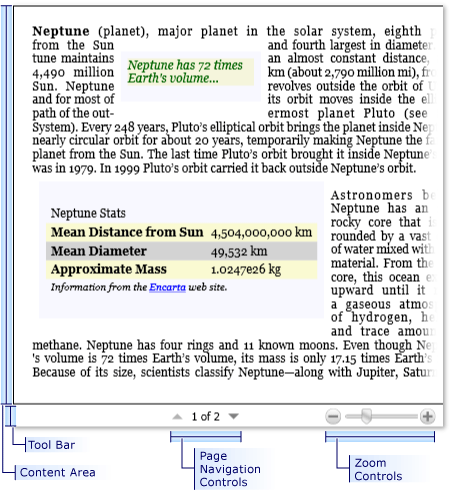
The following illustration shows a FlowDocumentPageViewer control with its default user interface (UI).
Content Area - The content area displays the contents of the FlowDocument specified by the Document property.
Toolbar - The default toolbar is docked underneath the content area, and hosts controls for navigating pages, and changing the zoom level.
Page Navigation Controls - The page navigation controls include a button to jump to the next page (the down arrow) or previous page (the up arrow), as well as indicators for the current page number and total number of pages.
Zoom Controls - The zoom controls enable the user to increase or decrease the zoom level by clicking the plus or minus buttons, respectively. The zoom controls also include a slider for adjusting the zoom level. For more information, see Zoom.
Search - The user can use the Ctr+F keyboard shortcut or you can use Find to toggle a search textbox that is used to find strings within the content. See Find for more information.
Gets or sets a value indicating whether to clip the content of this element (or content coming from the child elements of this element) to fit into the size of the containing element. This is a dependency property.
Gets a collection of CommandBinding objects associated with this element. A CommandBinding enables command handling for this element, and declares the linkage between a command, its events, and the handlers attached by this element.
Gets or sets a property that enables customization of appearance, effects, or other style characteristics that will apply to this element when it captures keyboard focus.
Gets or sets a value that indicates whether this FrameworkElement should force the user interface (UI) to render the cursor as declared by the Cursor property.
Gets or sets the horizontal alignment characteristics applied to this element when it is composed within a parent element, such as a panel or items control.
Gets or sets a value that declares whether this element can possibly be returned as a hit test result from some portion of its rendered content. This is a dependency property.
Gets a value that indicates whether this element has been initialized, either during processing by a XAML processor, or by explicitly having its EndInit() method called.
Gets a value that indicates whether the position of the mouse pointer corresponds to hit test results, which take element compositing into account. This is a dependency property.
Gets a value indicating whether the mouse pointer is located over this element (including child elements in the visual tree). This is a dependency property.
Gets a value that determines whether stylus capture is held by this element, or an element within the element bounds and its visual tree. This is a dependency property.
Gets a value that indicates whether the stylus position corresponds to hit test results, which take element compositing into account. This is a dependency property.
Gets or sets the identifying name of the element. The name provides a reference so that code-behind, such as event handler code, can refer to a markup element after it is constructed during processing by a XAML processor.
Gets or sets an opacity mask, as a Brush implementation that is applied to any alpha-channel masking for the rendered content of this element. This is a dependency property.
Gets or sets the center point of any possible render transform declared by RenderTransform, relative to the bounds of the element. This is a dependency property.
Gets or sets a value that determines whether rendering for this element should use device-specific pixel settings during rendering. This is a dependency property.
Gets or sets the vertical alignment characteristics applied to this element when it is composed within a parent element such as a panel or items control.
Adds a routed event handler for a specified routed event, adding the handler to the handler collection on the current element. Specify handledEventsToo as true to have the provided handler be invoked for routed event that had already been marked as handled by another element along the event route.
Applies an animation to a specified dependency property on this element, with the ability to specify what happens if the property already has a running animation.
Positions child elements and determines a size for a UIElement. Parent elements call this method from their ArrangeCore(Rect) implementation (or a WPF framework-level equivalent) to form a recursive layout update. This method constitutes the second pass of a layout update.
Starts a specific animation for a specified animated property on this element, with the option of specifying what happens if the property already has a running animation.
Begins the sequence of actions contained in the provided storyboard, with options specified for what should happen if the property is already animated.
Coerces the value of the specified dependency property. This is accomplished by invoking any CoerceValueCallback function specified in property metadata for the dependency property as it exists on the calling DependencyObject.
Returns the base property value for the specified property on this element, disregarding any possible animated value from a running or stopped animation.
Returns a geometry for a clipping mask. The mask applies if the layout system attempts to arrange an element that is larger than the available display space.
Creates and returns a new, read-only collection of DocumentPageView objects that are associated with the current display document (represented by the Document property).
Invalidates the arrange state (layout) for the element. After the invalidation, the element will have its layout updated, which will occur asynchronously unless subsequently forced by UpdateLayout().
Invalidates the rendering of the element, and forces a complete new layout pass. OnRender(DrawingContext) is called after the layout cycle is completed.
Updates the DesiredSize of a UIElement. Parent elements call this method from their own MeasureCore(Size) implementations to form a recursive layout update. Calling this method constitutes the first pass (the "Measure" pass) of a layout update.
Invoked whenever the RequestBringIntoView event reaches an element derived from this class in its route. Implement this method to add class handling for this event.
Invoked whenever an unhandled ContextMenuClosing routed event reaches this class in its route. Implement this method to add class handling for this event.
Called whenever an unhandled ContextMenuOpening routed event reaches this class in its route. Implement this method to add class handling for this event.
Invoked when an unhandled DragEnter attached event reaches an element in its route that is derived from this class. Implement this method to add class handling for this event.
Invoked when an unhandled DragLeave attached event reaches an element in its route that is derived from this class. Implement this method to add class handling for this event.
Invoked when an unhandled DragOver attached event reaches an element in its route that is derived from this class. Implement this method to add class handling for this event.
Invoked when an unhandled DragEnter attached event reaches an element in its route that is derived from this class. Implement this method to add class handling for this event.
Invoked when an unhandled GiveFeedback attached event reaches an element in its route that is derived from this class. Implement this method to add class handling for this event.
Invoked when an unhandled GotKeyboardFocus attached event reaches an element in its route that is derived from this class. Implement this method to add class handling for this event.
Invoked when an unhandled GotMouseCapture attached event reaches an element in its route that is derived from this class. Implement this method to add class handling for this event.
Invoked when an unhandled GotStylusCapture attached event reaches an element in its route that is derived from this class. Implement this method to add class handling for this event.
Invoked when an unhandled KeyUp attached event reaches an element in its route that is derived from this class. Implement this method to add class handling for this event.
Invoked when an unhandled LostKeyboardFocus attached event reaches an element in its route that is derived from this class. Implement this method to add class handling for this event.
Invoked when an unhandled LostMouseCapture attached event reaches an element in its route that is derived from this class. Implement this method to add class handling for this event.
Invoked when an unhandled LostStylusCapture attached event reaches an element in its route that is derived from this class. Implement this method to add class handling for this event.
Invoked when an unhandled MouseDown attached event reaches an element in its route that is derived from this class. Implement this method to add class handling for this event.
Invoked when an unhandled MouseLeftButtonUp routed event reaches an element in its route that is derived from this class. Implement this method to add class handling for this event.
Invoked when an unhandled MouseMove attached event reaches an element in its route that is derived from this class. Implement this method to add class handling for this event.
Invoked when an unhandled MouseRightButtonDown routed event reaches an element in its route that is derived from this class. Implement this method to add class handling for this event.
Invoked when an unhandled MouseRightButtonUp routed event reaches an element in its route that is derived from this class. Implement this method to add class handling for this event.
Invoked when an unhandled MouseUp routed event reaches an element in its route that is derived from this class. Implement this method to add class handling for this event.
Invoked when an unhandled PreviewDragEnter attached event reaches an element in its route that is derived from this class. Implement this method to add class handling for this event.
Invoked when an unhandled PreviewDragLeave attached event reaches an element in its route that is derived from this class. Implement this method to add class handling for this event.
Invoked when an unhandled PreviewDragOver attached event reaches an element in its route that is derived from this class. Implement this method to add class handling for this event.
Invoked when an unhandled PreviewDrop attached event reaches an element in its route that is derived from this class. Implement this method to add class handling for this event.
Invoked when an unhandled PreviewGiveFeedback attached event reaches an element in its route that is derived from this class. Implement this method to add class handling for this event.
Invoked when an unhandled PreviewGotKeyboardFocus attached event reaches an element in its route that is derived from this class. Implement this method to add class handling for this event.
Invoked when an unhandled PreviewKeyDown attached event reaches an element in its route that is derived from this class. Implement this method to add class handling for this event.
Invoked when an unhandled PreviewKeyUp attached event reaches an element in its route that is derived from this class. Implement this method to add class handling for this event.
Invoked when an unhandled PreviewKeyDown attached event reaches an element in its route that is derived from this class. Implement this method to add class handling for this event.
Invoked when an unhandled PreviewMouseDown attached routed event reaches an element in its route that is derived from this class. Implement this method to add class handling for this event.
Invoked when an unhandled PreviewMouseLeftButtonDown routed event reaches an element in its route that is derived from this class. Implement this method to add class handling for this event.
Invoked when an unhandled PreviewMouseLeftButtonUp routed event reaches an element in its route that is derived from this class. Implement this method to add class handling for this event.
Invoked when an unhandled PreviewMouseMove attached event reaches an element in its route that is derived from this class. Implement this method to add class handling for this event.
Invoked when an unhandled PreviewMouseRightButtonDown routed event reaches an element in its route that is derived from this class. Implement this method to add class handling for this event.
Invoked when an unhandled PreviewMouseRightButtonUp routed event reaches an element in its route that is derived from this class. Implement this method to add class handling for this event.
Invoked when an unhandled PreviewMouseUp attached event reaches an element in its route that is derived from this class. Implement this method to add class handling for this event.
Invoked when an unhandled PreviewMouseWheel attached event reaches an element in its route that is derived from this class. Implement this method to add class handling for this event.
Invoked when an unhandled PreviewQueryContinueDrag attached event reaches an element in its route that is derived from this class. Implement this method to add class handling for this event.
Invoked when an unhandled PreviewStylusButtonDown attached event reaches an element in its route that is derived from this class. Implement this method to add class handling for this event.
Invoked when an unhandled PreviewStylusButtonUp attached event reaches an element in its route that is derived from this class. Implement this method to add class handling for this event.
Invoked when an unhandled PreviewStylusDown attached event reaches an element in its route that is derived from this class. Implement this method to add class handling for this event.
Invoked when an unhandled PreviewStylusInAirMove attached event reaches an element in its route that is derived from this class. Implement this method to add class handling for this event.
Invoked when an unhandled PreviewStylusInRange attached event reaches an element in its route that is derived from this class. Implement this method to add class handling for this event.
Invoked when an unhandled PreviewStylusMove attached event reaches an element in its route that is derived from this class. Implement this method to add class handling for this event.
Invoked when an unhandled PreviewStylusOutOfRange attached event reaches an element in its route that is derived from this class. Implement this method to add class handling for this event.
Invoked when an unhandled PreviewStylusSystemGesture attached event reaches an element in its route that is derived from this class. Implement this method to add class handling for this event.
Invoked when an unhandled PreviewStylusUp attached event reaches an element in its route that is derived from this class. Implement this method to add class handling for this event.
Invoked when an unhandled PreviewTextInput attached event reaches an element in its route that is derived from this class. Implement this method to add class handling for this event.
Invoked when an unhandled QueryContinueDrag attached event reaches an element in its route that is derived from this class. Implement this method to add class handling for this event.
Invoked when an unhandled QueryCursor attached event reaches an element in its route that is derived from this class. Implement this method to add class handling for this event.
When overridden in a derived class, participates in rendering operations that are directed by the layout system. The rendering instructions for this element are not used directly when this method is invoked, and are instead preserved for later asynchronous use by layout and drawing.
Invoked when an unhandled StylusButtonDown attached event reaches an element in its route that is derived from this class. Implement this method to add class handling for this event.
Invoked when an unhandled StylusButtonUp attached event reaches an element in its route that is derived from this class. Implement this method to add class handling for this event.
Invoked when an unhandled StylusDown attached event reaches an element in its route that is derived from this class. Implement this method to add class handling for this event.
Invoked when an unhandled StylusInAirMove attached event reaches an element in its route that is derived from this class. Implement this method to add class handling for this event.
Invoked when an unhandled StylusInRange attached event reaches an element in its route that is derived from this class. Implement this method to add class handling for this event.
Invoked when an unhandled StylusMove attached event reaches an element in its route that is derived from this class. Implement this method to add class handling for this event.
Invoked when an unhandled StylusOutOfRange attached event reaches an element in its route that is derived from this class. Implement this method to add class handling for this event.
Invoked when an unhandled StylusSystemGesture attached event reaches an element in its route that is derived from this class. Implement this method to add class handling for this event.
Invoked when an unhandled StylusUp attached event reaches an element in its route that is derived from this class. Implement this method to add class handling for this event.
Invoked when an unhandled TextInput attached event reaches an element in its route that is derived from this class. Implement this method to add class handling for this event.
Supports incremental layout implementations in specialized subclasses of FrameworkElement. ParentLayoutInvalidated(UIElement) is invoked when a child element has invalidated a property that is marked in metadata as affecting the parent's measure or arrange passes during layout.
Determines the next element that would receive focus relative to this element for a provided focus movement direction, but does not actually move the focus.
Raises a specific routed event. The RoutedEvent to be raised is identified within the RoutedEventArgs instance that is provided (as the RoutedEvent property of that event data).
Removes the provided object from this element's logical tree. FrameworkElement updates the affected logical tree parent pointers to keep in sync with this deletion.
Occurs when this FrameworkElement is initialized. This event coincides with cases where the value of the IsInitialized property changes from false (or undefined) to true.
Occurs when the stylus moves while over the element. The stylus must move while being detected by the digitizer to raise this event, otherwise, PreviewStylusInAirMove is raised instead.
Occurs when the cursor is requested to display. This event is raised on an element each time that the mouse pointer moves to a new location, which means the cursor object might need to be changed based on its new position.
Occurs when the stylus moves over this element. The stylus must move while on the digitizer to raise this event. Otherwise, StylusInAirMove is raised instead.
The source for this content can be found on GitHub, where you can also create and review issues and pull requests. For more information, see our contributor guide.