Copy data from and to Salesforce V2 using Azure Data Factory or Azure Synapse Analytics
APPLIES TO:
Azure Data Factory
Azure Synapse Analytics
Tip
Data Factory in Microsoft Fabric is the next generation of Azure Data Factory, with a simpler architecture, built-in AI, and new features. If you're new to data integration, start with Fabric Data Factory. Existing ADF workloads can upgrade to Fabric to access new capabilities across data science, real-time analytics, and reporting.
This article outlines how to use Copy Activity in Azure Data Factory and Azure Synapse pipelines to copy data from and to Salesforce. It builds on the Copy Activity overview article that presents a general overview of the copy activity.
① Azure integration runtime ② Self-hosted integration runtime
For a list of data stores that are supported as sources or sinks, see the Supported data stores table.
Specifically, this Salesforce connector supports:
Salesforce Developer, Professional, Enterprise, or Unlimited editions.
Copying data from and to custom domain (Custom domain can be configured in both production and sandbox environments).
You can explicitly set the API version used to read/write data via apiVersion property in linked service. When you are copying data to Salesforce, the connector uses BULK API 2.0.
Prerequisites
API permission must be enabled in Salesforce.
You need configure the Connected Apps in Salesforce portal referring to this official doc or our step by step guideline in the recommendation in this article.
Important
The execution user must have the API Only permission.
Access Token expire time could be changed through session policies instead of the refresh token.
Salesforce Bulk API 2.0 Limits
We use Salesforce Bulk API 2.0 to query and ingest data. In Bulk API 2.0, batches are created for you automatically. You can submit up to 15,000 batches per rolling 24-hour period. If batches exceed the limit, you encounter failures.
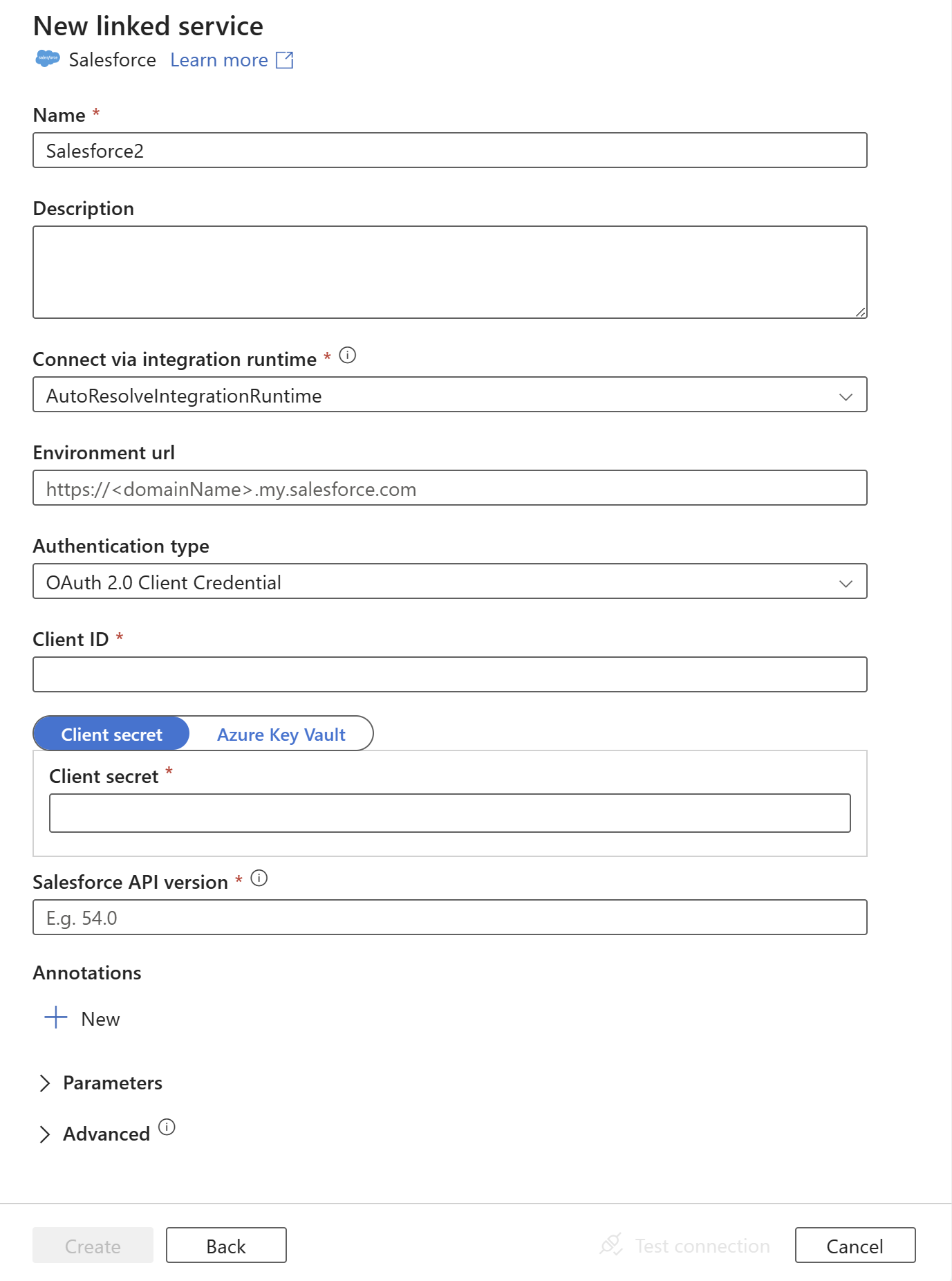
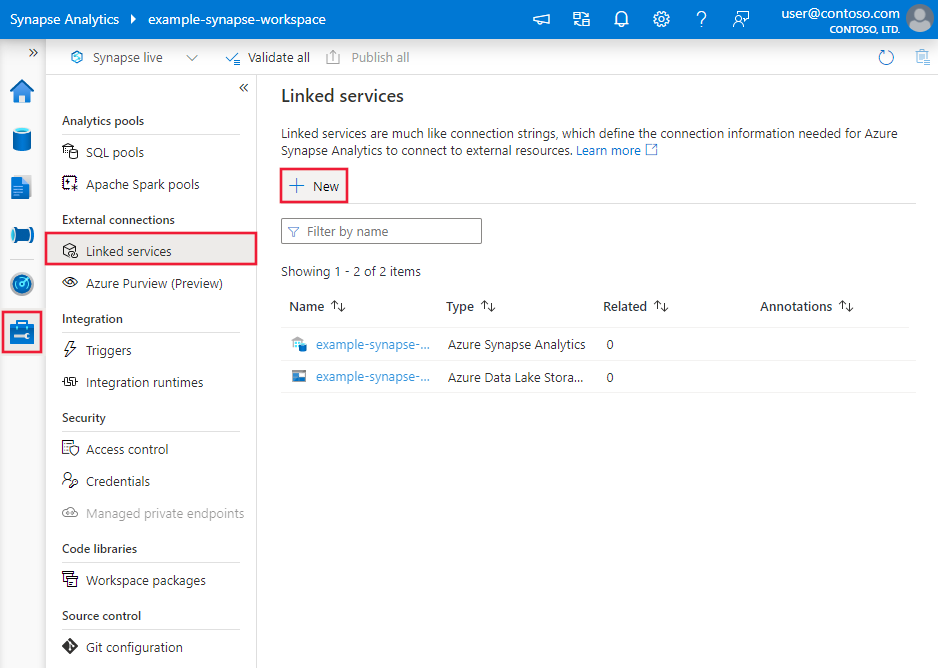
Search for Salesforce and select the Salesforce connector.
Configure the service details, test the connection, and create the new linked service.
Connector configuration details
The following sections provide details about properties that are used to define entities specific to the Salesforce connector.
Linked service properties
The following properties are supported for the Salesforce linked service.
Property
Description
Required
type
The type property must be set to SalesforceV2.
Yes
environmentUrl
Specify the URL of the Salesforce instance. For example, specify "https://.my.salesforce.com" to copy data from the custom domain. Learn how to configure or view your custom domain referring to this article.
Yes
authenticationType
Type of authentication used to connect to the Salesforce. The allowed value is OAuth2ClientCredentials.
Yes
clientId
Specify the client ID of the Salesforce OAuth 2.0 Connected App. For more information, go to this article
Yes
clientSecret
Specify the client secret of the Salesforce OAuth 2.0 Connected App. For more information, go to this article
Yes
apiVersion
Specify the Salesforce Bulk API 2.0 version to use, for example, 52.0. The Bulk API 2.0 only supports API version >= 47.0. To learn about Bulk API 2.0 version, see article. A failure occurs if you use a lower API version.
Yes
connectVia
The integration runtime to be used to connect to the data store. If not specified, it uses the default Azure Integration Runtime.
Example: Store credentials in Key Vault, as well as environmentUrl and clientId
By doing storing credentials in Key Vault, as well as environmentUrl and clientId, you can longer use the UI to edit settings. The Specify dynamic contents in JSON format checkbox must be checked, and you must this configuration manually. The advantage of this scenario is that you can derive all configuration settings from the Key Vault instead of parameterizing anything here.
For a full list of sections and properties available for defining datasets, see the Datasets article. This section provides a list of properties supported by the Salesforce dataset.
To copy data from and to Salesforce, set the type property of the dataset to SalesforceV2Object. The following properties are supported.
Property
Description
Required
type
The type property must be set to SalesforceV2Object.
Yes
objectApiName
The Salesforce object name to retrieve data from. The applicable self-hosted integration runtime version is 5.44.8984.1 or above.
No for source (if "query" in source is specified), Yes for sink
reportId
The ID of the Salesforce report to retrieve data from. It isn't supported in sink. There are limitations when you use reports. The applicable self-hosted integration runtime version is 5.44.8984.1 or above.
No for source (if "query" in source is specified), not support sink
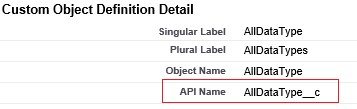
Important
The "__c" part of API Name is needed for any custom object.
For a full list of sections and properties available for defining activities, see the Pipelines article. This section provides a list of properties supported by Salesforce source and sink.
Salesforce as a source type
To copy data from Salesforce, set the source type in the copy activity to SalesforceV2Source. The following properties are supported in the copy activity source section.
Property
Description
Required
type
The type property of the copy activity source must be set to SalesforceV2Source.
Yes
query
Use the custom query to read data. You can only use Salesforce Object Query Language (SOQL) query. If query isn't specified, all the data of the Salesforce object specified in "objectApiName/reportId" in dataset is retrieved.
No (if "objectApiName/reportId" in the dataset is specified)
includeDeletedObjects
Indicates whether to query the existing records, or query all records including the deleted ones. If not specified, the default behavior is false. Allowed values: false (default), true.
No
preserveScaleFromSchema
Indicates whether to enable decimal scale rounding or not according to the decimal scale definition in the schema. Rounding only happens when property is set to true. If not specified, the default behavior is false. For example, if a column is defined as decimal(18,3) in the schema, the value 123.123789 is rounded to 123.124 when this option is enabled. Allowed values: false (default), true.
No
partitionOption
Provide capability to automatically detect and apply the optimal partitioning algorithm to optimize for read throughput when applicable. You are recommended to specify AutoDetect for long-running copy that can benefit from multi-threaded reads. The default value is AutoDetect.
No
Important
The "__c" part of API Name is needed for any custom object.
To copy data to Salesforce, set the sink type in the copy activity to SalesforceV2Sink. The following properties are supported in the copy activity sink section.
Property
Description
Required
type
The type property of the copy activity sink must be set to SalesforceV2Sink.
Yes
writeBehavior
The write behavior for the operation. Allowed values are Insert and Upsert.
No (default is Insert)
externalIdFieldName
The name of the external ID field for the upsert operation. The specified field must be defined as "External ID Field" in the Salesforce object. It can't have NULL values in the corresponding input data.
Yes for "Upsert"
writeBatchSize
The row count of data written to Salesforce in each batch. Suggest set this value from 10,000 to 200,000. Too few rows in each batch reduces copy performance. Too many rows in each batch may cause API timeout.
No (default is 100,000)
ignoreNullValues
Indicates whether to ignore NULL values from input data during a write operation. Allowed values are true and false. - True: Leave the data in the destination object unchanged when you do an upsert or update operation. Insert a defined default value when you do an insert operation. - False: Update the data in the destination object to NULL when you do an upsert or update operation. Insert a NULL value when you do an insert operation.
No (default is false)
maxConcurrentConnections
The upper limit of concurrent connections established to the data store during the activity run. Specify a value only when you want to limit concurrent connections.
When you copy data from Salesforce, the following mappings are used from Salesforce data types to interim data types within the service internally. To learn about how the copy activity maps the source schema and data type to the sink, see Schema and data type mappings.
Salesforce data type
Service interim data type
Auto Number
String
Checkbox
Boolean
Currency
Decimal
Date
DateTime
Date/Time
DateTime
Email
String
ID
String
Lookup Relationship
String
Multi-Select Picklist
String
Number
Decimal
Percent
Decimal
Phone
String
Picklist
String
Text
String
Text Area
String
Text Area (Long)
String
Text Area (Rich)
String
Text (Encrypted)
String
URL
String
Note
Salesforce Number type is mapping to Decimal type in Azure Data Factory and Azure Synapse pipelines as a service interim data type. Decimal type honors the defined precision and scale. For data whose decimal places exceeds the defined scale, its value is rounded off in preview data and copy. To avoid getting such precision loss in Azure Data Factory and Azure Synapse pipelines, consider increasing the decimal places to a reasonably large value in Custom Field Definition Edit page of Salesforce.
Lookup activity properties
To learn details about the properties, check Lookup activity.
Salesforce connector lifecycle and upgrade
The following table shows the release stage and change logs for different versions of the Salesforce connector:
Version
Release stage
Change log
Salesforce V1
Removed
Not applicable.
Salesforce V2
GA version available
• Support OAuth2ClientCredentials authentication instead of the basic authentication.
• Support SOQL query only.
• Support report by selecting a report ID.
• Support partitionOption in the copy activity source.
• Support preserveScaleFromSchema in the copy activity source.
• readBehavior is replaced with includeDeletedObjects in the copy activity source or the lookup activity.
Upgrade the Salesforce connector from V1 to V2
Here are steps that help you upgrade your Salesforce connector:
Configure the connected apps in Salesforce portal by referring to Prerequisites.
Create a new Salesforce linked service and configure it by referring to Linked service properties. You also need to manually update existing datasets that rely on the old linked service, editing each dataset to use the new linked service instead.
Support partitionOption in the copy activity source. For the detailed configuration, see Salesforce as a source type.
Support preserveScaleFromSchema in the copy activity source. For the detailed configuration, see Salesforce as a source type.
readBehavior is replaced with includeDeletedObjects in the copy activity source or the lookup activity. For the detailed configuration, see Salesforce as a source type.
Related content
For a list of data stores supported as sources and sinks by the copy activity, see Supported data stores.
Feedback
Was this page helpful?
No
Need help with this topic?
Want to try using Ask Learn to clarify or guide you through this topic?
 Azure Data Factory