Note
Access to this page requires authorization. You can try signing in or changing directories.
Access to this page requires authorization. You can try changing directories.
APPLIES TO:  Azure Data Factory
Azure Synapse Analytics
Azure Data Factory
Azure Synapse Analytics
Tip
Data Factory in Microsoft Fabric is the next generation of Azure Data Factory, with a simpler architecture, built-in AI, and new features. If you're new to data integration, start with Fabric Data Factory. Existing ADF workloads can upgrade to Fabric to access new capabilities across data science, real-time analytics, and reporting.
This article outlines how to use the Copy Activity in Azure Data Factory and Synapse Analytics pipelines to copy data from a PostgreSQL database. It builds on the copy activity overview article that presents a general overview of copy activity.
Note
This connector is also available in Data Factory in Microsoft Fabric. For Fabric-specific configuration and features, see the Fabric PostgreSQL connector documentation.
Important
The PostgreSQL V1 connector is at removal stage. You are recommended to upgrade the PostgreSQL connector from V1 to V2.
Supported capabilities
This PostgreSQL connector is supported for the following capabilities:
| Supported capabilities | IR |
|---|---|
| Copy activity (source/-) | ① ② |
| Lookup activity | ① ② |
① Azure integration runtime ② Self-hosted integration runtime
For a list of data stores that are supported as sources/sinks by the copy activity, see the Supported data stores table.
Specifically, this PostgreSQL connector supports PostgreSQL version 12 and above.
Prerequisites
If your data store is located inside an on-premises network, an Azure virtual network, or Amazon Virtual Private Cloud, you need to configure a self-hosted integration runtime to connect to it.
If your data store is a managed cloud data service, you can use the Azure Integration Runtime. If the access is restricted to IPs that are approved in the firewall rules, you can add Azure Integration Runtime IPs to the allow list.
You can also use the managed virtual network integration runtime feature in Azure Data Factory to access the on-premises network without installing and configuring a self-hosted integration runtime.
For more information about the network security mechanisms and options supported by Data Factory, see Data access strategies.
The Integration Runtime provides a built-in PostgreSQL driver starting from version 3.7, therefore you don't need to manually install any driver.
Getting started
To perform the copy activity with a pipeline, you can use one of the following tools or SDKs:
- Copy Data tool
- Azure portal
- .NET SDK
- Python SDK
- Azure PowerShell
- REST API
- Azure Resource Manager template
Create a linked service to PostgreSQL using UI
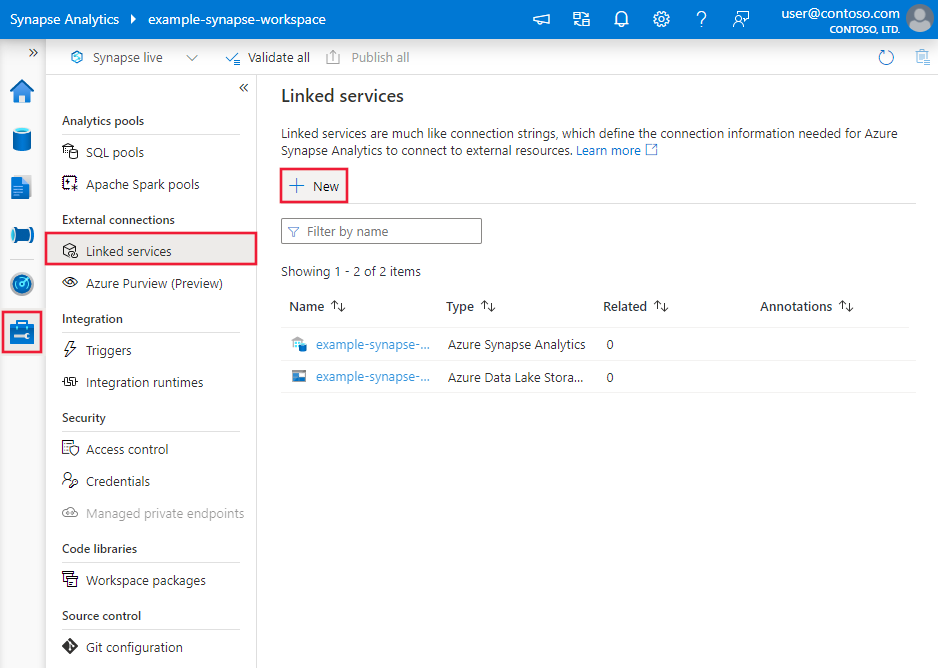
Use the following steps to create a linked service to PostgreSQL in the Azure portal UI.
Browse to the Manage tab in your Azure Data Factory or Synapse workspace and select Linked Services, then click New:
Search for Postgre and select the PostgreSQL connector.

Configure the service details, test the connection, and create the new linked service.


Connector configuration details
The following sections provide details about properties that are used to define Data Factory entities specific to PostgreSQL connector.
Linked service properties
The following properties are supported for PostgreSQL linked service:
| Property | Description | Required |
|---|---|---|
| type | The type property must be set to: PostgreSqlV2 | Yes |
| server | Specifies the host name - and optionally port - on which PostgreSQL is running. | Yes |
| port | The TCP port of the PostgreSQL server. | No |
| database | The PostgreSQL database to connect to. | Yes |
| username | The username to connect with. | Yes |
| password | The password to connect with. | Yes |
| sslMode | Controls whether SSL is used, depending on server support. - Disabled: SSL is disabled. If the server requires SSL, the connection will fail. - Allow: Prefer non-SSL connections if the server allows them, but allow SSL connections. - Preferred: Prefer SSL connections if the server allows them, but allow connections without SSL. - Required: Fail the connection if the server doesn't support SSL. - Verify_ca: Fail the connection if the server doesn't support SSL. Also verifies server certificate. - Verify_full: Fail the connection if the server doesn't support SSL. Also verifies server certificate with host's name. Options: Disabled (0) / Allow (1) / Preferred (2) (Default) / Required (3) / Verify_ca (4) / Verify_full (5) |
No |
| authenticationType | Authentication type for connecting to the database. Only supports Basic. | Yes |
| connectVia | The Integration Runtime to be used to connect to the data store. Learn more from Prerequisites section. If not specified, it uses the default Azure Integration Runtime. | No |
| Additional connection properties: | ||
| schema | Sets the schema search path. | No |
| pooling | Whether connection pooling should be used. | No |
| connectionTimeout | The time to wait (in seconds) while trying to establish a connection before terminating the attempt and generating an error. | No |
| commandTimeout | The time to wait (in seconds) while trying to execute a command before terminating the attempt and generating an error. Set to zero for infinity. | No |
| trustServerCertificate | Whether to trust the server certificate without validating it. | No |
| sslCertificate | Location of a client certificate to be sent to the server. | No |
| sslKey | Location of a client key for a client certificate to be sent to the server. | No |
| sslPassword | Password for a key for a client certificate. | No |
| readBufferSize | Determines the size of the internal buffer Npgsql uses when reading. Increasing may improve performance if transferring large values from the database. | No |
| logParameters | When enabled, parameter values are logged when commands are executed. | No |
| timezone | Gets or sets the session timezone. | No |
| encoding | Gets or sets the .NET encoding that will be used to encode/decode PostgreSQL string data. | No |
Note
In order to have full SSL verification via the ODBC connection when using the Self Hosted Integration Runtime you must use an ODBC type connection instead of the PostgreSQL connector explicitly, and complete the following configuration:
- Set up the DSN on any SHIR servers.
- Put the proper certificate for PostgreSQL in C:\Windows\ServiceProfiles\DIAHostService\AppData\Roaming\postgresql\root.crt on the SHIR servers. This is where the ODBC driver looks > for the SSL cert to verify when it connects to the database.
- In your data factory connection, use an ODBC type connection, with your connection string pointing to the DSN you created on your SHIR servers.
Example:
{
    "name": "PostgreSqlLinkedService",
    "properties": {
        "type": "PostgreSqlV2",
        "typeProperties": {
            "server": "",
            "port": 5432,
            "database": "",
            "username": "",
            "password": {
                "type": "SecureString",
                "value": ""
            },
            "sslmode": ,
            "authenticationType": "Basic"
        },
        "connectVia": {
            "referenceName": "",
            "type": "IntegrationRuntimeReference"
        }
    }
}
Example: store password in Azure Key Vault
{
    "name": "PostgreSqlLinkedService",
    "properties": {
        "type": "PostgreSqlV2",
        "typeProperties": {
            "server": "",
            "port": 5432,
            "database": "",
            "username": "",
            "password": {
                "type": "AzureKeyVaultSecret",
                "store": {
                    "referenceName": "",
                    "type": "LinkedServiceReference"
                },
                "secretName": ""
            }
            "sslmode": ,
            "authenticationType": "Basic"
        },
        "connectVia": {
            "referenceName": "",
            "type": "IntegrationRuntimeReference"
        }
    }
}
Dataset properties
For a full list of sections and properties available for defining datasets, see the datasets article. This section provides a list of properties supported by PostgreSQL dataset.
To copy data from PostgreSQL, the following properties are supported:
| Property | Description | Required |
|---|---|---|
| type | The type property of the dataset must be set to: PostgreSqlV2Table | Yes |
| schema | Name of the schema. | No (if "query" in activity source is specified) |
| table | Name of the table. | No (if "query" in activity source is specified) |
Example
{
"name": "PostgreSQLDataset",
"properties":
{
"type": "PostgreSqlV2Table",
"linkedServiceName": {
"referenceName": "",
"type": "LinkedServiceReference"
},
"annotations": [],
"schema": [],
"typeProperties": {
"schema": "",
"table": ""
}
}
}
If you were using RelationalTable typed dataset, it's still supported as-is, while you are suggested to use the new one going forward.
Copy activity properties
For a full list of sections and properties available for defining activities, see the Pipelines article. This section provides a list of properties supported by PostgreSQL source.
PostgreSQL as source
To copy data from PostgreSQL, the following properties are supported in the copy activity source section:
Property
Description
Required
type
The type property of the copy activity source must be set to: PostgreSqlV2Source
Yes
query
Use the custom SQL query to read data. For example: "query": "SELECT * FROM \"MySchema\".\"MyTable\"".
No (if "tableName" in dataset is specified)
queryTimeout
The wait time before terminating the attempt to execute a command and generating an error, default is 120 minutes. If parameter is set for this property, allowed values are timespan, such as "02:00:00" (120 minutes). For more information, see CommandTimeout.
If both commandTimeout and queryTimeout are configured, queryTimeout takes precedence.
No
Note
Schema and table names are case-sensitive. Enclose them in "" (double quotes) in the query.
Example:
"activities":[
{
"name": "CopyFromPostgreSQL",
"type": "Copy",
"inputs": [
{
"referenceName": "",
"type": "DatasetReference"
}
],
"outputs": [
{
"referenceName": "
If you were using RelationalSource typed source, it is still supported as-is, while you are suggested to use the new one going forward.
Data type mapping for PostgreSQL
When copying data from PostgreSQL, the following mappings are used from PostgreSQL data types to interim data types used by the service internally. See Schema and data type mappings to learn about how copy activity maps the source schema and data type to the sink.
PostgreSQL data type
Interim service data type for PostgreSQL V2
Interim service data type for PostgreSQL V1
SmallIntInt16Int16
IntegerInt32Int32
BigIntInt64Int64
Decimal (Precision <= 28)DecimalDecimal
Decimal (Precision > 28)Unsupported
String
NumericDecimalDecimal
RealSingleSingle
DoubleDoubleDouble
SmallSerialInt16Int16
SerialInt32Int32
BigSerialInt64Int64
MoneyDecimalString
CharStringString
VarcharStringString
TextStringString
ByteaByte[]Byte[]
TimestampDateTimeDateTime
Timestamp with time zoneDateTimeString
DateDateTimeDateTime
TimeTimeSpanTimeSpan
Time with time zoneDateTimeOffsetString
IntervalTimeSpanString
BooleanBooleanBoolean
PointStringString
LineStringString
IsegStringString
BoxStringString
PathStringString
PolygonStringString
CircleStringString
CidrStringString
InetStringString
MacaddrStringString
Macaddr8StringString
TsvectorStringString
TsqueryStringString
UUIDGuidGuid
JsonStringString
JsonbStringString
ArrayStringString
BitByte[]Byte[]
Bit varyingByte[]Byte[]
XMLStringString
IntArrayStringString
TextArrayStringString
NumericArrayStringString
DateArrayStringString
RangeStringString
BpcharStringString
Lookup activity properties
To learn details about the properties, check Lookup activity.
Upgrade the PostgreSQL connector
Here are steps that help you upgrade your PostgreSQL connector:
Create a new PostgreSQL linked service and configure it by referring to Linked service properties.
The data type mapping for the PostgreSQL V2 connector is different from that for V1. To learn the latest data type mapping, see Data type mapping for PostgreSQL.
Differences between PostgreSQL V2 and V1
The table below shows the data type mapping differences between PostgreSQL V2 and V1.
PostgreSQL data type
Interim service data type for PostgreSQL V2
Interim service data type for PostgreSQL V1
Money
Decimal
String
Timestamp with time zone
DateTime
String
Time with time zone
DateTimeOffset
String
Interval
TimeSpan
String
BigDecimal
Not supported. As an alternative, utilize to_char() function to convert BigDecimal to String.
String
Related content
For a list of data stores supported as sources and sinks by the copy activity, see supported data stores.
Additional resources