Timing control
Numula uses two time coordinate systems:
-
Score time is the system in which note times and durations are originally specified. The unit is a 4-beat measure; e.g., 1/4 (0.25) is a quarter note.
-
Performance time is the system in which notes are performed. The unit is seconds; i.e. real time.
Each note has a start time and duration (sounding time) in each system:
n.time              # score start time
n.dur               # score duration
n.perf_time         # performance start time
n.perf_dur # performance durationNumula supports three types of timing adjustment, with different musical uses.
-
Tempo control: the performance times of note starts and ends are changed according to a 'tempo function, which can vary linearly or exponentially. The tempo function can include pauses before and/or after particular times. Tempo functions are represented as PFTs.
-
Adjusting note durations: Note durations (in either score time or performance time) can be scaled or set to particular values, to express legato, portamento, and staccato. You can do this in various ways, including continuous variation using a PFT.
-
Adjusting note starts. Notes can be shifted - moved earlier or later - in score or performance time. Generally the duration is changed so that the end time of the note remains fixed. Other notes are not changed. There are various functions for doing this. For example, you can "roll" a chord with specified shifts for each chord note. You can specify, using a PFT, a pattern of "agogic accents" in which melody notes are played slightly after accompaniment notes.
In most cases these adjustments can be described by shorthand notations. Use these in preference to the lower-level interfaces described here.
Adjustments can be layered. For example, you might use several layers of tempo control, followed by note start adjustments.
The adjustments must be applied in the following order:
-
Adjustments of score times (start and/or duration).
-
Tempo control.
-
Adjustments of performance times (start and/or duration).
You can vary the tempo of some or all notes in a Score using a PFT.
The value of the PFT has three possible 'modes':
-
TIME_PSEUDO_TEMPO: larger values mean faster. 60 means no change; 120 means twice as fast, 30 means half as fast. This is the default mode. -
TIME_TEMPO: similar semantics, but computed in different and less efficient way. -
TIME_INVERSE_TEMPO: the PFT value is performance time per unit score time; larger is slower.
The PFT segments are typically Linear or ExpCurve.
An additional PFT primitive is available:
from numula.nuance import *

Pause(
    dt: float,
    after: bool = False
)
This inserts a pause of dt seconds at the current PFT time.
If after is True, the pause occurs after notes that begin at this time;
otherwise, before.
To adjust the tempo of a set of notes:
Score.tempo_adjust_pft(
    pft: PFT,
    t0: float = 0,
    selector: Selector = None,
    normalize: bool = False,
    mode: int = TIME_PSEUDO_TEMPO
)
This applies the tempo adjustment defined by the given PFT,
starting at score time t0,
to the selected notes.
If no selector is given, the adjustment is also applied to pedal events during
the domain of the PFT.
If "normalize" is True, the adjustment is scaled so that the adjusted notes synch up with other notes at the end. This can be used, for example, to apply rubato to right hand notes without modifying the left hand.
Example:
Score.tempo_adjust_pft(
    [
        Linear(60, 120, 4/4),
        Delta(.1),
        Linear(120, 60, 4/4)
    ],
    normalize=True,
    selector=lambda n: 'rh' in n.tags
)
causes the right hand notes (tagged with 'rh') to speed up and slow down over 2 measures, with a slight pause in the middle, synching up with other notes at the end.
As an example, consider the following from Chopin's 1st Nocturne:
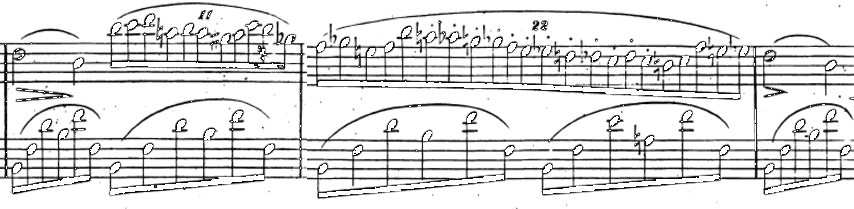
We can use Numula to play the 11 against 6 precisely, but that sounds robotic.
Instead, we use tempo_adjust_pft() with normalize=True to speed up and then slow down the RH notes,
and add some small pauses,
while not changing the LH.
The source code is here;
the audio result is here.
You can add pauses using a PFT with Pause primitives, as described above.
Alternatively, you can add individual pauses:
Score.pause_before(
    t: float,
    dt: float,
    connect: bool = True
)
Add a pause of dt seconds before score time t.
In other words, add dt to the start time of notes at or after t.
If connect is true,
earlier notes that end at or after t are elongated;
e.g. legato is preserved.
Score.pause_after(
    t: float,
    dt: float
)
Add a pause of dt seconds after score time t.
Notes that start at t are elongated.
Score.pause_before_list(
    ts: list[float],
    dts: list[float]
)
ts is a list of score times, and dts is a same-sized list of gap durations.
Insert gaps of those durations before those times.
This is the same as a sequence of pause_before(... connect=False) calls,
but it's more efficient because the score is traversed just once.
These functions change the start times of notes. The end time is not changed.
Score.start_adjust(
    offset: float,
    selector: Selector = None,
    is_perf: bool = True
)
The given time offset is added to the start times of the selected notes.
If is_perf is set, the adjustment is in performance time;
otherwise it's in score time.
Score.start_adjust_list(
    offsets: list[float],
    selector: Selector = None,
    is_perf: bool = True
)
offsets is a list of time offsets.
They are added to the start times of selected notes,
in time order.
Score.start_adjust_func(
    func: NoteToFloat,
    selector: Selector = None,
    is_perf: bool = True
):
For each selected note, the given function is called with that note, and the result is added to the note's start time.
Score.start_adjust_pft(
    pft: PFT,
    selector: Selector=None
)
Move notes earlier or later in performance time according to the value of a PFT.
Score.roll(
    t: float,
    offsets: list[float],
    is_up: bool = True,
    selector: Selector = None
)
offsets is a list of time offsets.
These offsets are added to the performance start times
of selected notes that start at score time t.
Note durations are modified so that end times remain the same.
If is_up is true, offsets are applied from bottom pitch upwards;
otherwise from top pitch downward.
You can use the NumPy linspace() function to generate evenly-spaced lists, e.g.
import numpy as np
score.roll(t, np.linspace(-.5, .1, 6))
does a roll with 6 offsets ranging from -.5 to .1.
For more interesting and realistic rolls, you can use
roller(
    n: int,             # how many notes
    t0, t1: float,      # offsets of first and last notes
    ratio: float = 1,   # ratio of each interval to previous one
                        # e.g. .5 makes the roll speed up as it goes
    m0=0: float, m1=0: float    # increment initial, final interval by these
): list[float]
Rolling a chord may cause it to overlap adjacent notes.
You can prevent this with pause_before() or pause_after().
Score.t_random_uniform(
    min: float,
    max: float,
    selector: Selector = None
):

Score.t_random_normal(
    stddev: float,
    max_sigma: float = 2,
    selector: Selector = None
):
These functions change the start time of selected notes by a random amount;
the end time is not changed.
For t_random_uniform(),
the offset is chosen from a uniform distribution between min and max.
For t_random_normal(),
the offset is chosen from a normal distribution with mean zero
and the given standard deviation.
Offsets with sigma > max_sigma are not used.
If you use textual notation to specify a score, each note's duration is the time until the next note. In other words, the default articulation is perfect legato. You can change the articulation - staccato, portamento, etc. - by adjusting note durations, in either score or performance time.
Score.adjust_dur_abs(
    dur: float,
    selector: Selector = None,
    is_perf: bool = True
)
Set the duration (performance or score, depending on is_perf)
of the selected notes to the given value.
Score.adjust_dur_rel(
    factor: float,
    selector: Selector = None,
    is_perf: bool = True
)
Multiply the duration of the selected notes by the given factor.
Score.adjust_dur_func(
    func: NoteToFloat,
    selector: Selector = None,
    is_perf: bool = True
)
Call the given function to compute the duration based on note attributes. For example:
Score.adjust_dur_func(lambda n: n.dur-1/16, lambda n: n.dur>1/8, is_perf=False)shortens all notes longer than an eighth by a sixteenth; i.e. it leaves a small gap until the next note.
Score.adjust_dur_pft(
    pft: PFT,
    t0: float,
    selector: Selector = None,
    is_rel: bool = True
)
Adjust the performance duration of selected notes using a PFT.
-
pftis a PFT that describes time-varying articulation according torel -
t0: the score time when the adjustment begins -
selector: an optional selector -
is_rel: if True, the duration of a note at time T is multiplied by the value of the PFT at T. If False, the duration is set to the value of the PFT.
For example:
Score.adjust_dur_pft(
    [Linear(.1, 1.2, 4/4)],
    0, lambda n: 'rh' in n.tags
)
varies the articulation of right-hand notes linearly from staccato to legato over a 4/4 measure, starting at the beginning of the score.
Score.slur(slur_tag:str, selector:Selector, ratio:float)Scan the selected notes. If a note N is tagged as slurred, and so is the following note M, multiply N's performance duration by the given ratio (i.e., if ratio>1, so that it overlaps M).
Score.dur_pattern(
    dur_array: list[float],
    t0: float,
    t1: float
)
sets the score duration of notes with score times in [t0, t1)
to the values in dur_array,
cycling through these values indefinitely.