

Preview kakoune faces easily.
Useful to create your own colorschemes or visualize RGBA colors.
Add palette.kak to your autoload dir: ~/.config/kak/autoload/.
Or via plug.kak:
plug 'delapouite/kakoune-palette'
Select a string in your buffer of the following hexadecimal format:
- #rrggbbaa
- #rrggbb
- #rgba
- #rgb
- rrggbbaa
- rrggbb
- rgba
- rgb
Run the palette-status command. A colored block appears in the status bar.
Example: select #bada55, run palette-status, a greenish block is displayed.
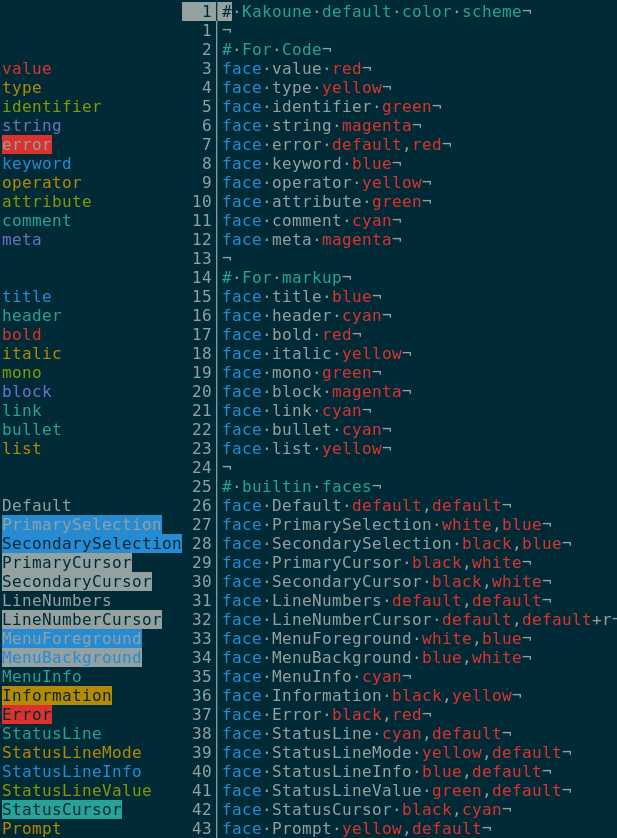
Open a colorscheme kak file in kakoune, for example colors/default.kak. Run the palette-gutter command.
A new column should appear on the left, displaying a preview of faces on each line they are set.
The screenshot below illustrates this scenario (taken in xterm with base16-solarized-dark):
You can also use the palette-gutter command on the output of the debug faces command in the *debug* buffer.
Support for css, less, sass, scss and stylus:
- all props ending with color and only in 3 digits hex (ex #f00) or 6 digits hex (ex #ff0000) formats
- kakoune-ink: online colorscheme editor
- kakoune-colors: collection of dark and light colorschemes
- colorcol
- :doc faces
- vim-hexokinase
MIT