

OrgPortal is a FreeScout module that adds full B2B organization management to your helpdesk: group customers into companies, define department hierarchies, give corporate managers a self-service portal, and automate notifications — all inside FreeScout, with no external tools required.
Looking for a way to manage company accounts in FreeScout? To give corporate clients their own support portal? To control which tickets each B2B contact can see based on their role and department? OrgPortal solves all of that.
Works with: FreeScout 1.8.147+
Optional integrations: End-User Portal, API and Webhooks, Kanban, Custom Fields
Important
Always install from the latest release, not from the repository source.
Download OrgPortal.zip from the Releases page — it contains the correct directory structure required by FreeScout.
Downloading the source code (via "Code → Download ZIP" or git clone) will not work and will break the module structure.
Automatic updates also require the release ZIP to have been used for the initial installation.
🌐 Also available in: Українська · Deutsch · Français · Español · Italiano · Polski · Čeština · Slovenčina · Nederlands · Norsk · Dansk · Svenska · Suomi · Português (BR) · Português (PT) · Română · 中文 (简体)
- What OrgPortal adds to FreeScout
- Organizations
- Structural Units — Department-Level Access Control
- Org Snapshot — Permanent Ticket Attribution
- Kanban Integration
- Custom Fields Integration
- Access Control & Permissions
- System Settings
- End-User Portal — Self-Service for Corporate Managers
- Real-Time Notification Bell
- Notification Subscriptions
- Portal Organization Settings
- Multilingual Notification Email Templates
- REST API
- Installation
- Automatic Updates
- Module Compatibility
- Configuration
- Translations
- Screenshots
- License
FreeScout is built around individual customers — every email is from a person, and there is no built-in concept of a company that person works for. This works fine for B2C helpdesks. For B2B, it falls short.
OrgPortal fills that gap:
- Company accounts — group customers into organizations with a name, color badge, mailbox scope, and active/inactive status
- Department hierarchies — divide organizations into structural units (departments, branches, teams); each member is scoped to their unit
- Role-based access —
membersees own tickets only;unit_managersees the entire unit;managersees the entire organization - Corporate self-service portal — managers view all company tickets, reply, close, reassign authors, and manage notification preferences without contacting your team
- Permanent ticket attribution — every ticket is snapshotted to its organization at creation; historical reporting survives client roster changes
- Multilingual notifications — automated email alerts in each manager's own language, with per-locale templates and a built-in WYSIWYG editor
- REST API — sync memberships from your CRM, automate onboarding, manage tags programmatically
One place for everything about a corporate account.
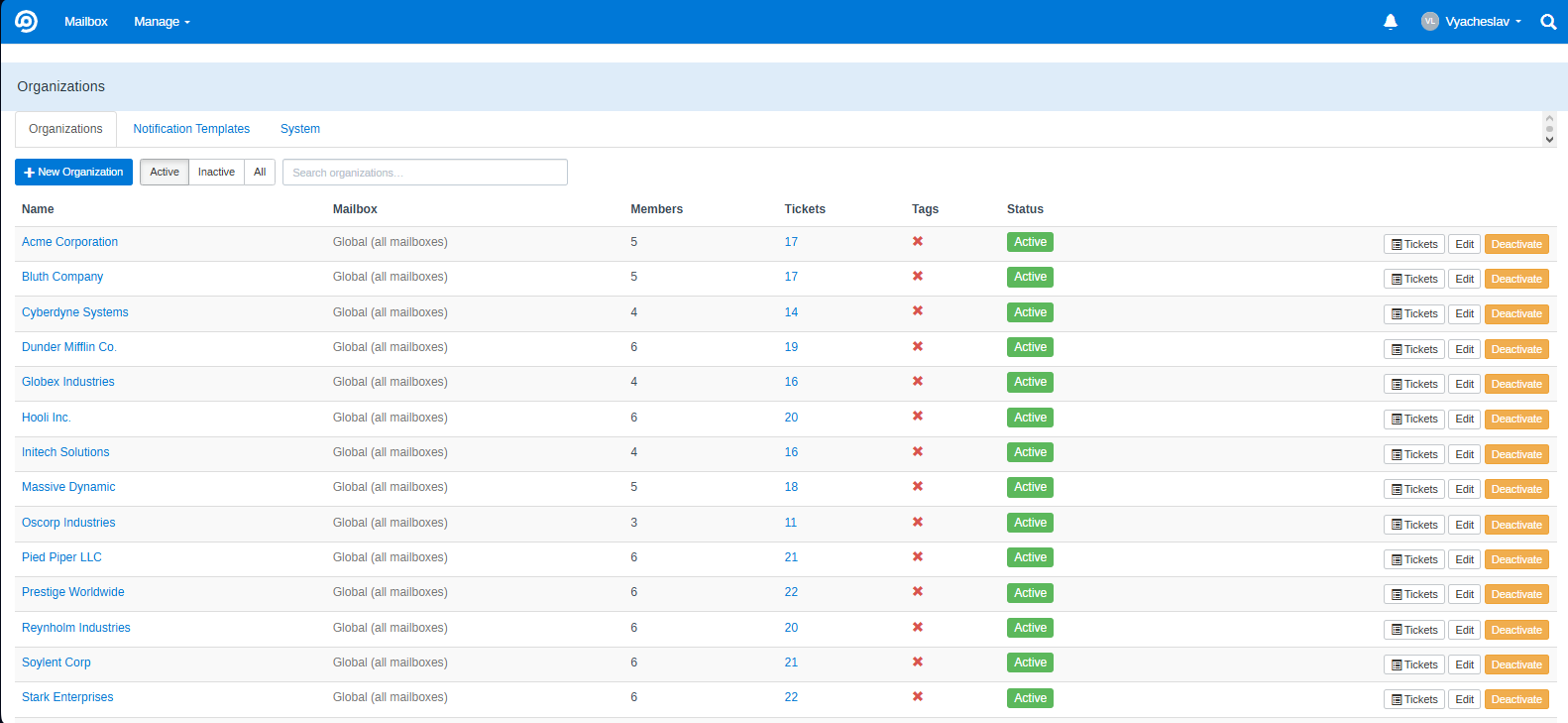
Manage → Organizations opens a tabbed interface with three sections: Organizations, Templates, and System.
- Create, edit, delete, activate/deactivate organizations
- Status filter — toggle between Active / Inactive / All with a radio group; filters the table client-side instantly
- Live search — starts filtering at 2+ characters, no page reload
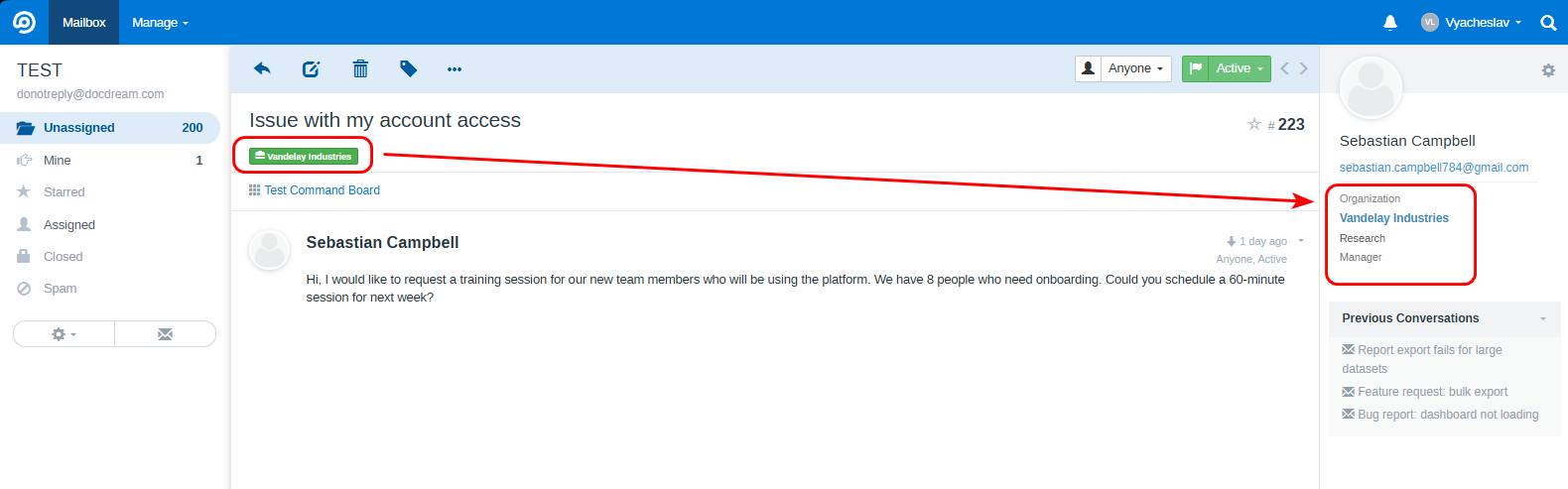
- Color-coded badges — interactive color picker with 12 swatches and a live badge preview next to the picker; badge appears on every ticket and Kanban card
- Clicking the badge or the ticket count opens a FreeScout search filtered to that organization
- Mailbox binding — organizations can be global (all mailboxes) or scoped to a specific mailbox
- Tags column — shows ✓/✗ whether any FreeScout tags are bound to the organization (Tags module required); tags are assigned in the edit form with a chip-based widget and autocomplete search
- Ticket count column — total conversations per organization; clickable link to full search results
- Members count column
- Activate / deactivate — suspend an account without losing any history; requires Org Snapshot to be enabled (button is disabled with a tooltip when it is not)
- Delete — available only when the organization has 0 members and 0 tickets (safety guard)
- All delete and deactivate actions require confirmation
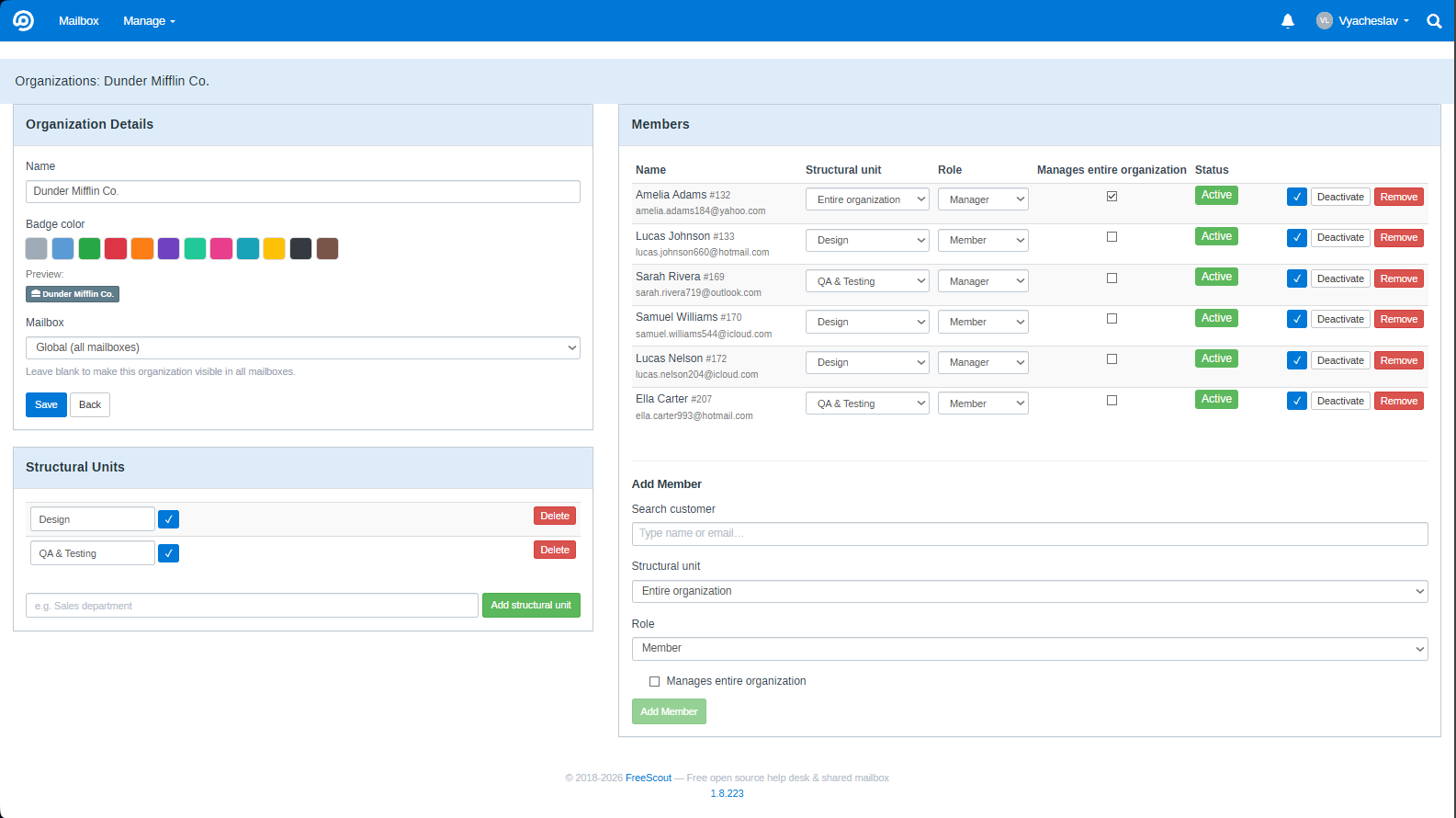
- Name and mailbox binding
- Color picker — 12 swatches with live badge preview
- Tags — chip-based widget: type to search existing FreeScout tags, click to add, × to remove
- Members table — per-member: name, role, structural unit,
can_manage_orgcheckbox (grants admin access to organizations without full admin rights), active/inactive toggle - Structural units panel — create and rename units directly in the edit form; members are assigned to units in the same view
- Adding a member — automatically backfills existing un-attributed conversations for that customer
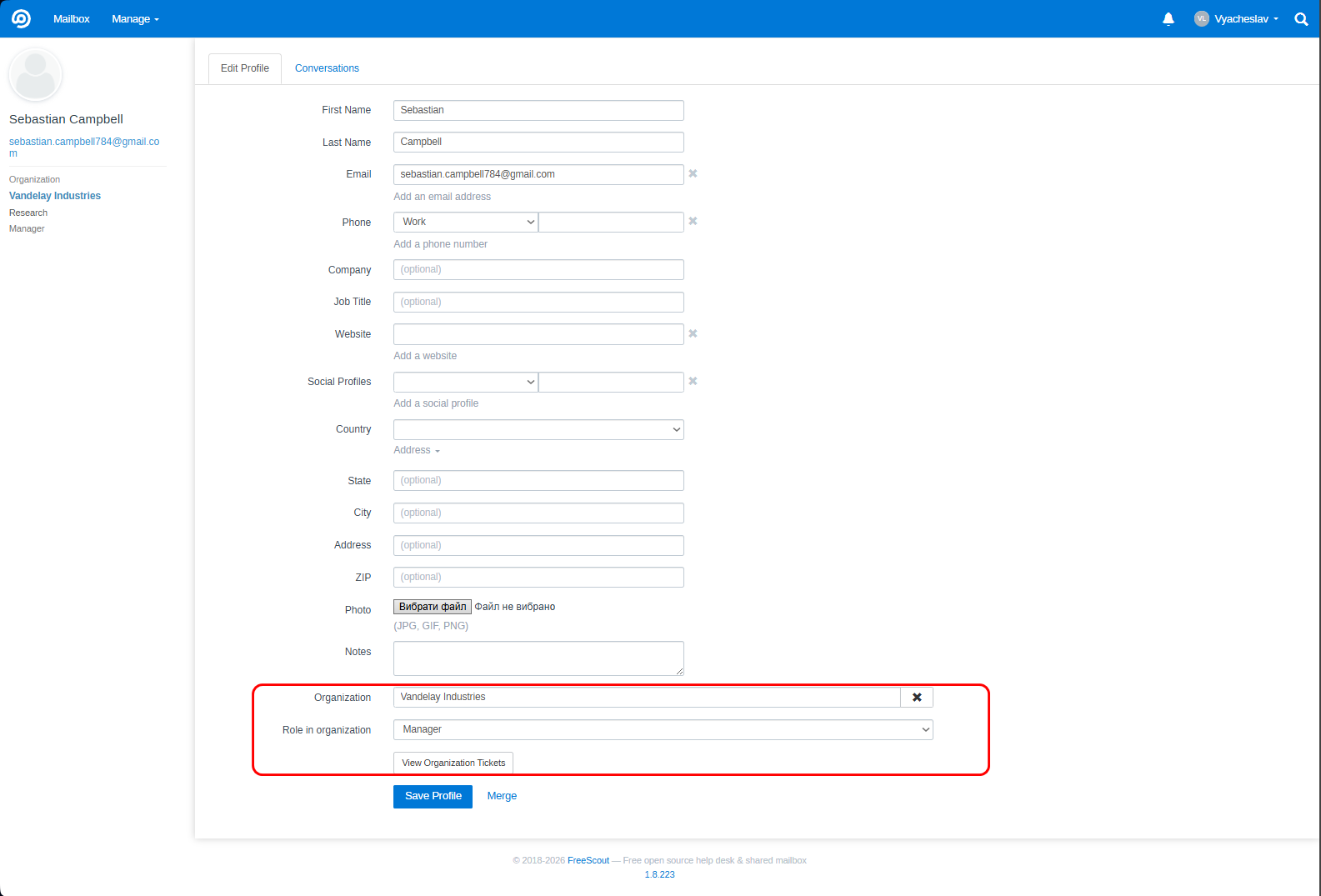
- Organization field in the FreeScout customer edit form — live autocomplete search for organizations; role dropdown appears after selecting an org; × button to remove
- "View org tickets" shortcut link in the customer form
- Org info block in the admin ticket sidebar — organization name (clickable link to the org edit page), structural unit, and member role; toggle visibility per mailbox in settings
- One active membership per customer — a customer cannot be added to a second organization while they have an active membership; inactive/archived memberships are allowed
Support large enterprises with complex internal hierarchies.
Organizations can be divided into unlimited structural units (departments, branches, regional offices, project teams):
- Create, rename, and delete units in the admin org edit form, or directly from the portal (global managers only)
- Assign members to units — each member belongs to one unit
- Deleting a unit automatically demotes its
unit_managermembers tomember
Three role levels:
| Role | Access scope |
|---|---|
member |
Own tickets only |
unit_manager ¹ |
All tickets within their structural unit |
manager (global) |
All tickets across the entire organization |
¹ API note: the API uses only two
rolevalues —"member"and"manager". A unit manager is represented asrole: "manager"with a non-nullunitId. The string"unit_manager"does not exist in the API.
- Unit managers have full portal capabilities — replies, attachments, author reassignment, close/reopen, notification management — scoped strictly to their unit
- Ticket access and notification delivery are enforced at unit boundaries
Reliable historical reporting even as your client roster changes.
When a ticket is created, OrgPortal records the organization context as a permanent snapshot:
org_id,org_unit_id, andorg_attributed_atare written to the conversation at creation time- Immutable — if a customer later leaves an organization, their historical tickets remain attributed to that org; reporting never breaks
- Adding a member triggers automatic backfill of that customer's existing un-attributed conversations
Configured in Manage → Organizations → System tab:
| Mode | Behavior |
|---|---|
member |
Attribute ticket to the organization the ticket author is a member of |
tag |
Attribute by FreeScout tag bound to an org first; fall back to membership if no tag matches |
tag_only |
Attribute exclusively by tag; membership is not used |
tag and tag_only modes are disabled when the Tags module is inactive.
- Progress bar — shows X / Y tickets attributed (%) with a "complete" indicator when done
- Preflight stats — before running backfill, a breakdown shows how many tickets will be attributed by tag vs. by membership vs. unmatched
- Run backfill button — processes up to 2000 tickets per click; result summary (by_tag / by_member / unmatched) is shown after
- Auto-cron (
attribution_cron_enabled) — schedules backfill every 5 minutes, 1000 tickets per run, without overlap - Reset attribution — clears all org snapshots (danger action, requires confirmation)
- Command line:
php artisan orgportal:backfill-attribution
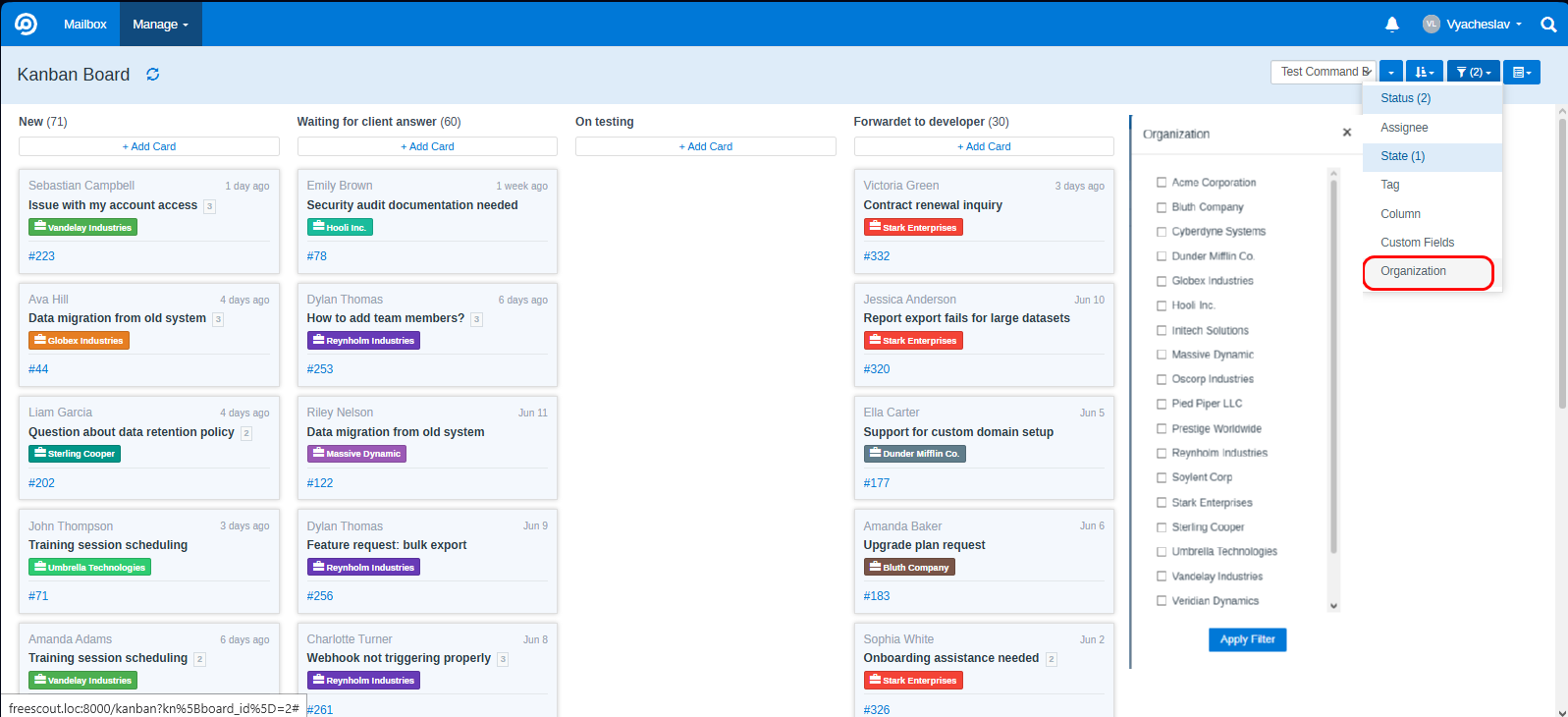
Keep your visual workflow aligned with your B2B accounts.
- Organization badge on every Kanban card with the account's assigned color
- Organization filter in the Kanban filter panel — multi-select modal with checkboxes; filter state persists across navigation
- Multilingual Kanban status filter labels — give each Kanban column a custom name per portal language; switch locales with the language picker in per-mailbox settings; drag to reorder filters
- Translated labels appear in both the portal filter bar and the State column of the company tickets table; fallback chain: saved locale → saved English → original column name
Surface your Custom Fields module data right on the portal ticket page.
Requires the Custom Fields module to be installed and active.
- Per-mailbox panel in Mailbox Settings → OrgPortal lets you pick which custom fields appear on the portal ticket page
- Drag to reorder fields; each field can have a custom label per portal language, with fallback to the saved English label, then the original field name
- On the portal ticket page, enabled fields render in a responsive two-column grid between the ticket subject and the thread — only fields with a non-empty value are shown
- Fully optional — the panel and the ticket-page block are hidden automatically when the Custom Fields module is not installed or not active
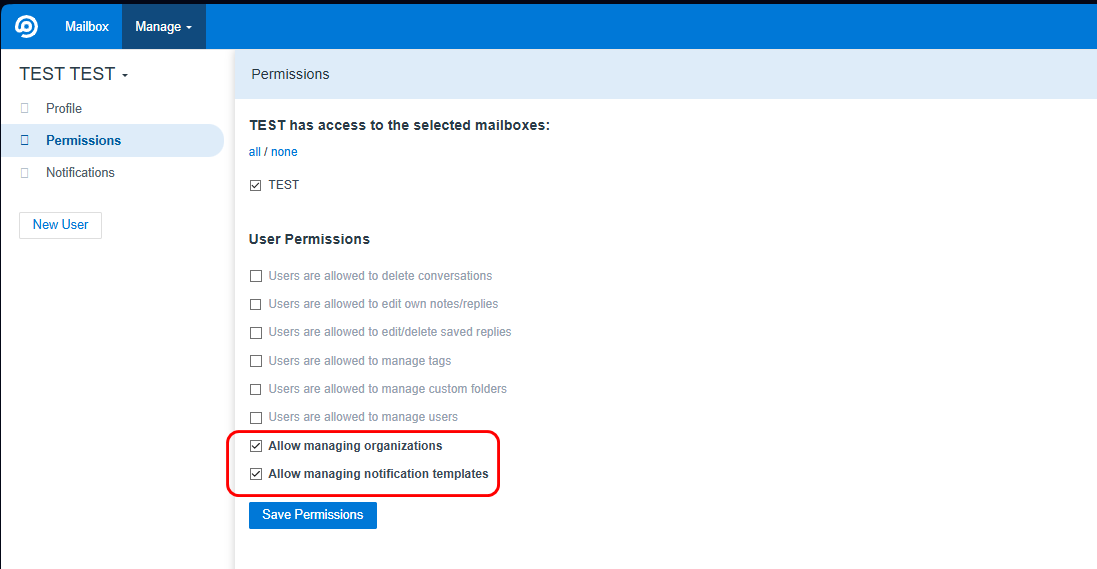
Delegate organization management without granting admin access.
- "Allow managing organizations" (
can_manage_org) — two levels:- As a user permission in agent settings — lets a support team lead manage all organizations without admin rights
- As a per-member flag in the organization edit form — lets a specific org member manage that one organization from the admin panel
- "Allow managing notification templates" — separate granular permission for template editing
- Deleting organizations remains exclusively admin-only
- Portal access is strictly scoped per mailbox: a manager from Organization A cannot access Organization B
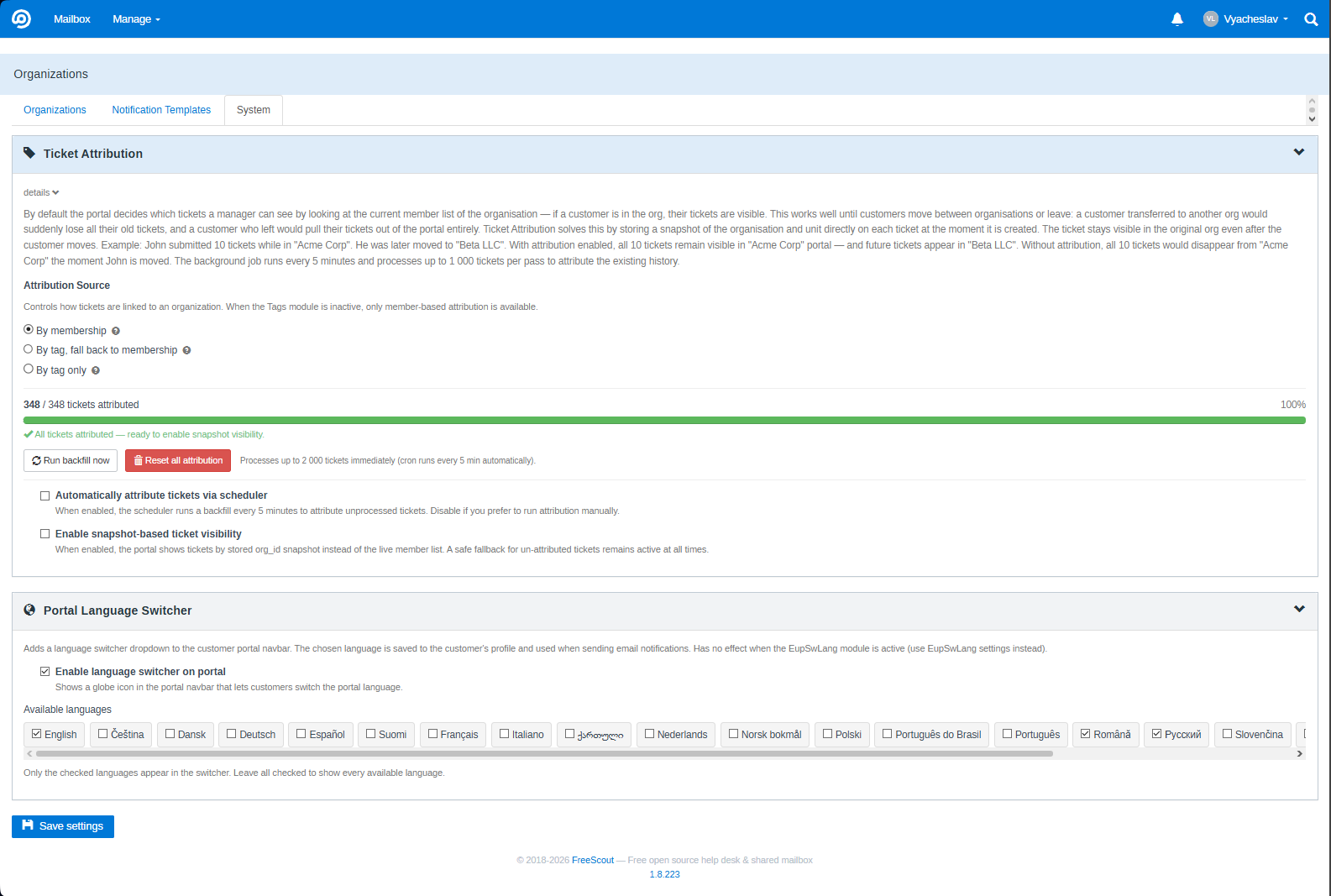
Admin-only controls for attribution, backfill, and the portal language switcher.
The System tab is visible only to FreeScout administrators.
See Org Snapshot above for the full description of attribution modes, backfill tools, and auto-cron.
- Enable/disable the language switcher in the End-User Portal navbar
- Choose which of the 19 locales to offer (checkbox grid); all are enabled by default
- When enabled, managers can switch the portal language; their choice is saved and used for notification emails
- This is OrgPortal's built-in language switcher — it works independently of any third-party language switch module; both can coexist
Give your B2B clients a portal where they manage their company's support relationship — without contacting your team for every status update.
Requires the End-User Portal module.
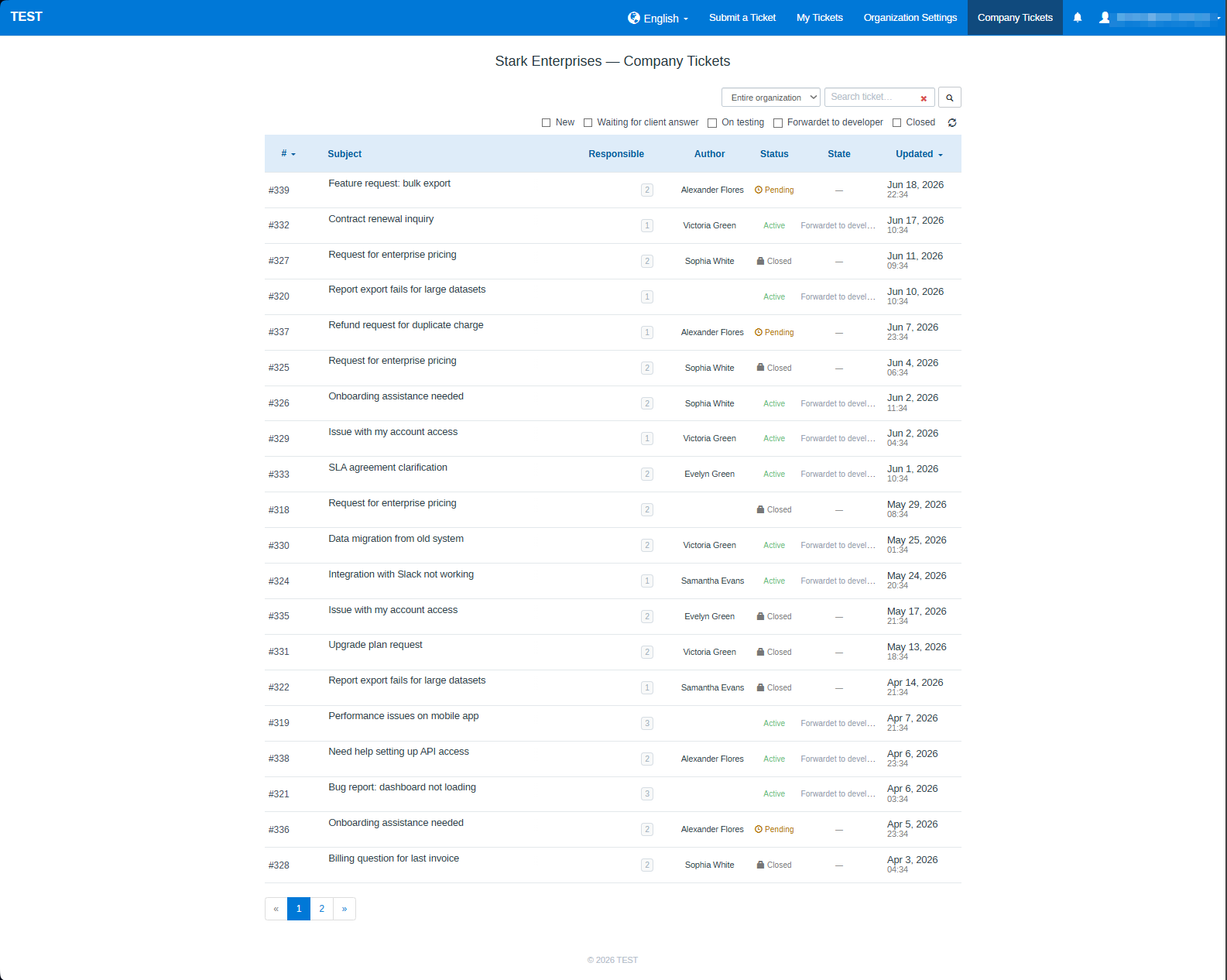
A dedicated Company Tickets section in portal navigation with a full-featured ticket table:
| Column | Description |
|---|---|
| # | Ticket ID |
| Subject | Truncated with tooltip on hover |
| Responsible | Assigned support agent |
| Author | Customer who opened the ticket; click to filter by this author |
| Status | Active / Pending / Closed / Spam with icons |
| State | Kanban column name in the current portal language (only when Kanban module is active) |
| Updated | Date and time of last reply |
Two independent read status indicators per row — these track two different people and are shown simultaneously:
| Indicator | Whose read status | What it means |
|---|---|---|
| Bold row | The manager viewing the portal | Manager has unread notifications for this conversation — something happened that they haven't seen yet |
| 👁 Eye icon | The ticket author (the customer who submitted it) | The author has not yet opened the latest agent reply — useful for knowing whether a client actually saw the response |
These two states are completely independent: a row can be bold (manager hasn't read) while the eye is absent (author already read), or vice versa. The manager sees both at the same time, giving a complete picture of what's happening on both sides of the ticket without opening it.
Author filter — clicking an author name activates a filter; a banner appears at the top of the table showing the active author's name with a × link to clear the filter.
Both the desktop table and a responsive mobile card layout are included; they switch automatically based on screen width.
The filter bar template supports override via enduserportal::partials.tickets_filters — place a custom view at that path to replace OrgPortal's default filter bar while keeping all other functionality.
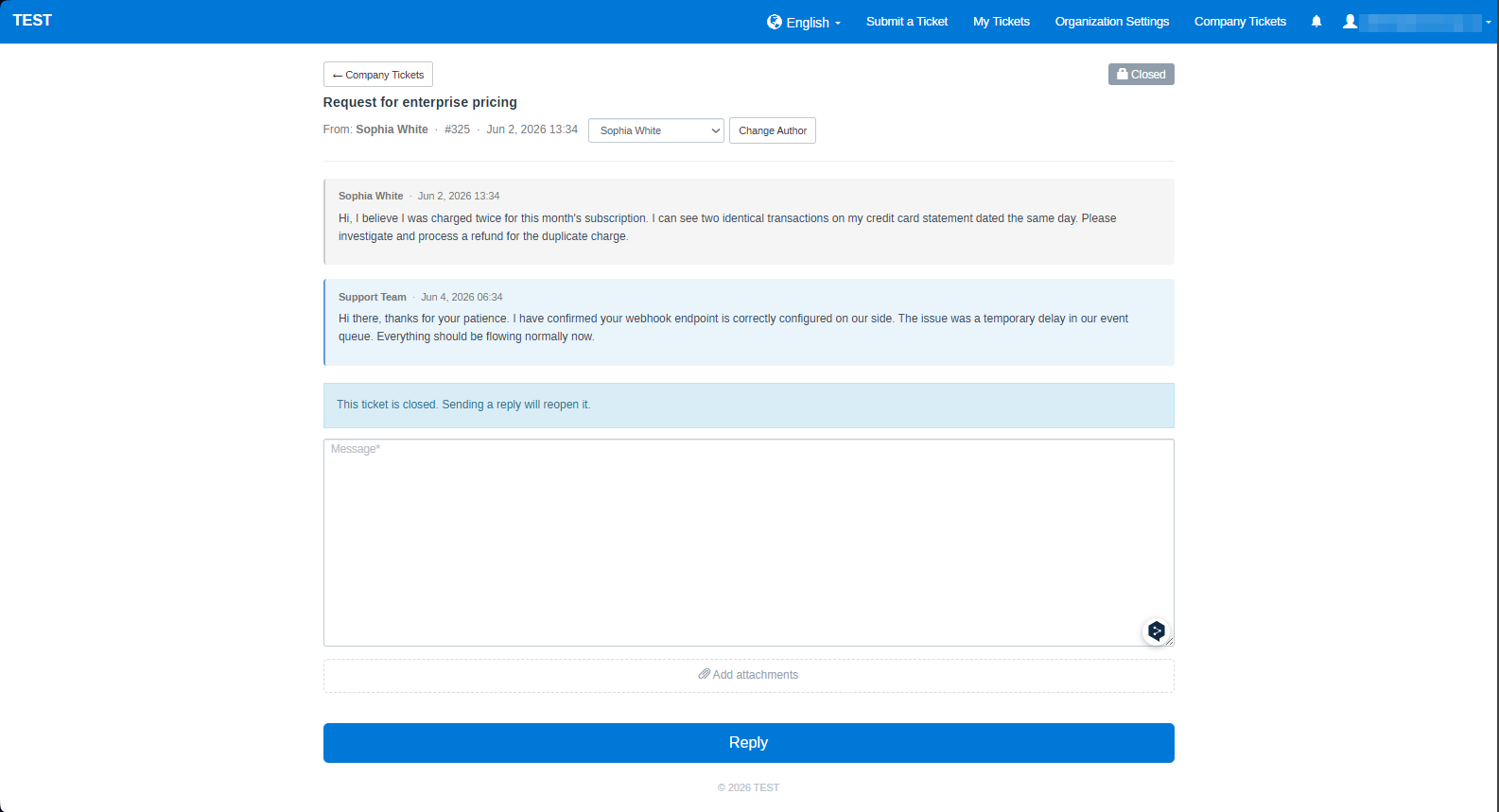
Managers can take action directly — no need to contact support:
- Reply with attachments — drag & drop, multiple files per reply; attachment names and file sizes shown on each thread
- Close ticket — a new reply automatically reopens it; a banner informs the manager of this when the ticket is closed
- Change ticket author — reassign a ticket to another organization member
- Filter by unit — global managers filter the ticket list by structural unit
- Filter by Kanban status — configurable per mailbox, labels shown in the current portal language
- A "viewed" note appears under agent replies in the admin ticket view when a manager opens the ticket in the portal
- Shows manager name, role (Organization manager / Unit manager), and time elapsed
- Global manager and unit manager views tracked and displayed independently — same UX as FreeScout's native "Customer viewed"

Keep managers informed the moment something happens with their company's tickets.
Requires the End-User Portal module.
- 🔔 Bell icon with live unread count badge in the EUP navbar — repositions automatically on mobile (next to the hamburger menu)
- Notifications for: new ticket, agent reply, customer reply — for all manager roles
- Dropdown panel with notifications grouped by date: actor name, event type, ticket number, message preview, timestamp
- Auto-mark as read when the manager opens the ticket
- Mark individual notifications read via ×; Mark all as read in panel header
- Polls every 15 seconds; refreshes on browser back/forward navigation (bfcache-aware)
Let managers decide what they hear about — nothing more, nothing less.
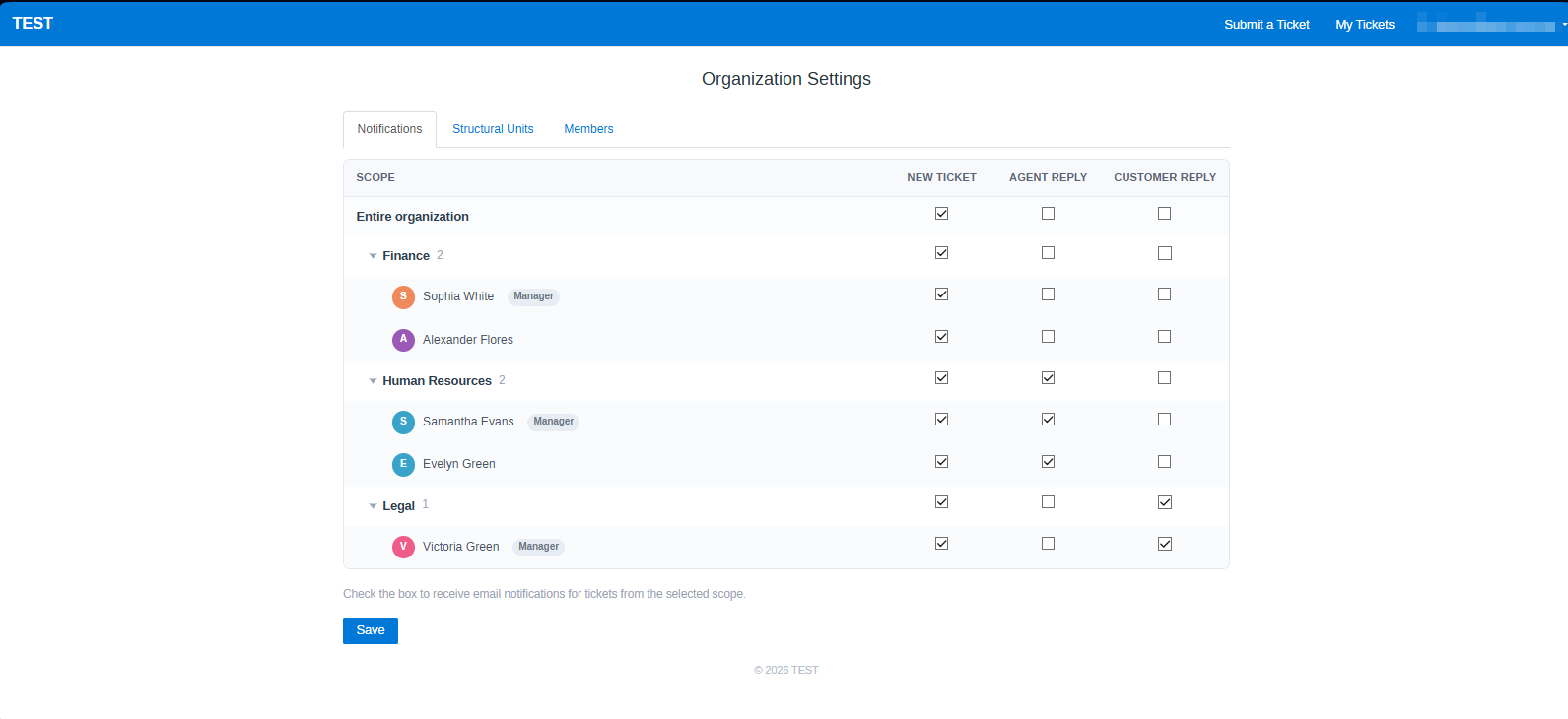
- Visual subscription matrix on the "Notifications" tab in portal Organization Settings
- Three event types: New ticket · Agent reply · Customer reply
- Two scope levels: Entire organization (global managers) · Individual structural units
- Members without a unit are grouped in a separate "No unit" expandable row
- Per-member overrides — expand any unit row to reveal individual members and toggle their subscriptions inline; unit managers with scoped role are labeled accordingly
- Cascaded logic in both directions:
- Enabling "Entire organization" → enables all units and all members
- Enabling a unit → enables all its members
- Disabling a member → auto-reconciles the unit and organization checkboxes
- Global managers manage all members; unit managers manage only their own unit
- Notifications use the mail driver of the corresponding mailbox
Managers configure their organization structure without admin access.
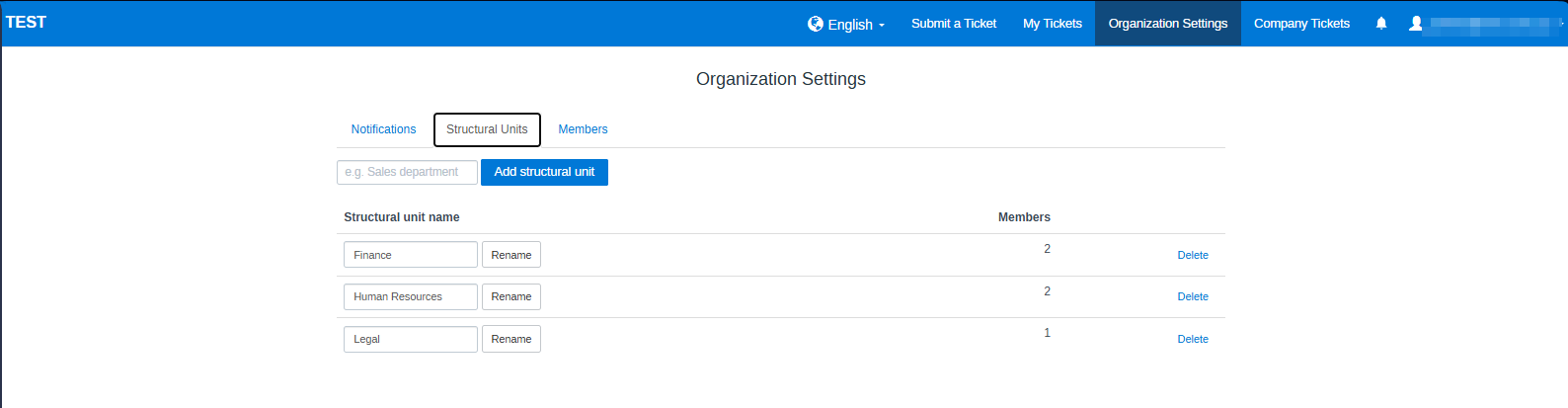
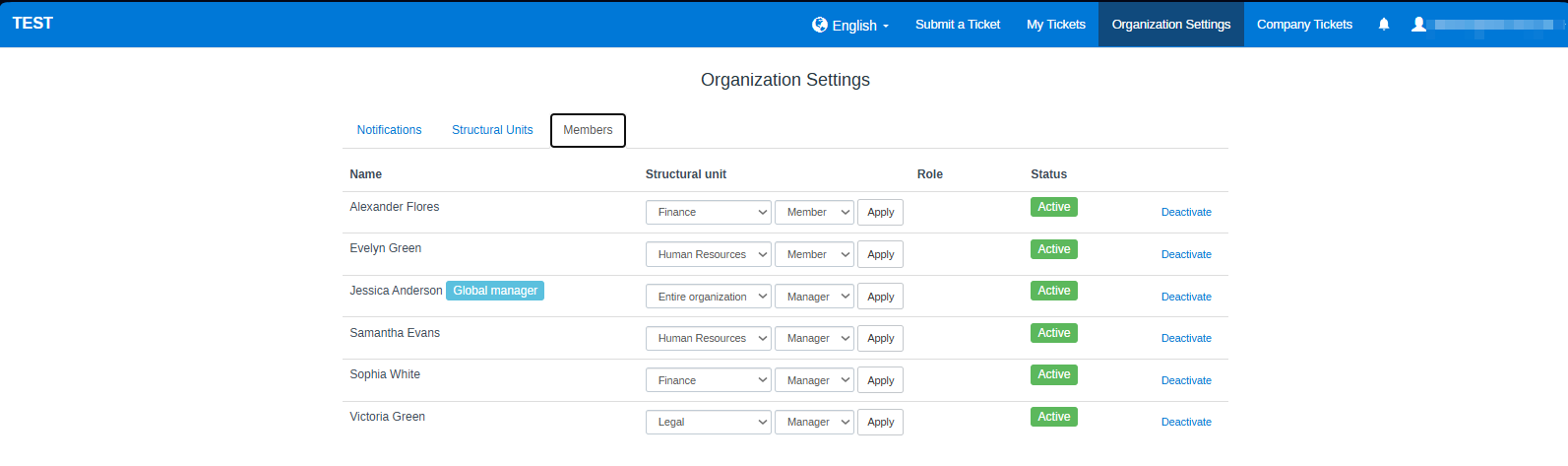
Organization Settings in the portal navigation has three tabs:
The subscription matrix described above.
- Create unit — inline form with name field
- Rename unit — inline edit directly in the table row
- Delete unit — button with confirmation; unit managers are automatically demoted to member
- Member count shown per unit
- Table of all organization members: name, structural unit, role, active/inactive status badge
- "Global manager" label shown next to the member name where applicable
- Show deactivated checkbox — appears only when inactive members exist; hidden by default
- Global managers can update any member's unit and role with an inline form (unit select + role select + Apply)
- Global managers cannot promote a member to global manager from the portal — this requires admin access
- Activate / deactivate button per member with confirmation for deactivation
Your corporate clients receive support emails in their own language — automatically, with no manual effort.
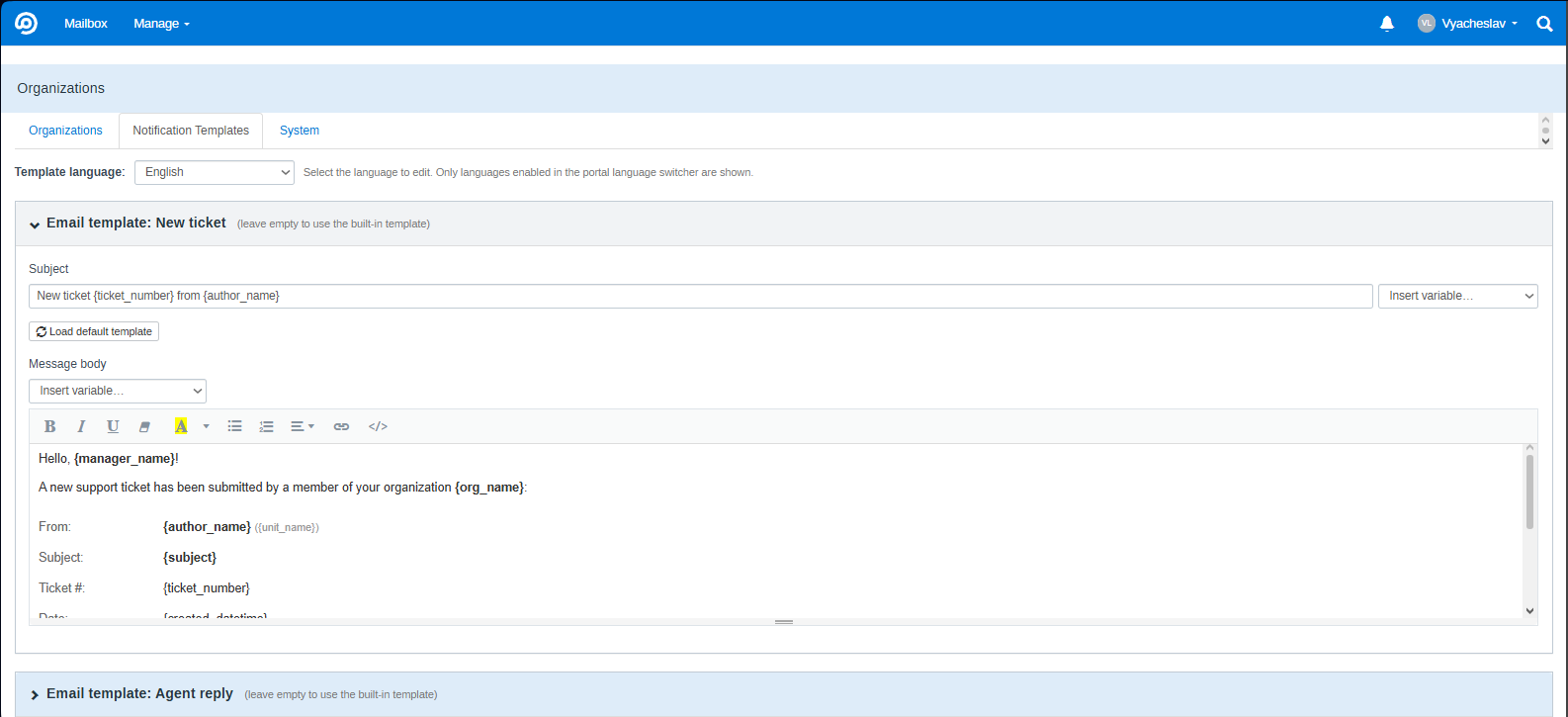
Configured in Manage → Organizations → Templates tab (visible to users with the "manage templates" permission).
- Per-locale templates — separate subject and body for each portal language; switch between them with the locale dropdown; values are swapped in memory without a page reload
- Collapsible panels per event type (New ticket / Agent reply / Customer reply) — Summernote editor initializes lazily when a panel is opened
- Load Default button in each panel — restores the built-in template for the currently selected locale (falls back to English built-in if no locale-specific default exists)
- Summernote WYSIWYG editor for rich HTML email composition
- Macro variable picker — insert placeholders into subject or body with one click; cursor position is preserved in the subject field
- 19 built-in default templates — ready to use out of the box; no configuration needed
Available macro variables:
| Variable | Description |
|---|---|
{manager_name} |
Name of the manager receiving the notification |
{author_name} |
Customer who created or replied to the ticket |
{org_name} |
Organization name |
{unit_name} |
Structural unit name |
{subject} |
Ticket subject |
{ticket_number} |
Ticket ID |
{ticket_url} |
Direct link to the ticket in the portal |
{ticket_text} |
Full text of the initial message (HTML) |
{reply_text} |
Full text of the latest reply (HTML) |
{created_date} |
Ticket creation date |
{created_time} |
Ticket creation time |
{created_datetime} |
Ticket creation date and time |
{reply_date} |
Reply date |
{reply_time} |
Reply time |
{reply_datetime} |
Reply date and time |
Fallback chain: saved locale template → built-in locale template → saved English template → built-in English template
Notification language is determined by each manager's portal language selection, saved automatically when they use the language switcher.
Integrate OrgPortal into your CRM, ERP, or customer onboarding workflow.
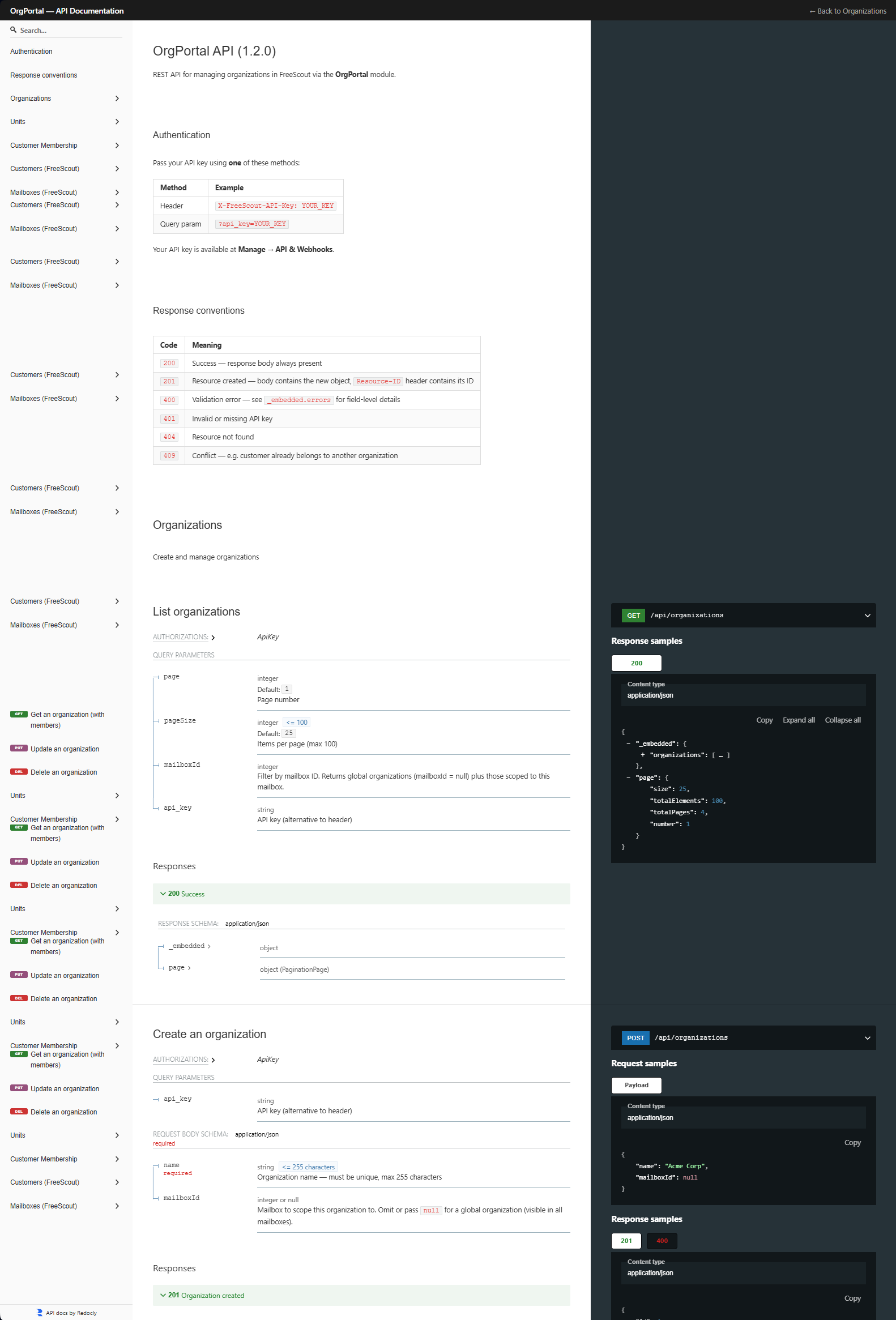
Requires the API and Webhooks module.
- Full CRUD for organizations, structural units, customer memberships, and tags
- Organization fields:
name,color,mailboxId,isActive— all readable and updatable via API - Members sub-resource —
GET/PUT/DELETE /api/organizations/{id}/members/{memberId}— update role, unit,canManageOrg, and per-memberisActiveflag independently without touching the rest of the membership - Tags sub-resource —
GET/PUT /api/organizations/{id}/tags— list or fully replace tag bindings (requires Tags module; returns503if inactive) - Authentication via
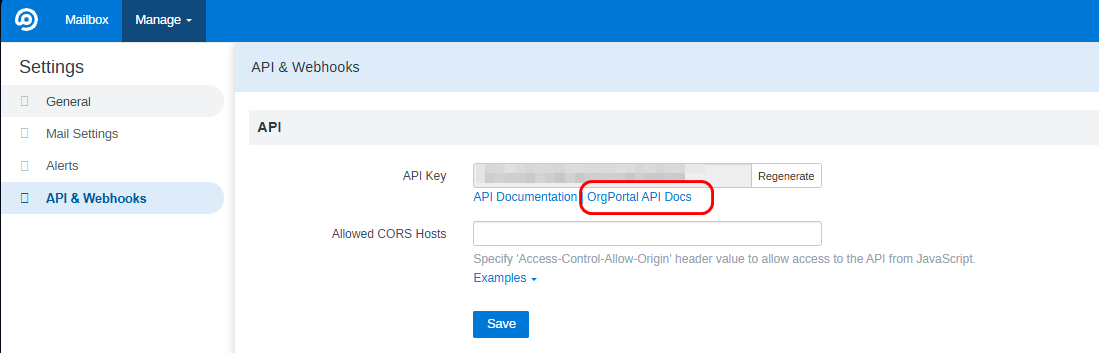
X-FreeScout-API-Keyheader orapi_keyquery parameter - Interactive ReDoc documentation at Manage → API & Webhooks → OrgPortal API Docs (
/orgportal/admin/api-docs)
📖 Full API reference → docs/api/README.md
Important
Download OrgPortal.zip from the Releases page — do not use "Code → Download ZIP" or clone the repository. Only the release ZIP has the correct structure for FreeScout and supports automatic updates.
- Download
OrgPortal.zipfrom the latest release - Extract and copy the
OrgPortalfolder intoModules/of your FreeScout installation - Go to Manage → Modules → OrgPortal → Activate
- Run migrations:
php artisan module:migrate OrgPortal
- Clear cache:
php artisan cache:clear && php artisan config:clear
Georgian language support is deployed automatically on first boot — no manual file copying required.
OrgPortal supports one-click updates via FreeScout's built-in module update mechanism.
Requires FreeScout 1.8.170 or later. On older versions, update manually by replacing the
OrgPortalfolder with the latest release ZIP.
When a new version is available, a banner appears on Manage → Modules. Click Update now — FreeScout downloads and installs the latest version automatically.
| Module | Status | Notes |
|---|---|---|
| End-User Portal ≥ 1.0.85 | Optional | Manager portal, notification bell, subscriptions |
| API and Webhooks ≥ 1.0.80 | Optional | REST API endpoints |
| Kanban ≥ 1.0.23 | Optional | Badge on cards, org filter, multilingual State column labels |
| Custom Fields | ✅ Compatible | — |
| Workflows | ✅ Compatible | — |
| Tags | ✅ Compatible | Tag chips on org edit form; tag bindings via API (/organizations/{id}/tags); tag-based ticket attribution |
| Option | Description |
|---|---|
| Show badge on ticket page | Org badge in conversation list and ticket view |
| Show badge on Kanban cards | Org badge on Kanban board cards |
| Attribution source | member / tag / tag_only — how tickets are attributed to organizations |
| Auto-cron backfill | Run backfill every 5 minutes automatically |
| Snapshot visibility | Show/hide attribution data in ticket sidebar |
| Portal Language Switcher | Enable language switcher in EUP navbar; choose which of 19 locales to offer |
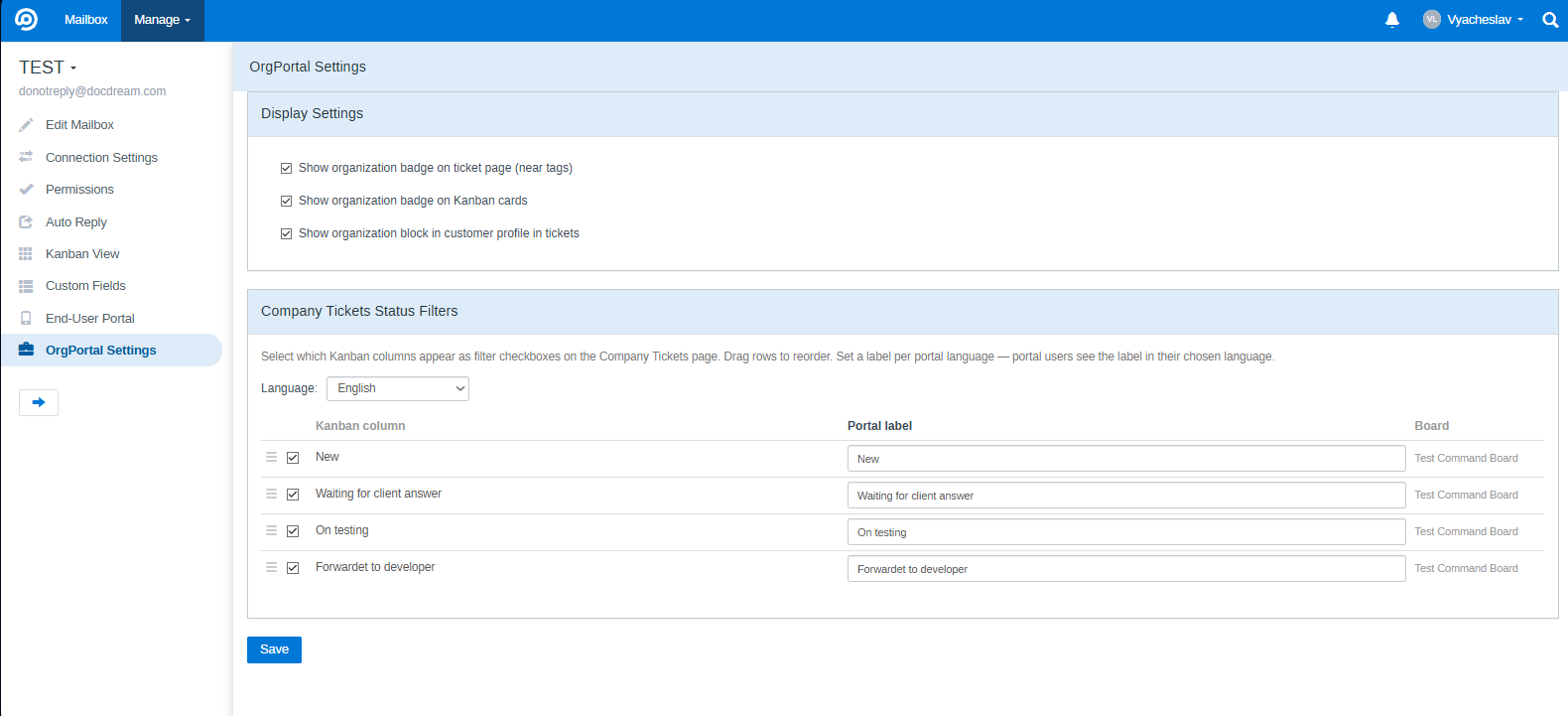
Overrides global values for the specific mailbox.
| Option | Description |
|---|---|
| Show badge on ticket page | Enable/disable badge for this mailbox |
| Show badge on Kanban cards | Enable/disable badge for this mailbox |
| Show organization block in customer profile | Toggle org info block in the ticket sidebar |
| Company ticket status filters | Map Kanban columns to named filters in the portal; per-language labels with locale switcher; drag to reorder |
OrgPortal is fully localized in 19 languages:
| Language | Code | Language | Code |
|---|---|---|---|
| English | en |
Dutch | nl |
| Ukrainian | uk |
Norwegian | no |
| German | de |
Danish | da |
| French | fr |
Swedish | sv |
| Spanish | es |
Finnish | fi |
| Italian | it |
Portuguese (BR) | pt-BR |
| Czech | cs |
Portuguese (PT) | pt-PT |
| Slovak | sk |
Romanian | ro |
| Polish | pl |
Chinese Simplified | zh-CN |
| Georgian | ka |
Translation files: Modules/OrgPortal/Resources/lang/{locale}/messages.php
Notification email templates have built-in defaults for all 19 languages.
OrgPortal includes a built-in portal language switcher (enable in System tab → Portal Language Switcher). It also integrates with EUP Switch Language — both can be active simultaneously.
The language a manager selects applies to all OrgPortal UI strings and is saved as their notification language — emails are sent in their chosen language automatically.
Technical note:
OrgPortalSetLocalemiddleware re-applies the portal locale after FreeScout'sLocalizemiddleware to prevent it from being reset to the system default on every request.
|
|
| Organizations list | Organization edit |
|
|
| Attribution settings | Customer edit |
|
|
| Conversation — organization badge | Kanban integration |
|
|
| Company Tickets | Portal ticket |
|
|
| Portal Settings — Units tab | Portal Settings — Members tab |
|
|
| Notification subscriptions | Email templates |
|
|
| Mailbox settings | User permissions |
|
|
| API documentation | Manager viewed |
MIT — © 2026 ASTIN-UA