

MongoDB is an open-source NoSQL database that stores data in flexible, JSON-like documents (BSON format).
- Handles large, unstructured or semi-structured data efficiently
- Adapts easily to changing data models
- Supports fast read/write operations for real-time applications and APIs
- Integrates seamlessly with Python using libraries like pymongo
MongoDB vs RDBMS

Prerequisites
- MongoDB installed locally or a MongoDB Atlas account
- Knowledge of JSON documents
- PyMongo library
Install pymongo using following command:
pip install pymongo
Connecting MongoDB with Python Using PyMongo
Step 1: Start MongoDB
Start MongoDB from the command prompt using the following command:
If starting with default settings:
mongod
When running directly with custom data directory:
mongod --dbpath "C:\data"
If MongoDB is installed as a Windows service:
net start MongoDB

See port number by default is set 27017 (last 2-3 lines in above image).
Step 2: Install and Import PyMongo
PyMongo is the native Python library for MongoDB. To install PyMongo, open Command Prompt and run:
pip install pymongo
After installation, open a Python environment and import the library:
from pymongo import MongoClient
Step 3: Connect to MongoDB Server Locally
To connect to a local MongoDB server, create a MongoClient object:
client = MongoClient()
Connect to the default MongoDB host and port (localhost:27017) using the following command to create a MongoClient explicitly.
client = MongoClient("mongodb://localhost:27017/")
Step 4: Connect to MongoDB Atlas (Cloud Database)
To connect to a cloud-based MongoDB database like MongoDB Atlas, follow these steps:
1. Create a MongoDB Atlas Account: Go to MongoDB Atlas and create an account if you don't already have one. Once logged in, create a new project, cluster, and database.
2. Get the Connection String: After creating the cluster, navigate to the Clusters tab, click Connect, and choose Connect your application. Select Python and copy the provided connection string.
3. Connection string typically looks like this:
mongodb+srv://
: @cluster0.mongodb.net/test?retryWrites=true&w=majority
4. Use the Connection String: Replace
client = MongoClient("mongodb+srv://
: @cluster0.mongodb.net/test?retryWrites=true&w=majority")
This will connect your Python application to the cloud-based MongoDB cluster.
Step 5: Access/Create a Database
To create a database or switch to an existing database use:
my_database = client["my_database"]
Or:
my_database = client.my_database
Note: Database names should not contain dashes (-). The names like my-Table will raise an error. Use underscores (_) instead.
Step 6: Access/Create a Collection
Collections are conceptually similar to tables in Relational Database Management Systems (RDBMS), but they store flexible JSON-like documents instead of rows and columns.
To access the collection named "myTable" from the "my_database" database:
mycollection = my_database["myTable"]
MongoDB stores data as BSON (Binary JSON) documents, which are represented as Python dictionaries when working with PyMongo.
record = {
"title": "MongoDB and Python",
"description": "MongoDB is no SQL database",
"tags": ["mongodb", "database", "NoSQL"],
"viewers": 104
}
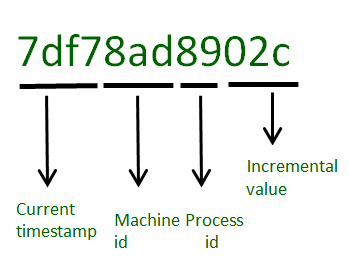
'_id' is a 12 bytes hexadecimal number. A special key which uniquely identifies each document in a collection and automatically added when not added explicitly.
Step 7: Inserting data inside collection
Methods used:
insert_one() or insert_many()
Insert the document into a collection:
rec = mycollection.insert_one(record)
The complete code looks like this when implemented:
from pymongo import MongoClient
try:
    client = MongoClient(
        "mongodb://localhost:27017/",
        serverSelectionTimeoutMS=5000
    )

    client.admin.command("ping")
    print("Connected successfully!")

except Exception as e:
    print(f"Connection failed: {e}")

mydb = client["my_database"]
mycollection = mydb["myTable"]

record = {
    "title": "MongoDB and Python",
    "description": "MongoDB is no SQL database",
    "tags": ["mongodb", "database", "NoSQL"],
    "viewers": 104
}

rec = mycollection.insert_one(record)
Step 8: Querying the Database
Certain query functions are used to filter data in a MongoDB database. Among them, the two most commonly used are:
find(): used to retrieve multiple documents from a collection that match a given query.
for i in mycollection.find({"title": "MongoDB and Python"}):
      print(i)
count_documents(): used to count the number of documents in a collection that match a specific query.
count = mycollection.count_documents({"title": "MongoDB and Python"})
print(count)
To print all the documents/entries inside 'myTable' of database 'my_database':
from pymongo import MongoClient

try:
    conn = MongoClient("localhost", 27017)
    print("Connected successfully!")
except Exception as e:
    print("Could not connect to MongoDB:", e)

db = conn["my_database"]

collection = db["myTable"]
for record in collection.find():
    print(record)
Explanation:
- connects to the local MongoDB server on port 27017 using MongoClient.
- accesses the my_database database and myTable collection.
- uses find() to retrieve all documents from the collection and prints it.
PyMongo Methods for CRUD
| Operation | PyMongo Method |
|---|---|
| Create | insert_one(), insert_many() |
| Read | find_one(), find() |
| Update | update_one(), update_many() |
| Delete | delete_one(), delete_many() |