The jQuery :checked selector is used to select all checked checkboxes, radio buttons, and options of select elements.
Note: To retrieve only the selected options of select elements, use:selected selector.
Syntax:
$(":checked")The below examples illustrate the : checked selector in jQuery:
Example 1: This example applies CSS to all checked elements(in this example, checkboxes).
<html>

<head>
    <title>
        jQuery | :checked Selector
    title>
    <script src=
"https://ajax.googleapis.com/ajax/libs/jquery/3.3.1/jquery.min.js">
    script>

    <script>
        $(document).ready(function () {
            $(":checked").wrap("");
        });
    script>
    <style>
        form {
            font-weight: bold;
            font-size: 25px;
            color: green;
        }
    style>
head>

<body style="text-align:center;">
    <h1>
        jQuery | :checked Selector
    h1>
    <form action="">
        GeeksForGeeks_1
        <input type="checkbox" name="GFG_1"
               value="GFG_1" checked="checked">
        <br>
        GeeksForGeeks_2
        <input type="checkbox" name="GFG_2"
               value="GFG_2">
        <br>
        GeeksForGeeks_3
        <input type="checkbox" name="GFG_3"
               value="GFG_3" checked="checked">
        <br>
    form>
body>

html>
Output:

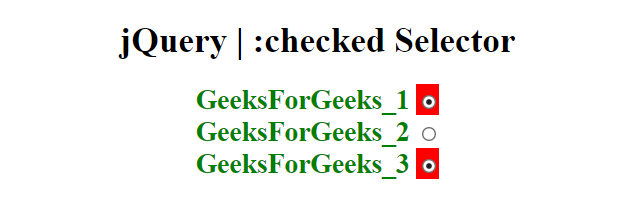
Example 2: This example uses checked selector on radio buttons.
<html>

<head>
    <title>
        jQuery | :checked Selector
    title>
    <script src=
"https://ajax.googleapis.com/ajax/libs/jquery/3.3.1/jquery.min.js">
    script>

    <script>
        $(document).ready(function () {
            $(":checked").wrap("");
        });
    script>
    <style>
        form {
            font-weight: bold;
            font-size: 25px;
            color: green;
        }
    style>
head>

<body style="text-align:center;">
    <h1>
        jQuery | :checked Selector
    h1>
    <form action="">
        GeeksForGeeks_1
        <input type="radio" name="GFG_1"
               value="GFG_1" checked="checked">
        <br>
        GeeksForGeeks_2
        <input type="radio" name="GFG_2"
               value="GFG_2">
        <br>
        GeeksForGeeks_3
        <input type="radio" name="GFG_3"
               value="GFG_3" checked="checked">
        <br>
    form>
body>

html>
Output: