

Before Kubernetes, Docker made application deployment easier by packaging applications and their dependencies into portable containers. As applications grew to hundreds or thousands of containers, managing them manually became increasingly complex.
- Managing and scaling large numbers of containers becomes difficult.
- Maintaining consistent applications across multiple cloud environments is challenging.
- Managing access, resources, and security across large container environments becomes complex.
- Updating applications without downtime requires automated deployment and coordination.
- Kubernetes automates container deployment, scaling, networking, and lifecycle management across a cluster.
Features of K8s
- Automated Scheduling: Efficiently places containers on nodes for optimal resource use.
- Self Healing: Automatically restarts, replaces, and reschedules failed containers.
- Rollouts & Rollbacks: Manages application updates and reverts when needed.
- Scaling & Load Balancing: Supports horizontal scaling and distributes traffic.
- Resource Optimization: Monitors and ensures efficient resource utilization.
Monolithic Vs Microservices
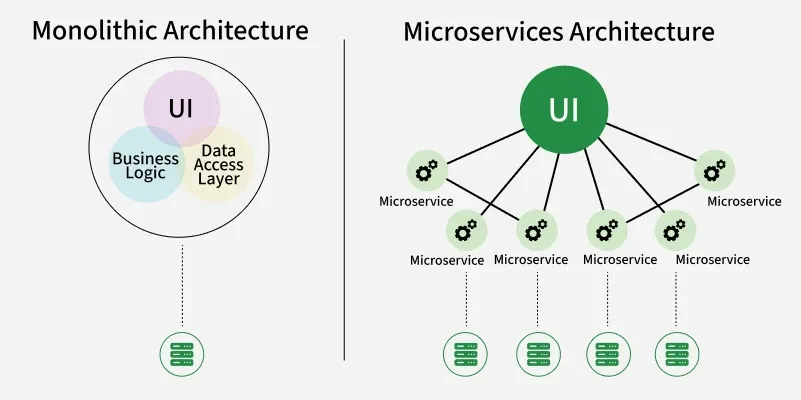
| Monolithic | Microservices |
|---|---|
| Single, unified code base and executable. | Collection of small, independent services. |
| Scaled by replicating the entire app. | Each service can be scaled independently. |
| All-or-nothing; entire app must be redeployed. | Services can be deployed individually. |
| A crash in one module can take down the app. | Failure in one service is usually isolated. |
| Forced to use one language/framework. | Each service can use a different stack. |
| Simple to start; complex as it grows. | High initial setup and operational complexity. |
Terminologies in K8s
Think of Kubernetes as a well organized company where different teams and systems work together to run applications efficiently. Here’s how the key terms fit into this system:
1. Pod
A Pod is the smallest unit you can deploy in Kubernetes. It wraps one or more containers that need to run together, sharing the same network and storage. Containers inside a Pod can easily communicate and work as a single unit.
2. Node
A Node is a machine (physical or virtual) in a Kubernetes cluster that runs your applications. Each Node contains the tools needed to run Pods, including the container runtime (like Docker), the Kubelet (agent), and the Kube proxy (networking).
3. Cluster
A Kubernetes cluster is a group of computers (called nodes) that work together to run your containerized applications. These nodes can be real machines or virtual ones.
There are two types of nodes in a Kubernetes cluster:
Master node (Control Plane):
- Think of it as the brain of the cluster.
- It makes decisions, like where to run applications, handles scheduling, and keeps track of everything.
Worker nodes:
- These are the machines that actually run your apps inside containers.
- Each worker node has a Kubelet (agent), a container runtime (like Docker or containerd), and tools for networking and monitoring.
4. Deployment
A Deployment is a Kubernetes object used to manage a set of Pods running your containerized applications. It provides declarative updates, meaning you tell Kubernetes what you want, and it figures out how to get there.
5. ReplicaSet
A ReplicaSet ensures that the right number of identical Pods are running.
6. Service
A Service in Kubernetes is a way to connect applications running inside your cluster. It gives your Pods a stable way to communicate, even if the Pods themselves keep changing.
7. Ingress
Ingress is a way to manage external access to your services in a Kubernetes cluster. It provides HTTP and HTTPS routing to your services, acting as a reverse proxy.
8. ConfigMap
- A ConfigMap stores configuration settings separately from the application, so changes can be made without modifying the actual code.
- Imagine you have an application that needs some settings, like a database password or an API key.
- Instead of hardcoding these settings into your app, you store them in a ConfigMap.
- Your application can then read these settings from the ConfigMap at runtime, which makes it easy to update the settings without changing the app code.
9. Secret
A Secret is a way to store sensitive information (like passwords, API keys, or tokens) securely in a Kubernetes cluster.
10. Persistent Volume (PV)
A Persistent Volume (PV) in Kubernetes is a piece of storage in the cluster that you can use to store data and it doesn’t get deleted when a Pod is removed or restarted.
11. Kubelet
A Kubelet runs on each Worker Node and ensures Pods are running as expected.
12. Kube-proxy
Kube-proxy manages networking inside the cluster, ensuring different Pods can communicate.