Starting on 17 August 2026, Google updated its bidding systems to deliver more consistent and predictable performance based on the targets you set, even when you make budget adjustments.
This article explains the changes and the actions you can take to optimize your campaigns. For additional information, visit Frequently asked questions about changes to Target-based bid strategies.
| A Google Ads update is coming for target-based bid strategies #googleads #digitalmarketing |
To view subtitles in your language, turn on YouTube captions. Select the Settings icon at the top right corner of the video player, select Captions, and then specify your language.
On this page
- Overview of changes
- What you can expect from this update
- Next steps
- Options to keep or adjust your targets
Overview of changes
Previously, when your campaign has a "Limited by budget" status, if you use a Target-based bid strategy (for example, Target CPA or Target ROAS), some campaigns may be overperforming on bidding targets and find performance fluctuations when budgets are adjusted.
Campaigns that are limited by budget and use a target-based bid strategy now perform more consistently toward your bid target, including when you make budget adjustments so you can grow your campaigns with more predictable performance.
What you can expect from this update
If you have a campaign that’s limited by budget that has historically overachieved its stated target, you may experience performance volatility if you don’t make any changes to the campaign before August 17.
Example
If your campaign's Target CPA is $10 USD, but your recent actual CPA performance is $5 USD, your campaign now delivers more closely to a $10 USD actual CPA. Update your target to $5 USD to maintain your recent performance or to a target CPA of your choosing based on your business goals.
For multi-channel campaigns like Performance Max and Demand Gen, you may also find shifts in how traffic is distributed across different channels.
Because the system optimizes more consistently toward the target you entered, campaigns currently performing more efficiently than their set targets now find campaign performance trend toward your set target.
Eligibility
Note: App Campaigns, Video reach campaigns, and Video view campaigns (VVC) will continue using previous bidding behavior. Hotel and Display campaigns already have the new bidding behavior.
| Campaign type | |
| Search | |
| Shopping | |
| Performance Max | |
| Demand Gen | |
| Display | |
| Hotel | |
| Travel | |
| App campaigns | |
| Video reach campaigns | |
|
Video view campaigns (VVC) |
Platform availability
|
Google Ads |
|
|
Search Ads 360 |
|
|
Display & Video 360 |
|
|
Google Ads Editor |
|
|
Google Ads API |
Next steps
Make sure your settings align with your business goals, especially for campaigns that are performing better than your targets. Google won't automatically adjust your bidding targets or budgets.
Additionally, you have the option to increase your budget to confidently scale your campaigns and capture more volume at your stated targets.
Options to keep or adjust your targets
Depending on your goals, you can choose one of the following actions.
Keep your current target as it is
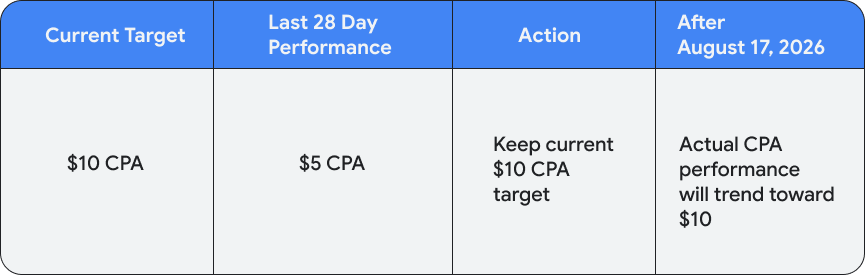
If your current campaign targets accurately reflect your business goals, no change to your bid target is required. Note that if your campaigns were previously overperforming their targets, their performance will now aim to deliver closer to your stated target.
After August 17th, you can confidently scale your campaigns and capture more volume at your stated targets. Learn more about how to increase your budget.
Example
Your budget-constrained campaign has a Target CPA of $10 USD, but it's been achieving a $5 USD CPA. You haven’t made any changes. When the update takes effect, your campaign will start delivering closer to the $10 USD target you originally set.
Adjust your target in line with recent performance
If your campaign is performing better than your stated target and you want to maintain your current actual performance, adjust your target based on your campaign's recent performance.
Example
Your campaign has a Target CPA of $10 USD, but has been achieving a $5 USD CPA. You can lower your target to $5 USD. Your performance will stay close to $5 USD, and you can raise your budget later.

Adjust your target to a custom number
You can enter a new target to match your business goals and focus on profitable conversions. Before and after the bidding change, you can continue to make target changes as business needs dictate.
Example
Your campaign has a Target CPA of $10 USD, but has been achieving a $5 USD CPA. If $7 USD is the right target CPA for your campaign based on your business goals, you can lower your target to $7 USD. Your campaign’s performance will adjust to deliver closer to $7 USD after August 17, and any additional spend will scale closely to this target.

Change your bid strategy
Switching to these bid strategies can help maintain your conversion volume. However, because the Maximize Conversions and Maximize Conversion Value bid strategies optimize to spend your full budget without a target, your actual CPA or ROAS will fluctuate as you adjust your budget. Learn more about bid strategies to help you meet your goals.
Example
You can switch your campaign to a Maximize conversions or Maximize conversion value bid strategy to capture the highest volume of conversions or conversion value for your set budget.

Increase your budget
Previously, if you increased the daily budget on a "Limited by budget" campaign with an over performing Target-based bid strategy, you would likely discover fluctuations or decreases in performance. With this update now live, the changes to bidding strategies help your campaigns consistently optimize to your stated target regardless of your budget limit. This means you can confidently increase your budget to capture more conversions and conversion value without your performance efficiency unexpectedly fluctuating.
With this update, consider taking the following actions:
- Give your budget room to scale: To capture as much profitable traffic as possible without restricting your campaign, try to maintain a daily budget that is comfortably higher than your average daily spend.
- Apply budget recommendations: Check your Recommendations page to forecast how many additional conversions you could gain at your target.
- Evaluate over time: After making budget increases, wait 1 to 2 conversion cycles to evaluate the campaign's performance to make sure it's delivering on your target.
